46
Basic Operation Guide
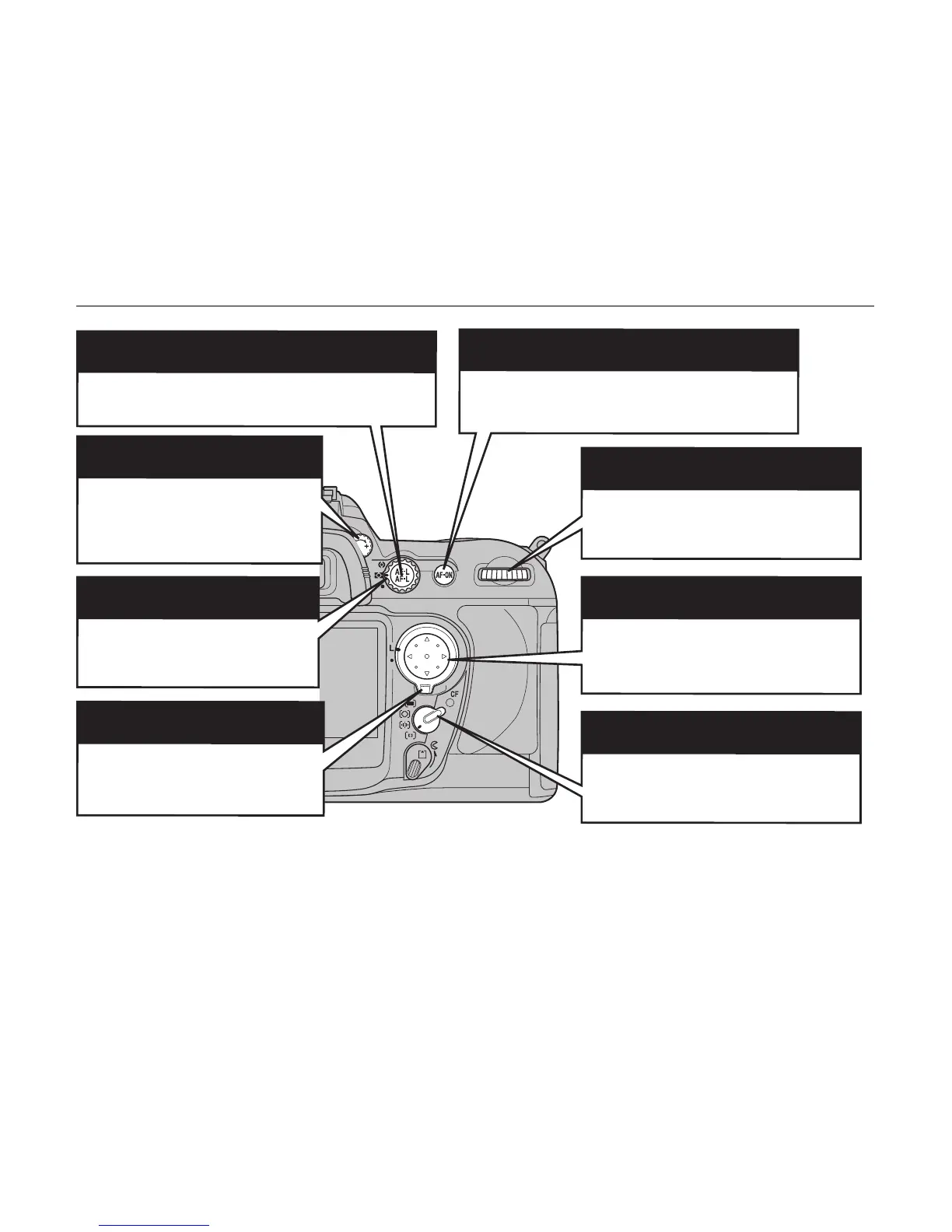
AE-L/AF-L (AE / AF lock) button (p.62, 69)
The exposure and focus is fixed while holding down this
button.
Diopter adjustment control (p.40)
Makes the image in the viewfinder
easier to see. Set the diopter
adjustment control to the position
where the focusing area appears
sharpest.
Metering selector (p.68)
Selects multi, center-weighted or
spot as the metering system.
Focus selector lock (p.59)
Unlock to select the focus area using
n o p q mark on the button.
AF-ON button (p.55)
Same as pressing the shutter button halfway; by
pressing this button, the camera automatically
focuses to the subjects.
Main-command dial
Changes settings such as the shutter
speed.
Multi-selector
Use this button to select menu options or
the focus area.
AF-area mode selector (p.55)
Used to set the AF-area mode for focusing.












 To Next Page