79
Advanced Features — Photography
Using the Built-in flash
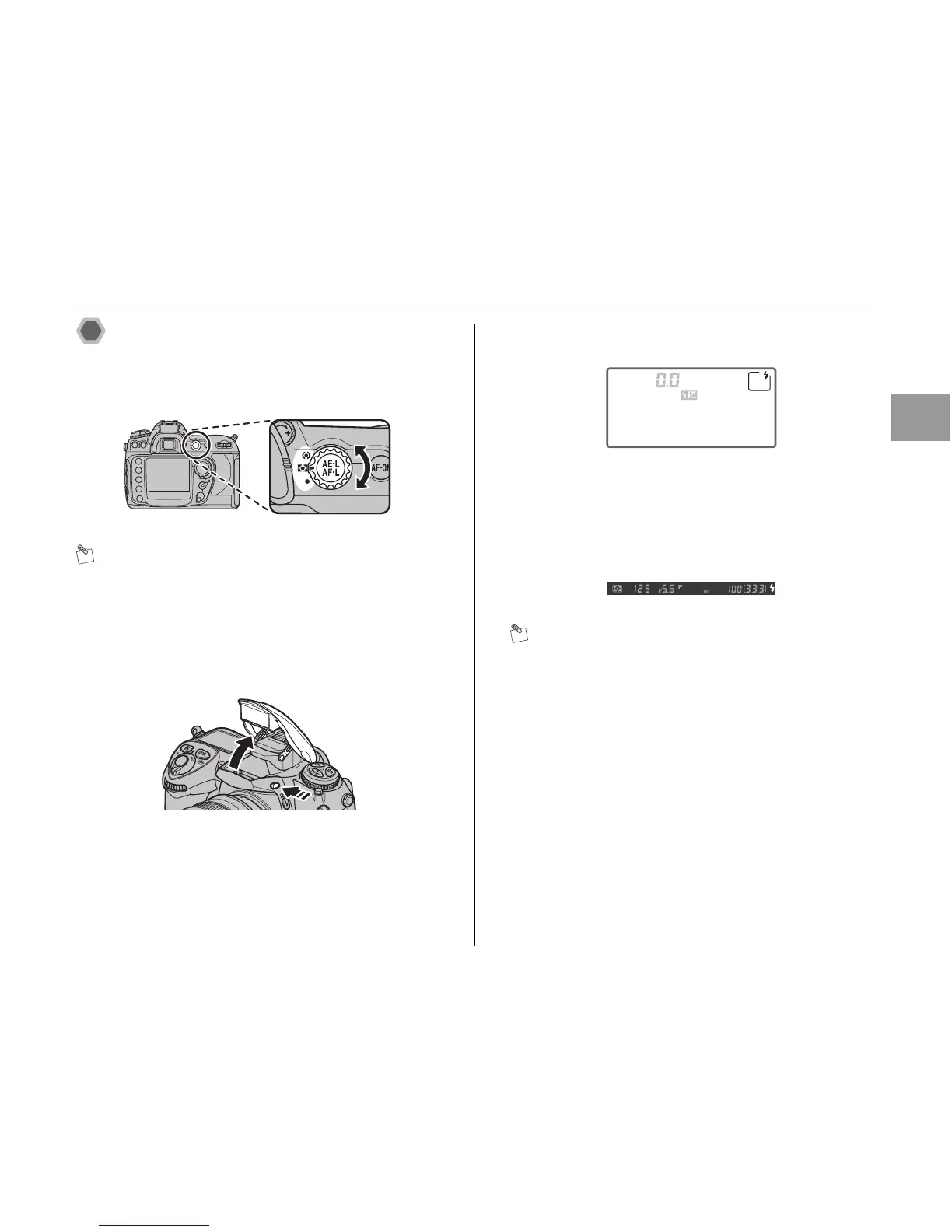
To use the built-in flash:
AChoose a metering method.
MEMO
• Select matrix or center-weighted metering to activate i-
TTL Balanced Fill-Flash for Digital SLR.
• Standard i-TTL Flash for Digital SLR is activated
automatically when spot metering is selected.
BPress the flash pop-up button. The built-in flash will
raise and begin charging.
CSet the flash sync mode.
(➝p.82).
DSet the exposure mode, shutter speed and aperture.
The shutter speeds and apertures available when the
built-in flash is raised (➝p.80).
ECheck that the d flash-ready indicator appears in the
viewfinder.
MEMO
If the d flash-ready indicator is not displayed when the
built-in flash is used, the shutter release will be disabled.
FCompose the photograph, making sure that the subject
is within range of the flash, then focus and shoot.
Continued Q












 To Next Page