93
Advanced Features — Photography
Changing the Image Quality Setting ( QUALITY)
The camera supports the following image quality options
(listed in descending order by image quality and file size):
Z Available settings for the image quality
CAUTION
• When photographs taken at [RAW+FINE JPG] or
[RAW+NORMAL JPG] are viewed on the camera, only
the JPEG image will be displayed.
• When photographs taken at [RAW+FINE JPG] or
[RAW+NORMAL JPG] settings are deleted, both RAW
and JPEG images will be deleted.
• The camera will be able to record TIFF-RGB formatted
images by firmware upgrades, which will become
available in the future.
See our web site for details about upgrading firmware.
http://www.fujifilm.com/products/digital/download/ispro/
fupd.html
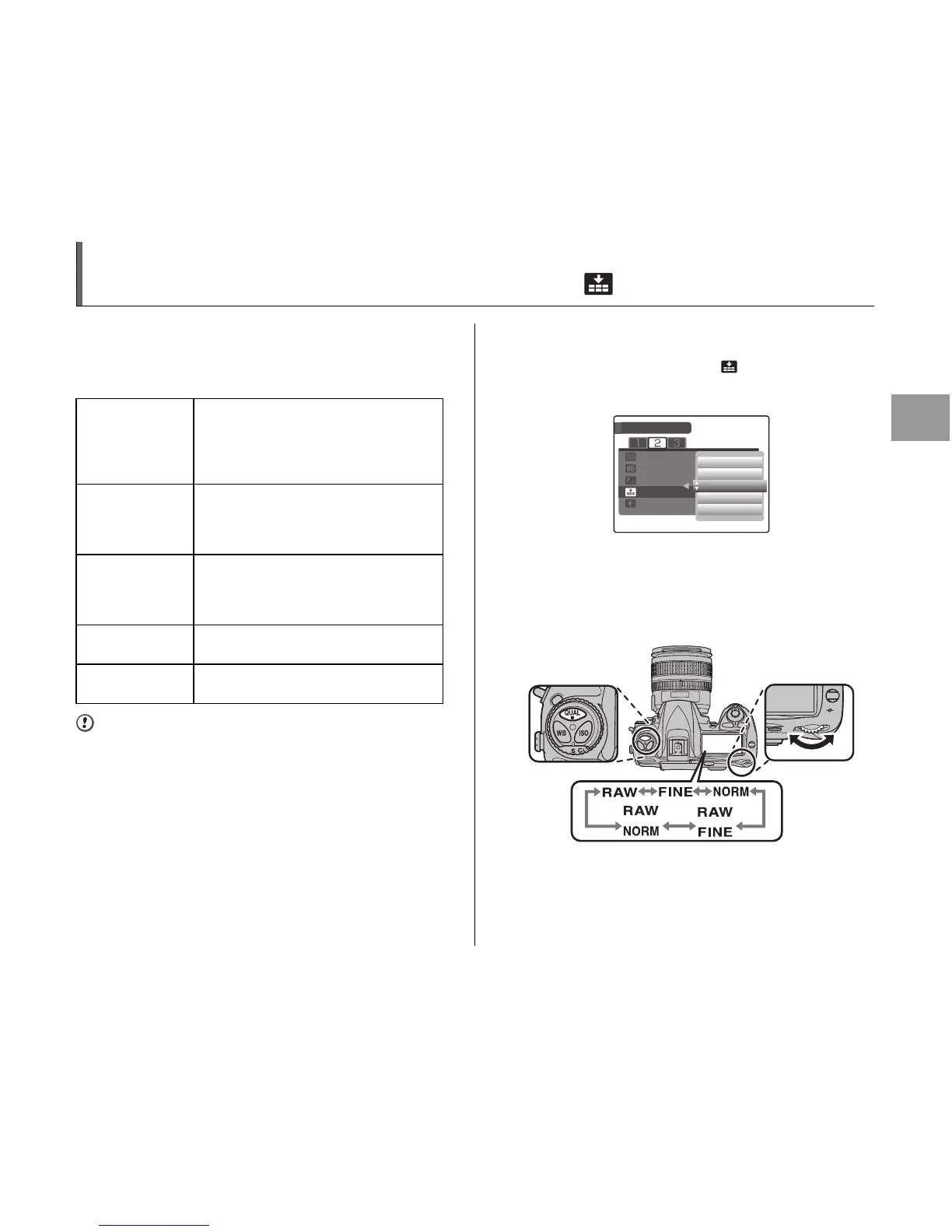
Z Setting the image quality in the [SHOOTING
MENU]
Select the desired quality in the [ QUALITY] under
[SHOOTING MENU].
See “Setting the [SHOOTING MENU]” (➝p.108).
Z Setting the image quality using QUAL and the
main-command dial
While pressing QUAL, rotate the main-command dial until
the desired setting is displayed in the control panel.
RAW Recorded as uncompressed CCD-RAW
data.
No image processing is performed on the
camera. Select this setting when you
want to process the image on a PC.
FINE JPG Records JPEG images in high quality
(low compression ratio). This mode
allows you to record more images than
the [RAW] setting.
NORMAL JPG Records JPEG images in standard
quality (standard compression ratio).
Allows you to record the largest number
of images.
RAW+
FINE JPG
Two images are recorded: one RAW
image and one FINE JPEG image.
RAW+
NORMAL JPG
Two images are recorded: one RAW
image and one NORMAL JPEG image.
RECORDING PIXELS












 To Next Page