- 43 -
DUCT TYPE
ARGA30-60F
11-2. Function settings by using remote controller
Some function settings can be changed on the remote controller. After confirming the setting proce-
dure and the content of each function setting, select appropriate functions for your installation envi-
ronment.
NOTE: Incorrect settings can cause a product malfunction.
Setting procedure by using wired remote controller
The function number and the associated setting value are displayed on the LCD of the remote
controller. Follow the instructions written in the local setup procedure supplied with the remote
controller, and select appropriate setting according to the installation environment.
Before turning on the power of the indoor unit, reconfirm following items:
• Piping air tight test and vacuuming have been performed firmly.
• There is no wiring mistake.
1. Turn on the power.
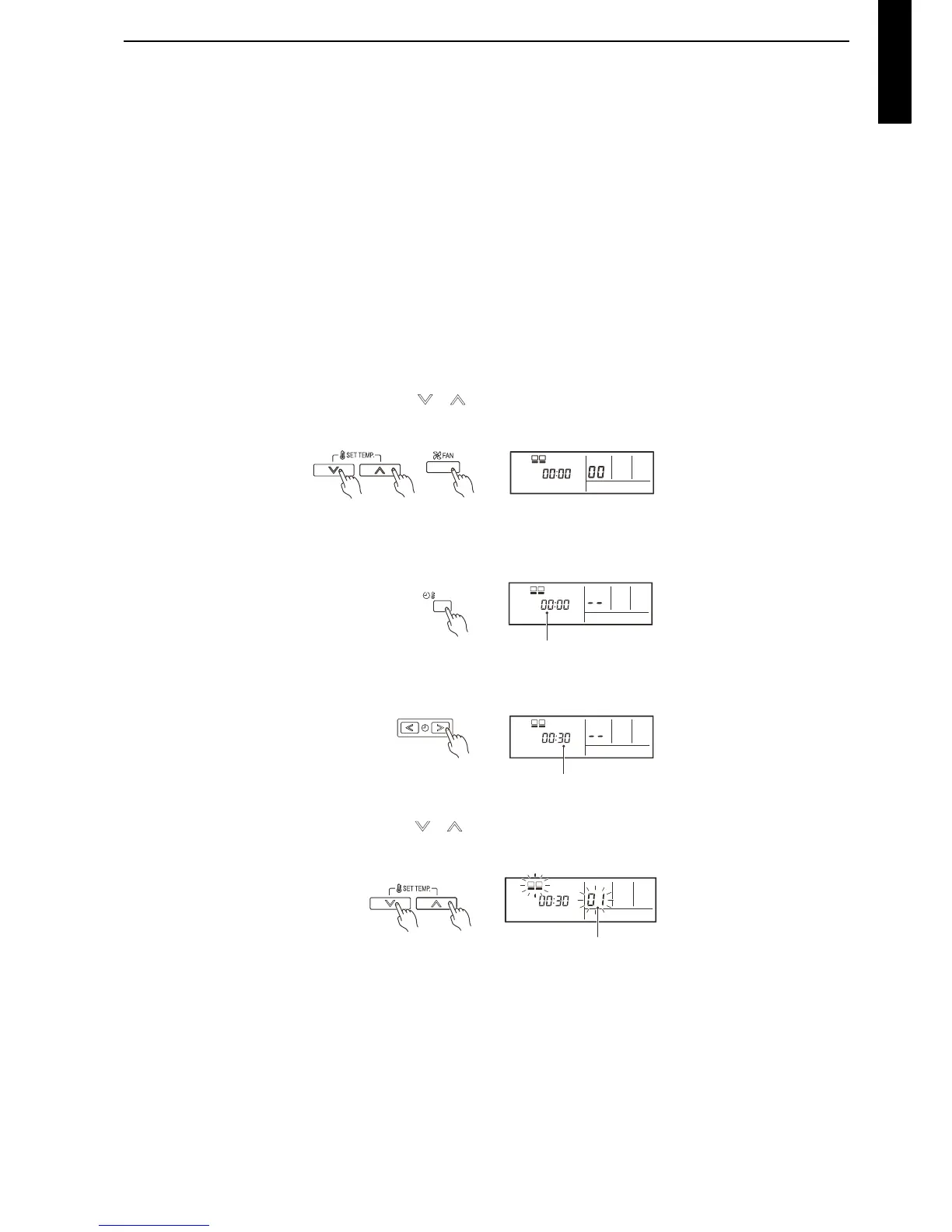
2. Press the SET TEMP. buttons ( ) ( ) and FAN button simultaneously for more than 5
seconds to enter the function setting mode.
3. Press the SET BACK button to select the indoor unit number when you set the remote
controller address setting.
4. Press the set time buttons to select the function number.
5. Press the SET TEMP. buttons ( ) ( ) to select the setting value. The display flashes during
setting value selection.
6. Press the TIMER SET button to confirm the setting. Press the TIMER SET button for a few
seconds until the setting value stops flashing. If the setting value display changes or if “- -” is
displayed when the flashing stops, the setting value has not been set correctly. (An invalid
setting value may have been selected for the indoor unit.)



 To Next Page