Ports and operating elements
Ports and operating elements
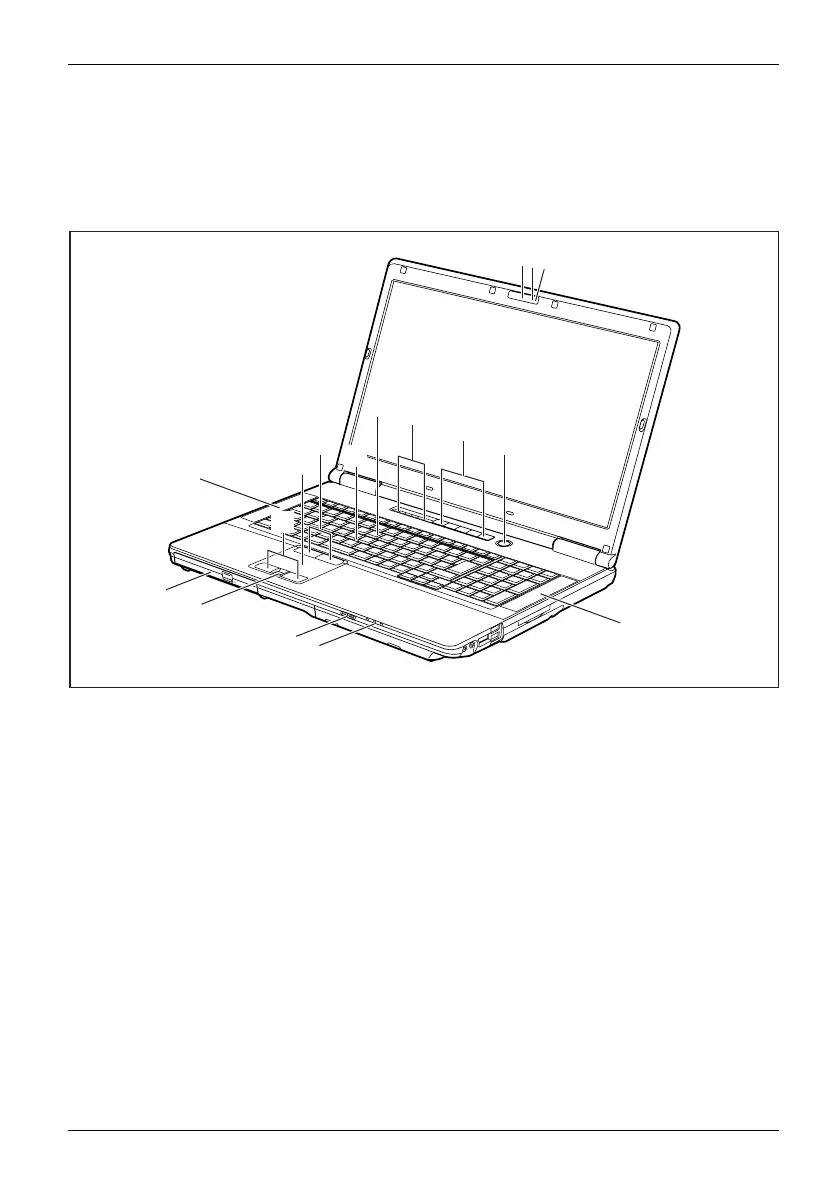
This chapte r presents the individual hardware component s of your device. It gives
an overview of the indicators and po rts of the device. Please familiarise yourself with
these components before you start to work with the device.
1
2
4
5
6
7
8
8
15
16
14
13
12
11
10
9
3
1 = WebCam (optional)
2 = WebCam LE
D (optional)
3 = Microphone
4 = Keyboard
5 = Status indicators
6=Applica
tion buttons
7 = ON/OFF switch
8 = Louds
peakers
9 = Status indicators
10 = ON/O FF sw
itch for radio compon ents
11 = Fingerprint sensor
12 = Optical d
rive
13 = Touchpad buttons
14 = Touchpa
d
15 = TouchStick buttons
16 = Touch
Stick
Fujitsu Technology Solutions 9


 To Next Page