Working with the notebook
Your Port Replicator (optional)
Your Port Replicator is a device that enables you to quickly c onnect your notebook
to your peripherals, such as a monitor, printer etc.
The fea tures offered by the Port Replicator include stand ard ports for
monitor, audio, mouse and keyboard.
You need only dock the notebook in order to use your peripheral devices.
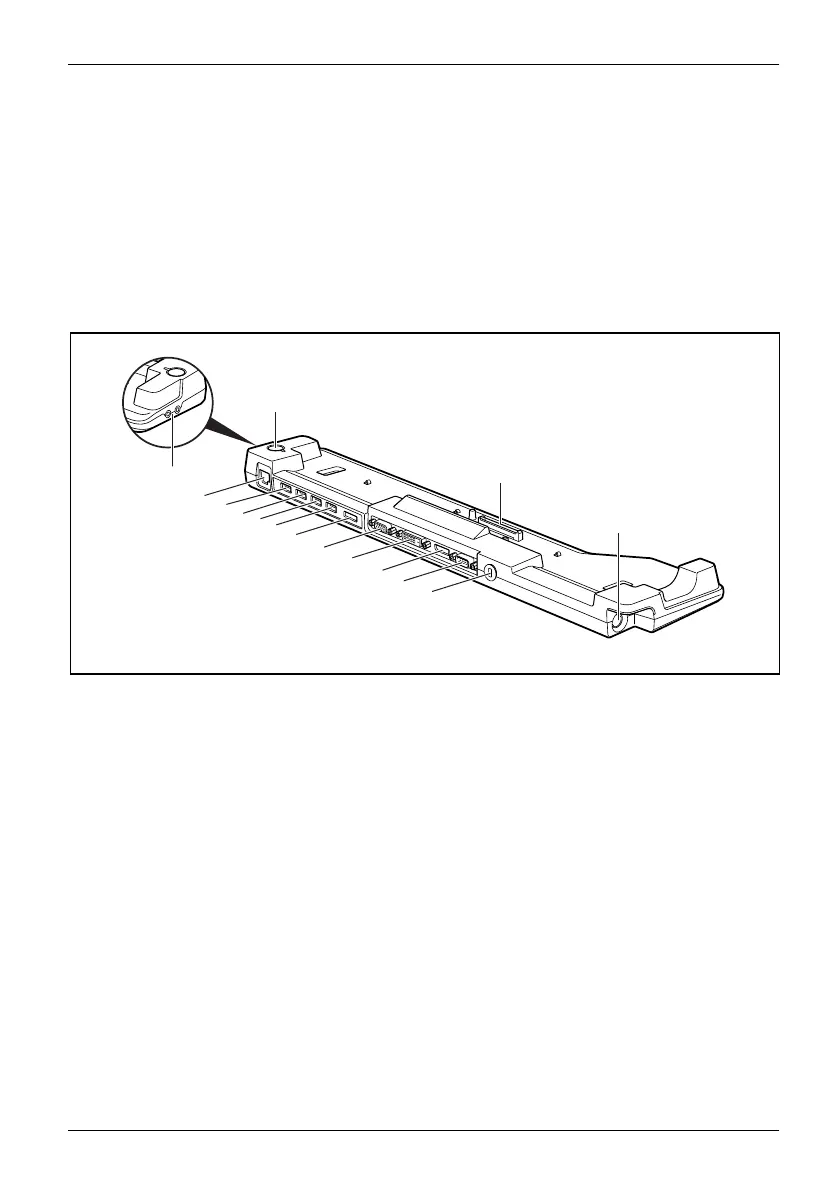
Ports o n the Port Replic
ator
1
13
14
2
3
4
5
6
7
8
9
10
11
12
15
1 = LAN port
2=USBport
3=USBport
4=USBport
5=USBport
6=e-SATAp
ort
7 = Monitor port (VGA)
8=DVImon
itor port
9 = D isplayPort
10 = Serial port
11 = Kensingto
n Lock
12 = DC input connector (DC IN)
13 = Connecto
r on the Port Replicator for
the docki
ng port on the underside
of the no
tebook
14 = ON/OFF switch
15 = Headph
ones and microphone port/Line In
Fujitsu Technology Solutions 45


 To Next Page