Working with the noteboo k
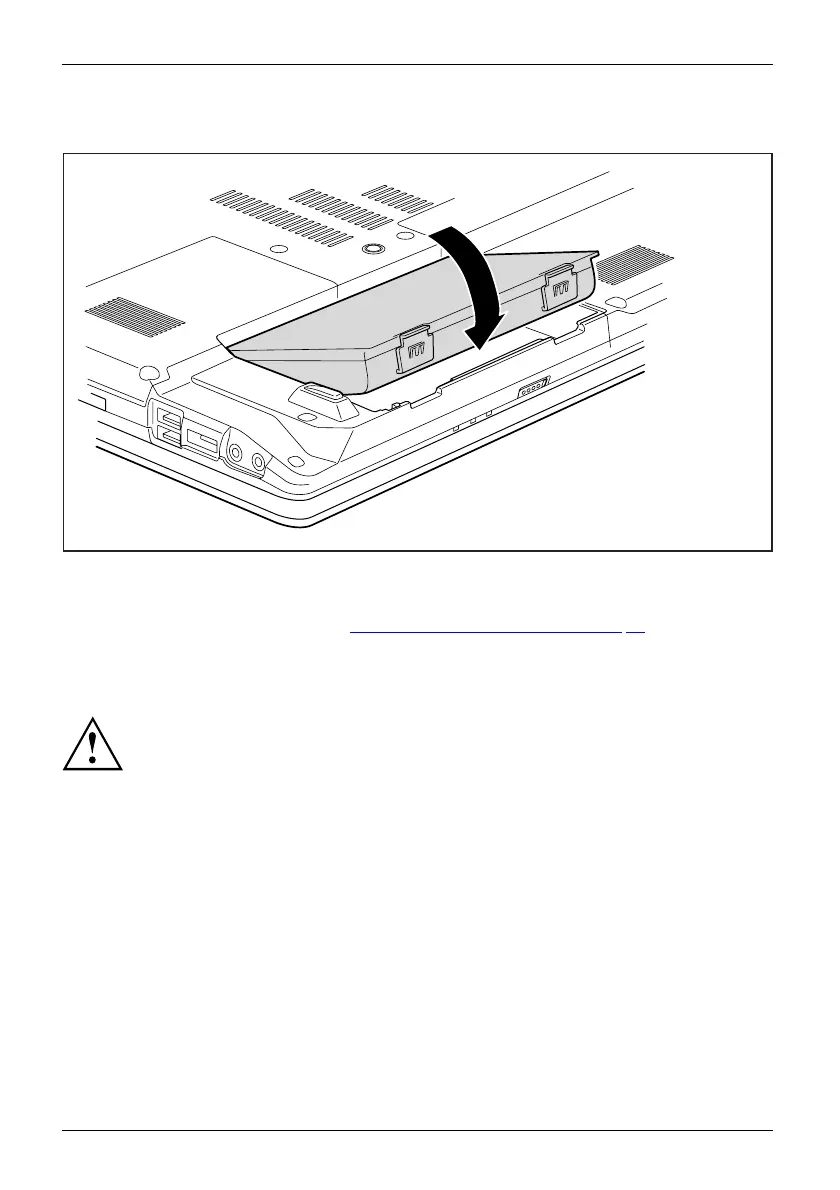
Installing a battery
1
► Position the ba
ttery at th e edge.
► Push the battery into the battery slot until you feel it lock into place (1).
► Complete the r
emoval, see chapter "
Finishin g component removal", Page 73.
Optical drive
Opticaldri
ve
This pro duct contains a light emitting diode, classified in accordance with IEC
8251:1993: LASER CLASS 1, and must therefore not be opened.
Handling
data carriers
Handling
Observe the following guidelines when handling data carriers:
• Avoid touching the surface of a data carrier. Only handle data carriers by their edges.
• Always
store data carriers in their cases. This will protect the data carrier against
being c
overed in dust, scratched or damaged in any other way.
• Protect your data carriers against dust, mechanical vibrations and direct sunlight.
•Avoid
storing a data carrier in areas subject to high temperatures or humidity.
You may use both 8-cm and 12-cm data c arriers in the optical drive.
When using a data carrier of lesser quality, vibrations and reading errors may occur.
32 Fujitsu Technology Solutions


 To Next Page