Working with the notebook
Indicator Description
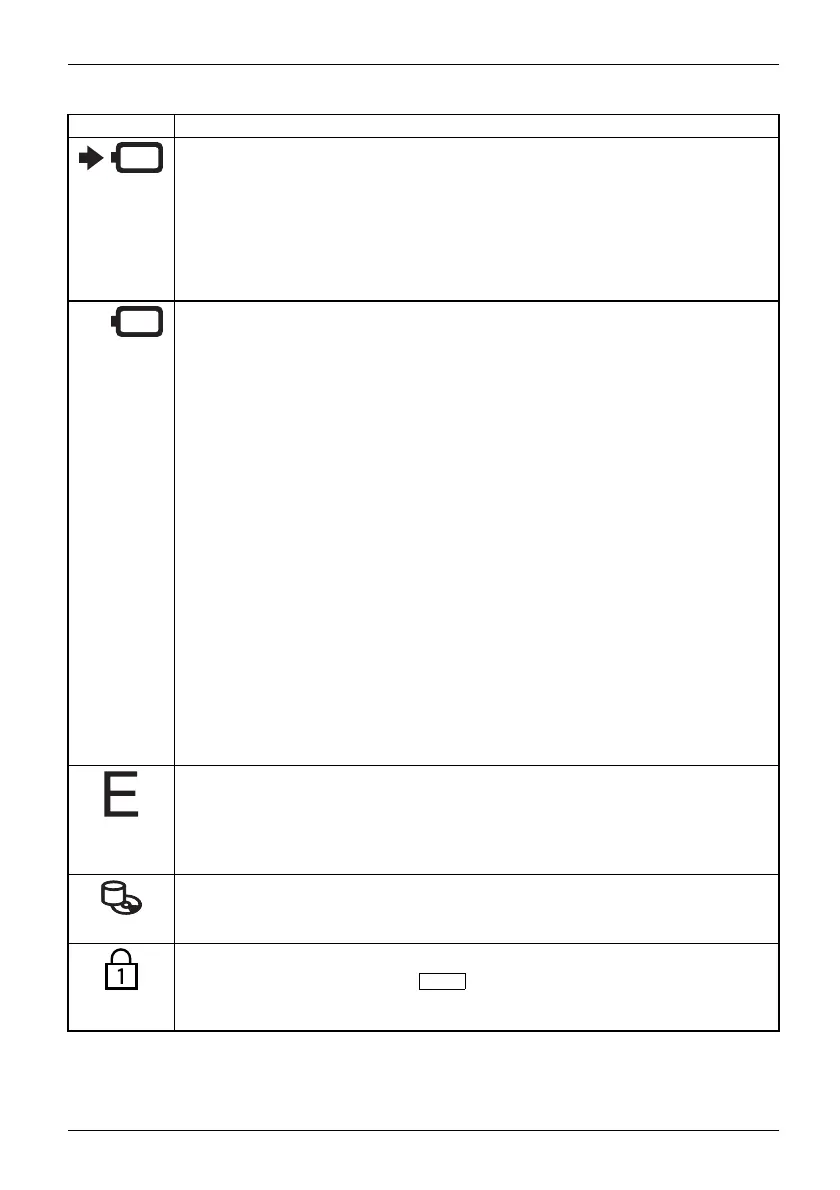
Battery charging indicato r
• The indicator lights up green: T he mains adapter is connected and the installed
battery or batteries are already fully charged, or no battery is installed.
• The indicator lights up orange: The mains adapter is connected and the
installed battery or batt eries are being charged.
•Theindicatorflashes orange: The m ains adapter is connected and the installed
battery or batteries cannot be charged (the battery is too hot for charging).
• The indicato r is not illuminated: The mains adapter is not connected.
Battery indicator
• Indicator is illuminated (green): The battery is charged to between 51% and
100% of its maximum capacity.
• The indicator slowly flashes green (1 second on/5 seconds off): The notebook
is in suspend mode and power is being supplied by the first battery. The battery
is charged to between 51% and 100% of its m aximum capa city.
• The indica tor is illuminated (orange): The mains adapter is connected and the
battery is being charged . The battery is charged to between 13% and 50% of
its maximum capacity.
• The indicator s lowly flashes orange (1 second o n/5 seconds off): The notebook
is in suspend mode a nd power is being supplied by the battery. The battery is
charged to between 13% and 50% of its maximum capa city.
• The indicator flashes orange (for four seconds a fter installing the battery): The
battery charge level is being checked.
• The indicator is illuminated (red): The mains adapter is connected and the
battery is being charged. The battery is charged to between 0% and 12% of
its maximum capacity.
• The indicator slowly flashes red (1 second o n/5 seconds off): The notebook is
in suspend m ode and power is being supplied by the batte ry. T he battery is
charged to between 0% and 12% of its maximum capacity.
• The indicator flashes red (1 second on/1 second off). Malfunction.
• The indicator is not illuminated: The battery is not installed or has been
completely d ischarged.
Energy sa ving functio ns indicator
• The indicator is illuminated: The energy saving fun ctions are enabled (e.g.
reduce screen brightness).
• The indicator is not illuminated: The energy s aving functions have been
disabled.
Drive indicator
Indica
tor
CD/DVD
indica tor
The indicator is illuminated: The hard disk drive or the CD/DVD in the optical drive
of the notebook is being accessed.
Num Lock indicator
IndicatorNumLock
The indicator is illuminated: The
Num
key has been pressed. T he virtual
numerical keypad is activated. You can output the characters indicated on the
upper right of the keys.
Fujitsu Technology Solutions 19


 To Next Page