This document provides a technical description of the Fujitsu Mainboard D3598, an innovative product based on the Intel® C422 chipset. The D3598 mainboard is designed to support a range of ultra-modern technologies, including Intel Xeon® processor series in the LGA 2066 R4 socket, multiple PCI-Express buses, Quad Channel DDR4 memory design, Onboard PCI-Express Gigabit Ethernet, SATA ports, and multiple USB 2.0 / 3.0 ports.
Function Description
The Fujitsu Mainboard D3598 serves as the central component of a computer system, facilitating communication and power distribution among various hardware components. It supports high-performance processors and memory configurations, making it suitable for demanding applications. The board integrates essential security features and comprehensive monitoring capabilities to ensure stable and reliable operation.
Important Technical Specifications
CPU - LGA2066 R4 socket:
- Supports Intel® Xeon Processors in the LGA2066 package.
- Features an integrated memory controller.
Main memory:
- Four-channel DDR4 memory architecture.
- Eight DDR4 memory sockets.
- Supports ECC RDIMM and LR DIMM memory modules.
- Supports DDR4 2133/2400/2667 memory interface speeds.
- Maximum memory capacity of up to 256 GB.
- Non-JEDEC standard DIMMs are not supported.
Chips on board:
- Intel® C422 chipset.
- Realtek Audio ALC 671.
- Intel I219LM Jacksonville LAN.
- Intel I210 Springville LAN.
- Infineon SLB 9670 TPM 2.0.
Audio:
- System speakers via front module.
- 4-pin headset connector via front module.
- Internet connection to front module.
Communication:
- Internal connectors: 4x USB 3.1 Gen1, 2x USB 2.0 standard connector (for memory stick).
- External ports (I/O Shield): 6x USB 3.1 Gen1 (rear).
LAN - 10/100/1000 Ethernet Controller:
- WakeOnLAN by Magic-Packet™.
- PXE support.
Environmental protection:
- Socketed battery (recyclable).
- RoHS-compliant.
Form factor, slots, compatibility list:
- Form factor: special.
- Compatible with ACPI, BBS.
Storage Devices:
- Up to 8 SATA3 ports.
- M.2 (PCIe/NVMe).
- RAID 0, 1, 5, 10 support.
BIOS features:
- System and BIOS password protection.
- Harddisk password protection.
- Recovery BIOS support.
- Boot sequential control for each floppy and HDD drive.
- Serial access protection.
- Bootsector virus warning.
- SPD EEPROM write protection against virus.
Advanced security features:
- FTS Smartcard reader.
- Trusted Platform Module 2.0.
- Intel PTT.
- Intel Authenticate (vPro).
Basic system monitoring and management:
- Wake on LAN.
- USB voltage short-circuit detection.
- Advanced Fan Control.
Advanced system monitoring and management:
- Fujitsu Technology Solutions System Management.
- Fujitsu Technology Solutions Thermal Management.
- Inventory identification.
- Intrusion via PSU.
Power Management:
- ACPI (Save to RAM / Disk) support.
- Energy Efficiency EuP Lot 6 (<0.5 W) EPA6.0.
- Intel Deep Sleep S5.
Usage Features
The D3598 mainboard is designed for ease of use and expandability. It provides numerous connectors for internal and external devices, including multiple USB ports, LAN, audio, and serial interfaces. The clear labeling of connectors and the detailed diagrams in the manual assist users in proper installation and configuration.
Memory Installation:
- The mainboard supports up to 512 GB of memory across eight DDR4 sockets.
- Memory modules with different timing parameters can be installed in the same channel, but the slowest module's timings will be applied to all.
- For maximal performance, modules should be plugged in a specific sequence (CH-B1, CH-A1, CH-C1, CH-D1, CH-B2, CH-A2, CH-C2, CH-D2).
- When installing two memory modules with different ranks in the same channel, the module with the higher number of ranks must be placed in the slot further from the CPU.
Processor and Heat Sink Installation:
- The processor socket is protected by a cap, which must be secured for warranty purposes.
- Care must be taken not to touch the underside of the processor or bend the delicate spring contacts in the socket.
- Only the heat sink supplied with the system should be used, with appropriate heat conducting material (pad or paste) applied between the processor and the heat sink.
Add-in Card Installation:
- Users should verify compatibility of add-in cards with the motherboard before installation.
- Cards should be inserted firmly into the appropriate PCIe slots (x8, x16, x1, x4).
- Installing add-in cards in a staggered manner is recommended to improve air circulation and cooling within the chassis.
Connecting External Devices:
- Standard peripherals like keyboards, mice, and printers can be easily connected to the ATX port stack.
- The manual provides a diagram detailing the layout of external ports, including PS/2, USB, LAN (RJ-45), audio (Line in, Line out, Microphone, Earphone/SPDIF), Firewire, and e-SATA.
- The LAN RJ45 connector features two LEDs to indicate link status (green for established link, blinking green for active connection) and speed (off for 10 Mbit/s, green for 100 Mbit/s, yellow for 1000 Mbit/s).
Maintenance Features
The D3598 mainboard includes features and guidelines to facilitate maintenance and troubleshooting.
BIOS POST-codes:
- BIOS POST-codes are displayed on an LCD-display (if connected) to indicate system status during boot-up.
- The manual provides a comprehensive list of checkpoint ranges, status codes, and their descriptions for SEC, PEI, DXE phases, and recovery processes, aiding in diagnosing boot issues.
- Beep codes are also provided for various errors, such as memory not installed, recovery failed, or invalid password.
BIOS Update:
- Fujitsu Technology Solutions provides new BIOS versions to ensure compatibility with new operating systems, software, or hardware, and to integrate new BIOS functions.
- BIOS updates should also be performed to resolve persistent problems not fixed by new drivers or software.
- Updates can be performed directly under Windows using the DeskFlash utility, found on the "Drivers & Utilities" CD.
BIOS Recovery:
- In case of a failed BIOS update or other issues, the mainboard supports a BIOS recovery procedure.
- This involves opening the casing, closing the Recovery BIOS jumper, inserting a BIOS Recovery Disk, and starting the PC.
- The system will emit rapidly repeated beeps upon successful recovery.
- After recovery, the Recovery BIOS jumper must be removed, and BIOS settings can be reset to default values via the "Reset Configuration" option in the BIOS Setup.
Lithium Battery Replacement:
- A lithium battery is installed to power the CMOS memory and save system information permanently.
- An error message will notify the user when the battery charge is low or empty.
- The battery must be replaced with an identical or manufacturer-recommended type.
- Users are warned about the risk of explosion if the battery is replaced incorrectly and instructed on proper disposal according to local regulations.
- The battery must be inserted with the plus pole facing up.
Safety Precautions:
- The manual emphasizes observing safety notes from the system's operating manual.
- Components can become very hot, so caution is advised when handling them during extensions.
- The warranty is invalidated if the system is damaged during installation or replacement of expansions.
- When handling boards with electrostatic sensitive devices (ESD), users must discharge static build-up, use static-free tools, remove the power plug, and hold boards by their edges, avoiding contact with pins or conductors.
- Always unplug the power connector to the motherboard before performing system hardware changes to prevent damage.

 Need help?
 General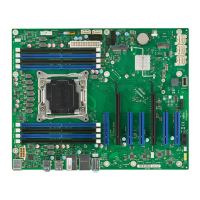

 To Next Page




