Mainboard D3598 English - 31
You must unplug the power connector to the motherboard before performing system
hardware changes, to avoid damaging the board or expansion device.
!
Connecting external devices
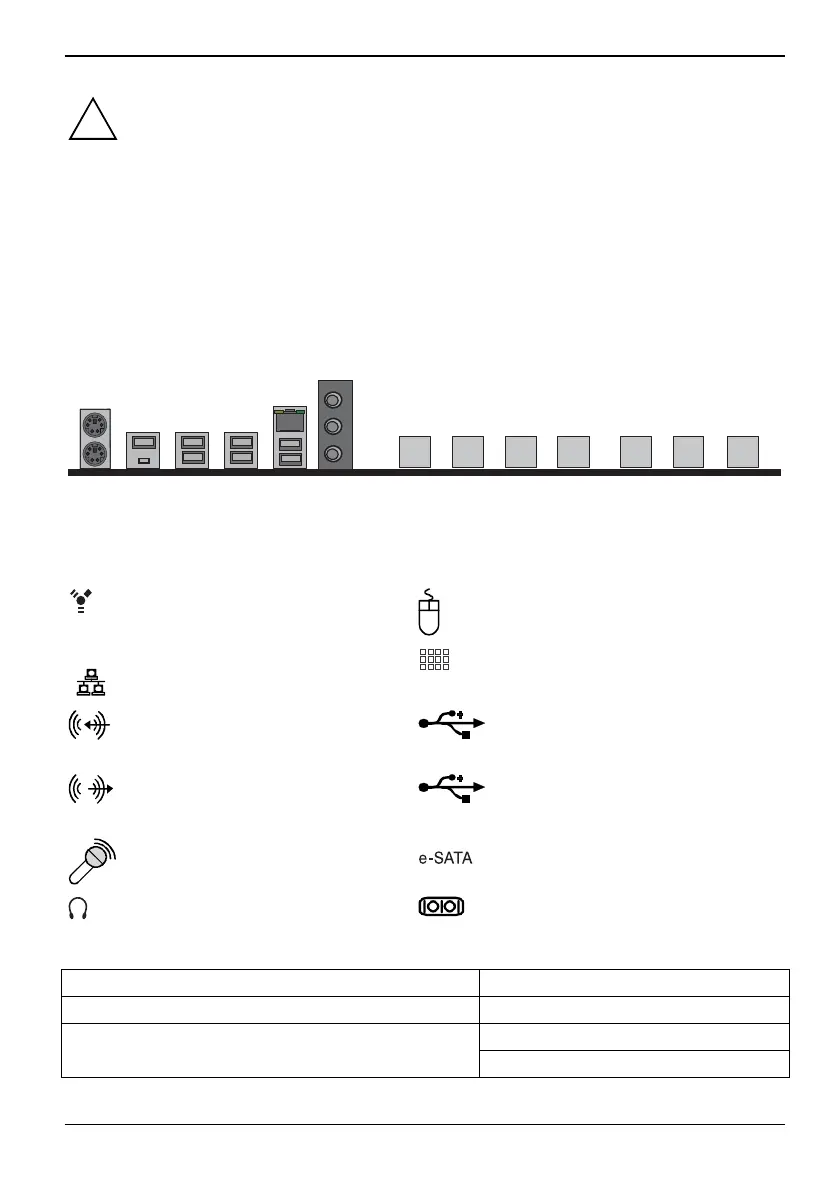
Connecting external devices to the motherboard is an easy task. The standard devices you should
expect to plug into the motherboard are keyboards, mouse, and printer cables. The following
diagram will detail the ATX port stack for the following board:
D3598
2xUSB
LAN
USB
Port
2xUSB 2xUSB
2xPS2
Line
-in
-out
MIC
PCIe
x8
PCIe
x16
PCIe
x1
PCIe
x4
PCIe
x16
PCIe
x1
PCIe
x4
External ports
The location of the external connections of your mainboard is specified at the beginning of the
manual.
Firewire, white
PS/2 mouse port, green (optional)
LAN
LAN port (RJ-45)
PS/2 keyboard, blue (optional)
Audio input (Line in), light blue
USB 3.1 Gen1 - Universal Serial Bus,
blue
Audio output (Line out), light green
USB 3.1 Gen2 - Universal Serial Bus,
red
Microphone jack (mono), pink
e-SATA port
Earphone / SPDIF, yellow
Serial interface, turquoise
The LAN RJ45 connector has two LEDs (light emitting diodes).
Left LED Right LED
Green: Link established Off: 10 Mbit/s
Green: 100 Mbit/s Blinking green: LAN connection is active
Yellow: 1000Mbit/s
Fujitsu 65


 To Next Page