fi-5120C / fi-5220C Image Scanner Operator Guide
TROUBLE SHOOTING
CONTENTS MAP
TOP
3.7ExcludingaColorintheImage(dropoutcolor)
A selected color (primary colors: red, green or blue) can be removed (dropped out) from the scanned image data.
For example, if the document contains black text in a green frame, you can set the scanner to read only the text and eliminate
(drop out) the green frame.To set the scanner to drop out a color, change the settings in the [TWAIN Driver] dialogbox before
scanning.
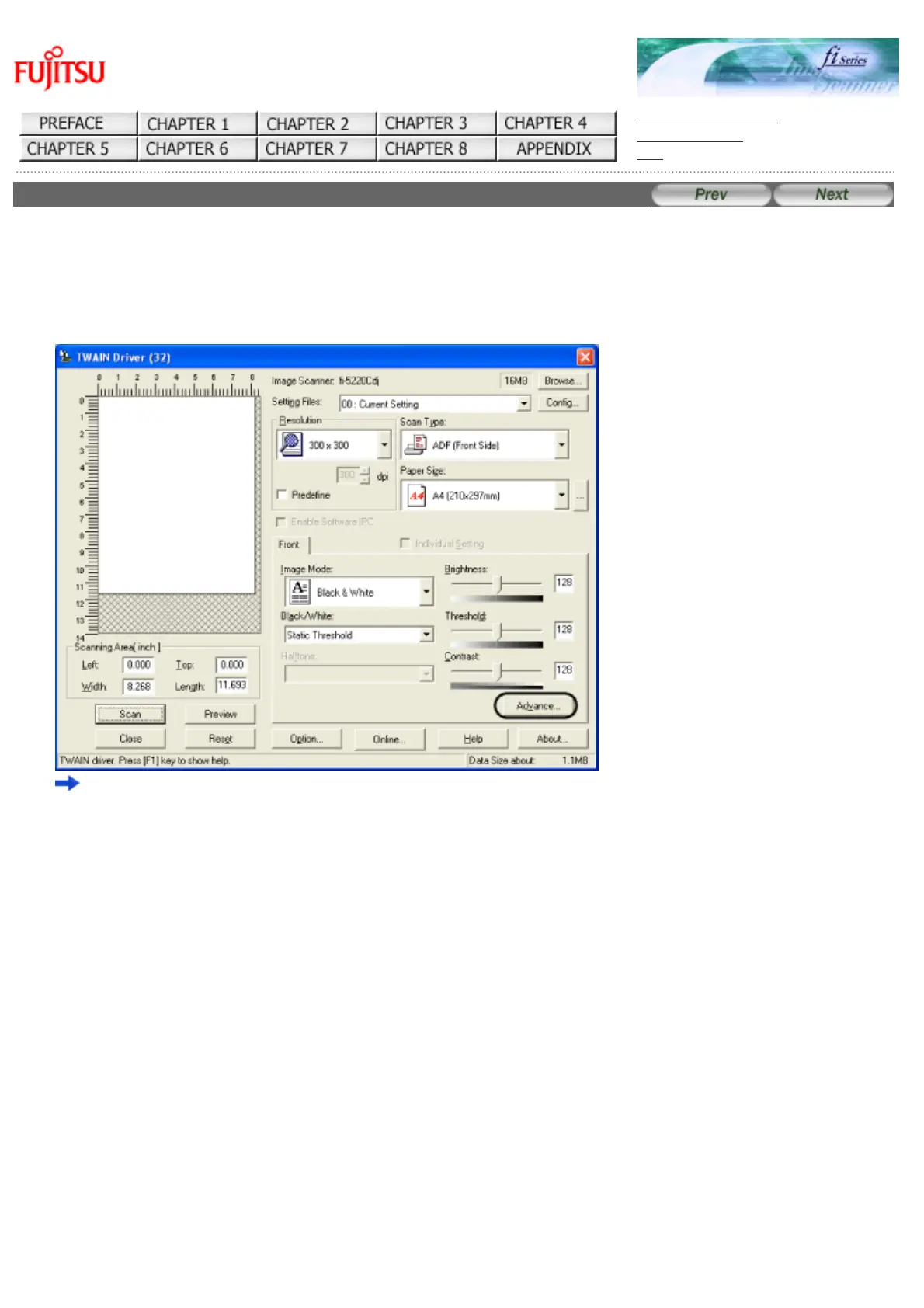
1. Click the [Advance...] button in the [TWAIN Driver] dialogbox.
The [Advance] dialogbox appears.
2. Select the color to be drop out from [Dropout Color] under "More".
For example, if the document contains black text in green frame, select [Green] so that the scanner only reads the text
and eliminates the frames. If you do not wish to have any colors dropped out select [None].
file://///Hd-htgle21/Manual/fi-5120C5220C-lynx2/OG/R03/contents/EN/03/c030701.htm(1/2)2006/08/2916:00:43












 To Next Page