Index
Chapter 8 Operational Settings
Appendix
Glossary
Introduction
Contents
TOP
167
How to Load
Documents
How to Use
the Operator
Panel
Various Ways
to Scan
Daily Care
Troubleshooting
Replacing
Consumables
Scanner
Overview
Operational
Settings
Scanning Documents with Dark Background
Color
[Scan Setting for Document in Dark Ground
Color]
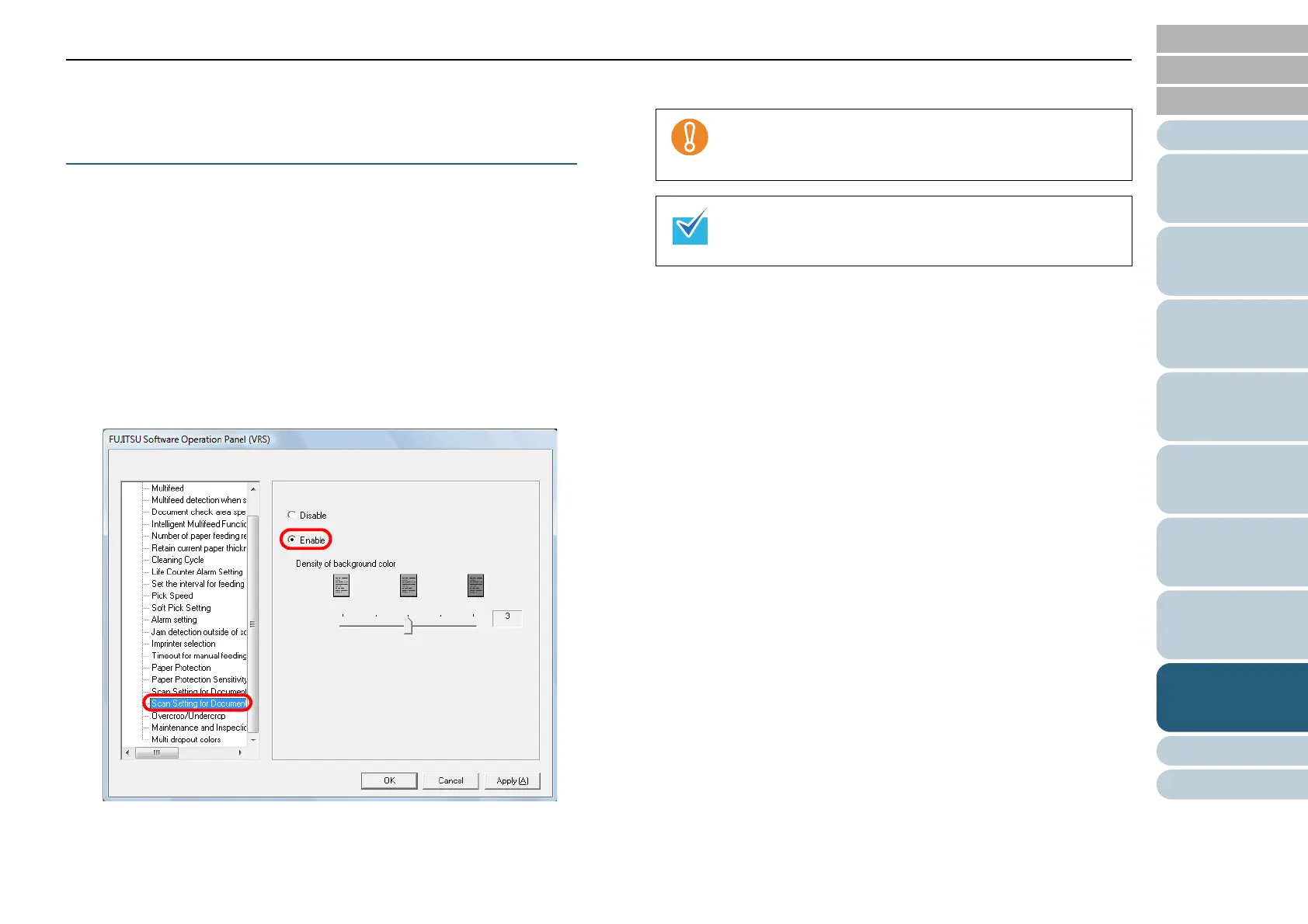
Configure this setting when the edges of a document with dark
background color are not detected accurately. You can specify
the level of sensitivity to accurately detect the edges of
documents with dark backgrounds.
1 Start up the Software Operation Panel.
Refer to "8.1 Starting Up the Software Operation Panel" (page 132).
2 From the listing on the left, click [Device Setting 2]
[Scan Setting for Document in Dark Ground Color], then
select [Enable].
3 Specify the [Density of background color].
When you increase the [Density of background color], it
may falsely detect the edges due to the dust inside the
paper path.
This setting appears ONLY when Kofax VRS (optional) is
used.



 To Next Page