Questions? Call (315) 298-5121, or visit us online at www.fulton.com
SECTION 3 PHW-IOM-2013-0214 OPERATION
3-11
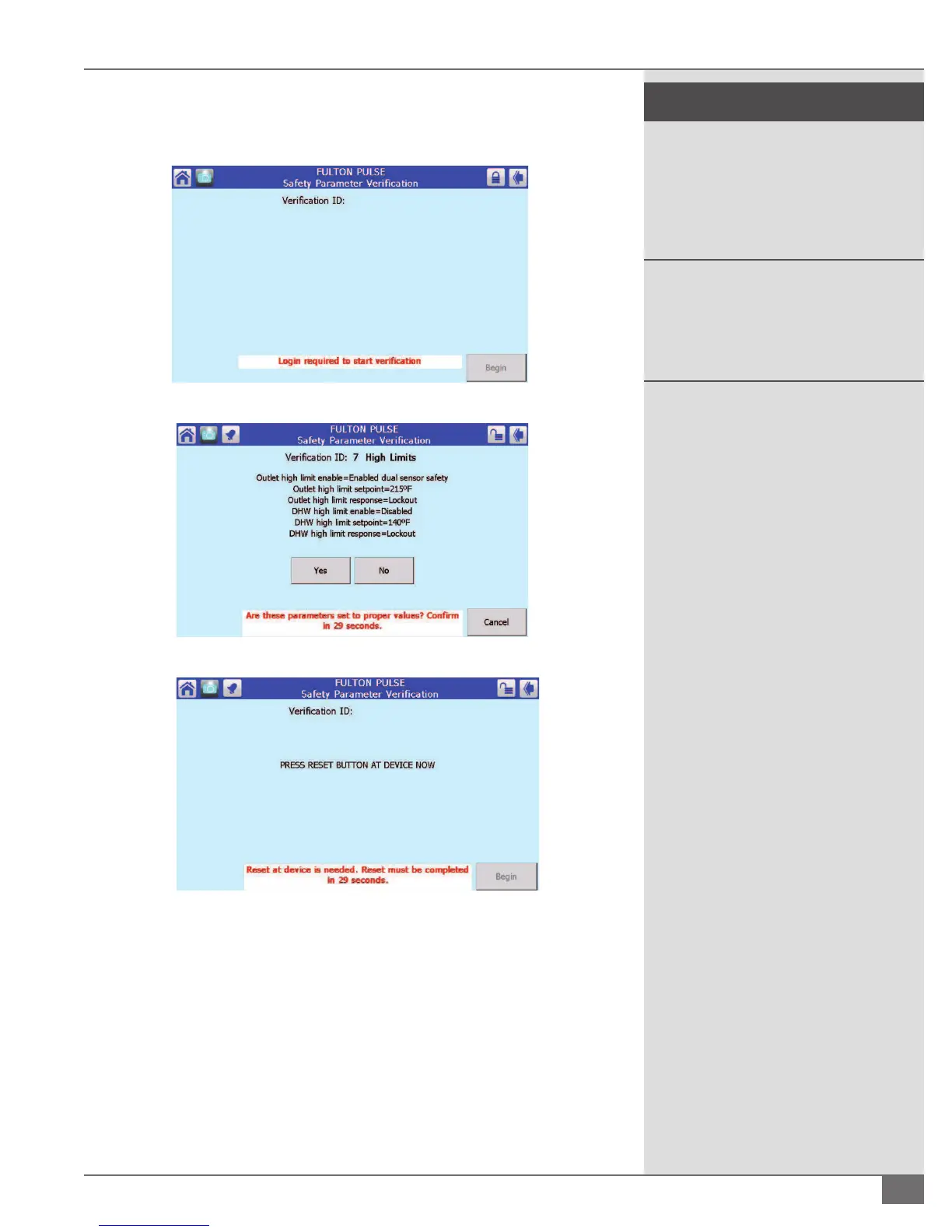
be done by pressing the reset button on the front of the Sola control (the
base) for 1 to 2 seconds. See Figure 30.
FIGURE 28 - VERIFICATION
FIGURE 29 - VERIFICATION
FIGURE 30 - VERIFICATION
¡ Accessing Lockout History and Clearing Lockouts
1. From the Status Summary screen resetting the lockout or viewing the
lockout history can be accessed by pressing where Figure 31 is showing a
Lockout. If there is no lockout, that same bar will display History.
2. If the control is in lockout another sub screen will be displayed and you will
have the option for Ok, Lockouts, Alerts and Silence. Pressing Lockouts will
display the screen shown in Figure 32. This will provide the time and date
stamp of the last fteen lockouts. By pressing the speci c lockout more
! WARNING
All information in this manual is for
reference and guidance purposes,
and does not substitute for required
professional training, conduct, and strict
adherence to applicable jurisdictional/
professional codes and regulations.
Non-Fulton product information is
for reference purposes only. No Fulton
document may substitute for full review
of documentation available from the
component manufacturer.




 To Next Page