© The Fulton Companies 2013
MAINTENANCE PHW-IOM-2013-0214 SECTION 4
4-6
Reviewing Diagnostics on SOLA Control
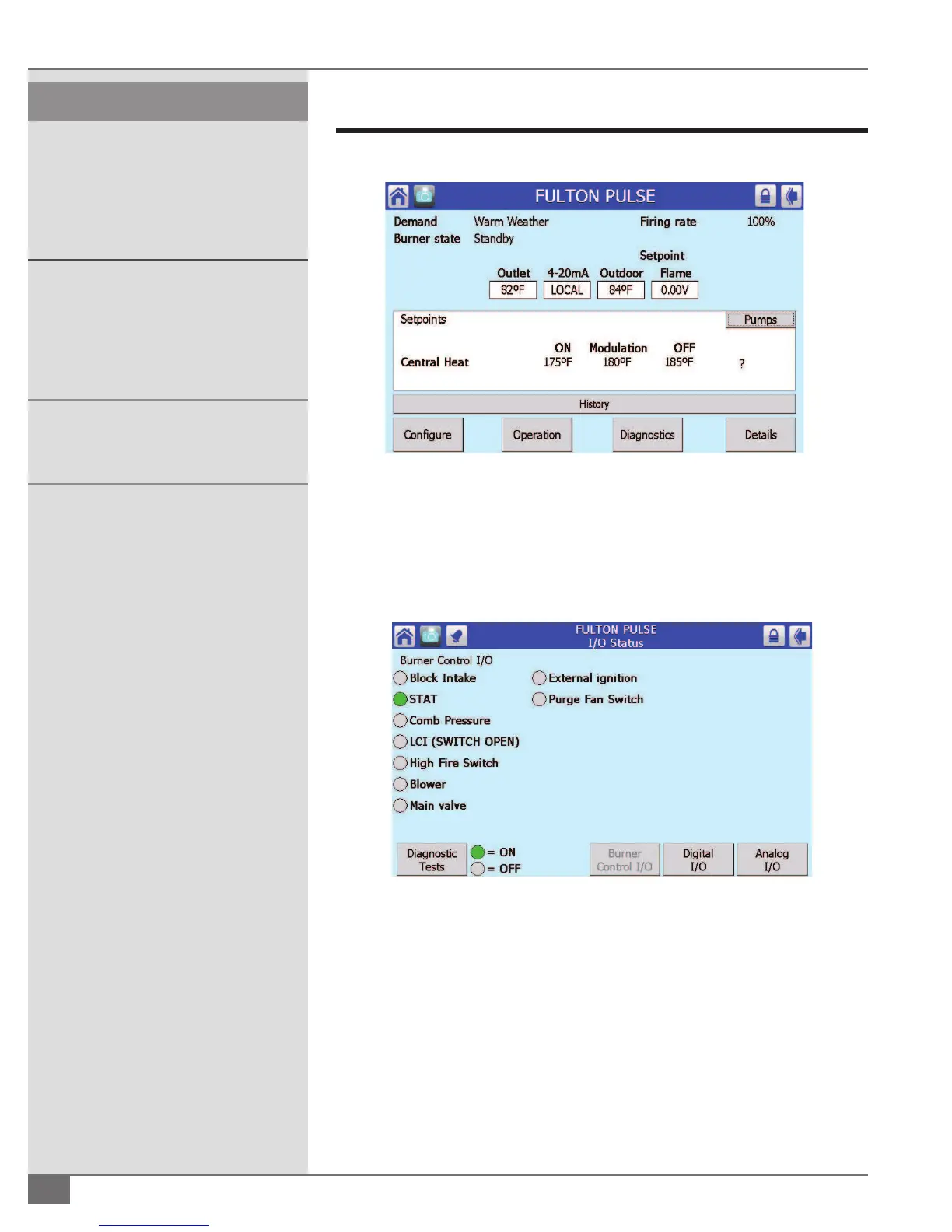
From the Status Summary screen press Diagnostics (see Figure 55) .
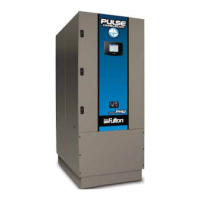
1. Pressing Burner I/O will place you into screen shown in Figure 56. From
here you can see the inputs being made and/or are open. A green light
next to the input indicates the control’s input is made or satis ed, a gray
circle indicates the input is not satis ed. This is also a helpful trouble
shooting screen.
2. Pressing Digital I/O will place you into screen shown in Figure 57. From
here you can see speci c information what inputs are/are not being made.
4 CAUTION
All information in this manual is for
reference and guidance purposes,
and does not substitute for required
professional training, conduct, and strict
adherence to applicable jurisdictional/
professional codes and regulations.
All maintenance procedures should
be completed by trained personnel.
Appropriate training and instructions
are available from the Fulton Service
Department at (315) 298-5121 or your local
Fulton Representative.
In order to meet warranty conditions, ensure
all appropriate maintenance activities are
performed.
FIGURE 55 - ACCESSING DIAGNOSTICS
FIGURE 56 - I/O STATUS SCREEN




 To Next Page