Questions? Call (315) 298-5121, or visit us online at www.fulton.com
SECTION 3 PHW-IOM-2013-0214 OPERATION
3-19
! WARNING
All information in this manual is for
reference and guidance purposes,
and does not substitute for required
professional training, conduct, and strict
adherence to applicable jurisdictional/
professional codes and regulations.
Non-Fulton product information is
for reference purposes only. No Fulton
document may substitute for full review
of documentation available from the
component manufacturer.
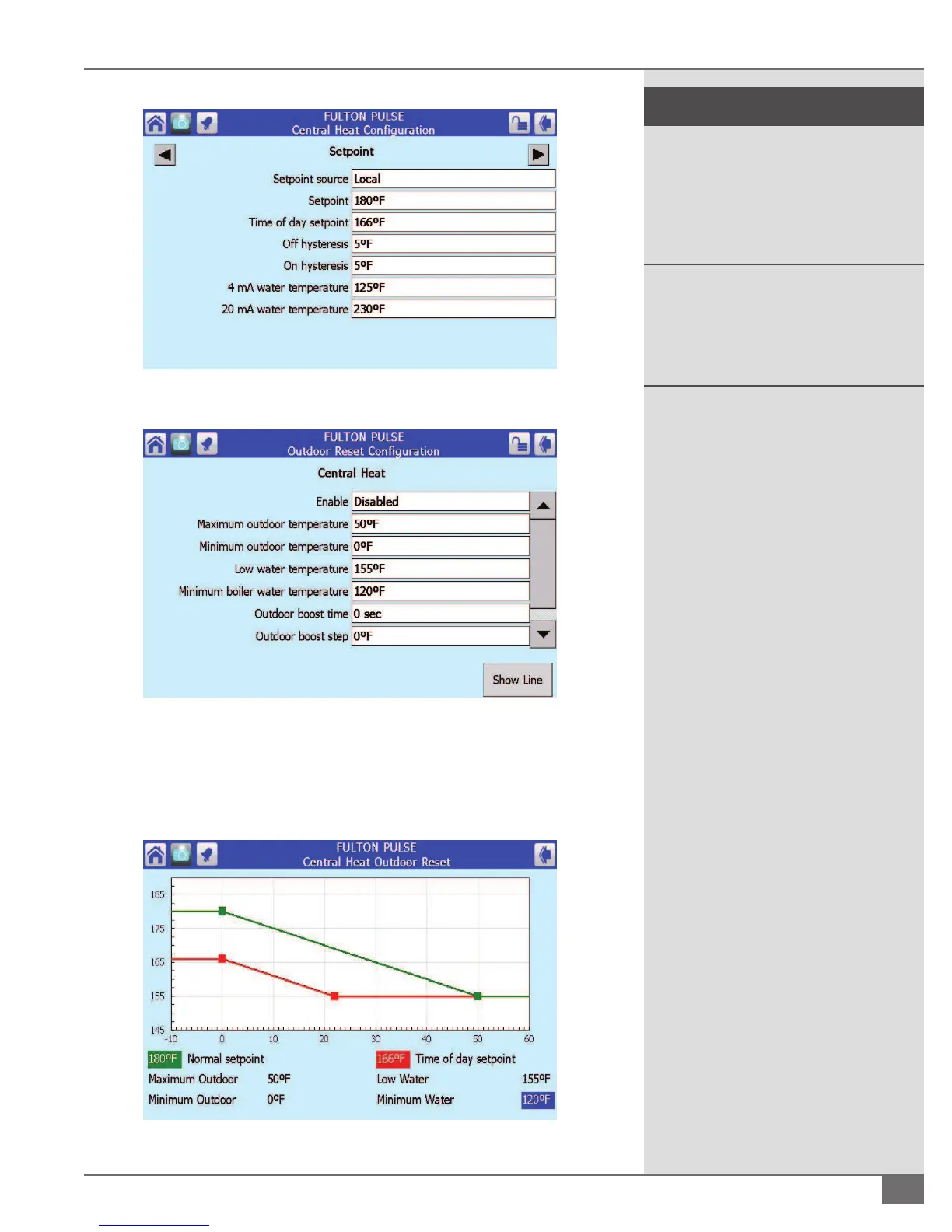
FIGURE 46 - VERIFYING SETPOINT
FIGURE 47 - OUTDOOR RESET CONFIGURATION
4. By pressing Show Line in the Outdoor Reset Con guration screen you can
see outdoor temperatures in relation to your water temperatures in a linear
format. See Figure 48.
FIGURE 48 - CENTRAL HEAT OUTDOOR RESET




 To Next Page