30
EN
This is a simple way to set the recording time in blocks of
30 minutes. Check that the disc you are recording onto
has enough space remaining for the time you set.
Press [REC I] repeatedly until the desired
recording time (30 minutes to 8 hours) appears
on the TV screen.
One-touch Timer Recording will start.
• When the unit reaches the specified time, it will be
turned off automatically.
To change the recording length during One-touch
Timer Recording:
Press [REC I] repeatedly until the desired length
appears.
To cancel One-touch Timer Recording within the
specified time:
Press [STOP C].
• This operation may take a few moments to complete.
To pause the One-touch Timer Recording:
Not possible.
• The remaining recording time will be displayed on the front
panel display during One-touch Timer Recording. Press
[DISPLAY] to see it on the TV screen.
• Unlike the timer recording, you can perform the following
operations during One-touch Timer Recording:
- Turn off the power. (One-touch timer recording will be
cancelled.)
-Use [REC I] or [STOP C] on the remote control.
• You cannot use the pause function during One-touch Timer
Recording.
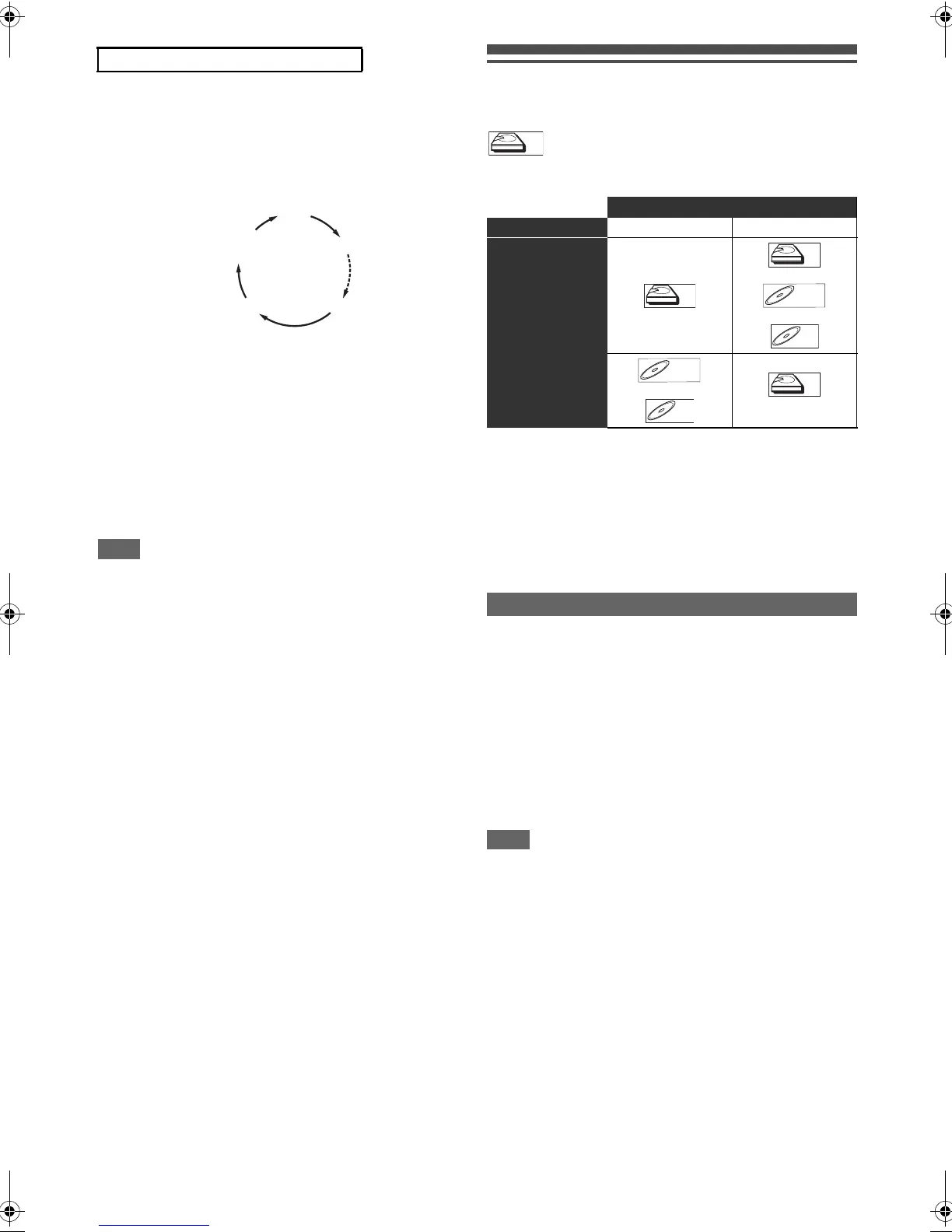
Dual Recording
(Recording 2 programmes at once)
Available combination
1 While making rec1 recording, select the
component you like to make rec2 to. If you are
recording to a Blu-ray Disc™, make sure the
disc is inserted.
2 Tune in to the programme you like to record as
rec2 using [PROG. G\H].
3 Press [REC I] to start rec2 recording.
When rec1 and rec2 are made on the different
components...
Select the component you want to stop the recording of, then
press [STOP C].
When rec1 and rec2 are made on the same component...
(Dual recording of the same channel is only available with
the timer recording.)
Select the component, then press [STOP C] while viewing the
channel you want to stop the recording of.
• While recording the same channel, pressing [STOP C] will
only affect rec1.
• During dual recording, the following operations are
prohibited:
- Selecting channels using [the Number buttons]
- Calling up the CH list using [ENTER\OK]
- Changing the external input mode.
• Only DVB & DVB channel combination is available.
• During dual recording, only those channels being recorded
can be selected with [PROG. G\H].
One-Touch Timer Recording (OTR):
0:30
8:00 7:30
1:00
Rec1 Rec2
Broadcast Type DVB Channel DVB Channel
Media
or
or
or
Stopping the Dual Recording
HDD
HDD
BD-R
BD-R
BD-RE
BD-RE
HDD
HDD
E4V21ED_EN.book Page 30 Friday, June 3, 2011 2:07 PM



 To Next Page