40
EN
Finalising Discs
You will need to finalise discs to play them back in other units.
Finalising may take from several minutes up to an hour.
A shorter recording period on the disc will require a longer
time period for finalisation. Do not unplug the mains cable
during finalisation.
1 Go to “BD/DVD Menu” A “Finalise”, then press
[ENTER\OK].
2 Select “Yes” using [K \ L], then press
[ENTER\OK].
Finalising will start.
You cannot cancel finalising once it has started.
3 Finalising is complete.
• Refer also to the “Making Discs Playable on Other Players
(Finalise)” on page 40.
• To release the finalisation of the disc, select “Undo Finalise”
at step
1.
• To release the finalisation of the DVD+RW, make an
additional recording to the disc.
• If you insert a DVD-RW finalised with this unit, “Undo
Finalise” will appear instead of “Finalise”.
• DO NOT power off during finalising. This may result in a
malfunction.
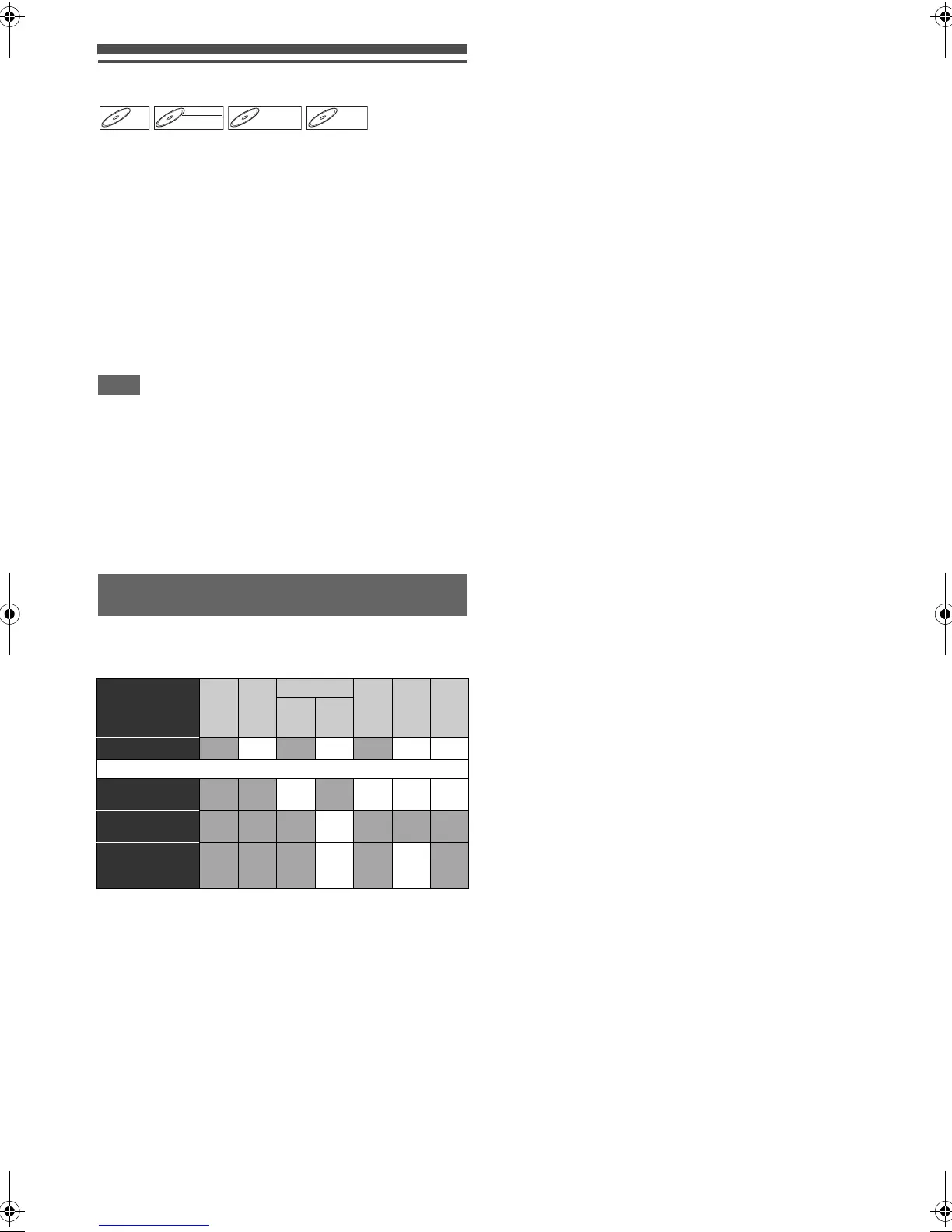
After recording, you must finalise the disc to play it back in
other players.
You cannot finalise discs on other recorders.
*1)
Automatically finalised after recording.
*2)
Additional recordings or editings will automatically undo the
finalisation.
Making Discs Playable on Other Players
(Finalise)
Disc Type
BD
-RE
BD-R
DVD-RW DVD
-R
Video
Mode
DVD
+RW
+VR
Mode
DVD
+R
+VR
Mode
Video
Mode
VR
Mode
Finalise (manual)
✔
*1
✔
*1
✔✔
After finalising
Automatic title
menu making
✔ ✔✔✔
Undo
finalising
✔
Additional
recording or
editing
✔ ✔
*2
✔: Available Gray: Not available
DVD+RW
DVD+RW
E4V21ED_EN.book Page 40 Friday, June 3, 2011 2:07 PM



 To Next Page