34
EN
• If there is a power failure or the unit is unplugged for more
than 30 seconds, the clock setting and all timer settings will
be lost.
• If a disc is not inserted or if a inserted disc is not recordable,
the unit will perform the alternate recording to the HDD. (See
page 32.)
• When a timer recording is completed, the unit will ask you
whether to turn off the unit if there is no timer recording
which starts within 4 minutes, except under conditions listed
below:
- During playback of HDD or disc.
- While displaying menus or information on the screen.
The unit will be turned off automatically if you select “Yes” or
if you do not reply in 1 minute.
• When the programmed starting and ending time are earlier
than the current time, the setting will not be accepted.
• Timer recording whose recording time exceeds 8 hours
cannot be made.
• It is prohibited to turn off the unit from 4 minutes before the
programmed starting time.
• The timer recording has the priority over the regular
recording or OTR when their recording channel is the same.
So, regular recording or OTR will be stopped and [REC I]
will no longer be available when it comes to 2 minutes before
the regular timer recording.
• Playback of a disc is prohibited from 2 minutes before the
programmed starting time when the recording media is Blu-
ray Disc™.
• If 2 consecutive timer recordings are set for Blu-ray Disc™,
the latter recording will be made to the HDD.
• As to the timer recording in progress, you only can edit the
end time. The changes made during recording will be
recognised as only specific to that recording in progress and
it will not affect the daily or the weekly recording setting.
Timer Recording (EPG)
With EPG screen, you can programme a timer recording
much easier.
Preparation:
• Read “Timer Recording” on page 31 for the information on
timer programming.
• If “Auto Clock Setting” is “Off”, “Timer Recording (EPG)” may
not be performed.
• Make sure the disc is in the unit if you are recording to
BD-RE/-R.
• Make sure the correct component mode (HDD/DISC) is
selected.
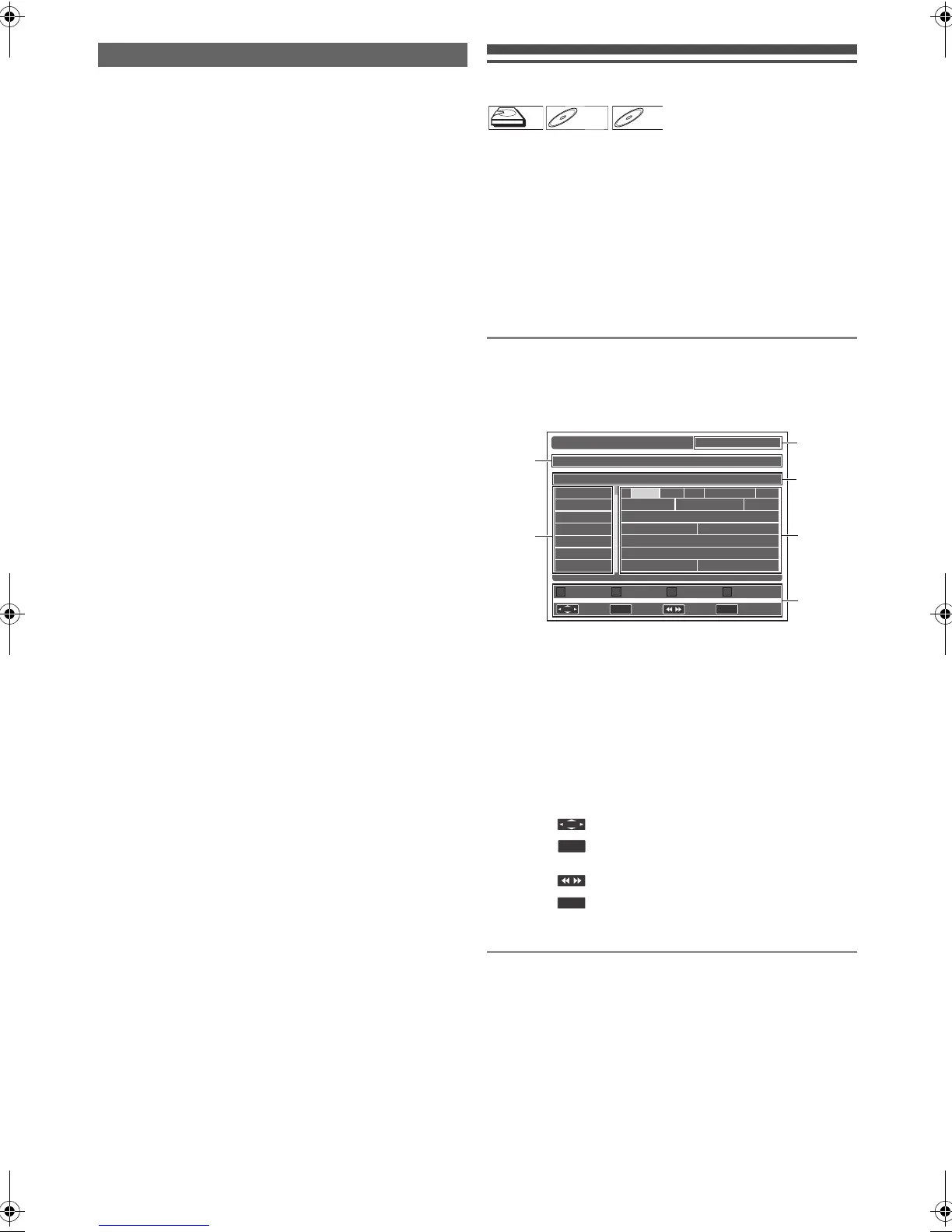
Guide to EPG Screen
To call up the EPG screen...
While viewing a DVB programme, press [GUIDE].
• EPG screen will appear.
1 Title of the highlighted programme and its air
time
2 List of channels
3 Current time and date
4 Time lapse
5 List of programmes
6 Operable buttons:
Refer also to “Displaying the EPG Screen” on page 26.
Note for the Timer Recording
[Red] : Displays the EPG in daily mode.
[Green] : Displays the EPG in weekly mode.
: Move the highlight.
: Press to access the timer programming
screen.
: Proceeds 24 hours ahead.
: Exits the EPG screen.
RETURN
OK
The Li Aft...Sky T... Live At Five Li...
Diagnosis M... Flog It! Ten of the...
This is BBC THREE
BBC News BBC News
Sportsworld Extra The Forum
Are You...
This is BBC FOUR
BBC Red Button
Daily Weekly
15:10 SAT 01/01/2011
Sky Today with Dermot...
15:05-15:25
SAT 01/01 15:00 15:30 16:00 16:30
Sky Spts New
BBC TWO
BBC THREE
BBC NEWS
BBC Red Button
BBC FOUR
BBC World Sv.
EPG [ Weekly Mode ]
Exit
Select Timer 24Hrs
1
2
5
3
4
6
RETURN
E4V21ED_EN.book Page 34 Friday, June 3, 2011 2:07 PM



 To Next Page