–
11
–
EN
DVD FUNCTIONS
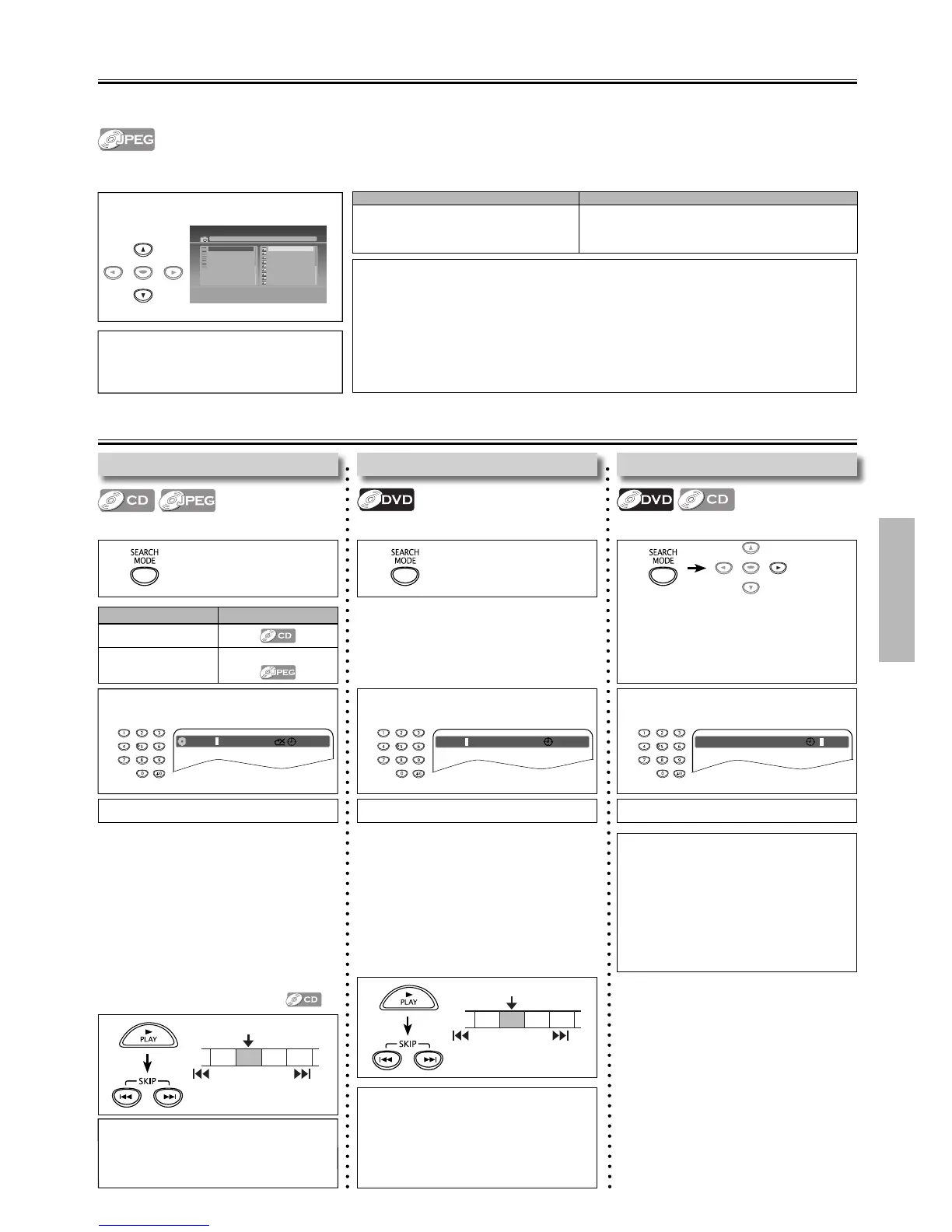
Search Functions
Using Time Search
Using Track / File Search
Using [SEARCH MODE]
Using Title / Chapter Search
Using [SEARCH MODE]
• Press [SEARCH MODE] once for the title
search.
• For the chapter search, press cursor [B]
to highlight the chapter number.
1
Using [SKIP H , G ]
2
Enter the desired title or chapter
number.
Title 00 : 08 : 10003 / 039
01 / 06 Chapter
JPEG Playback
1 Select the desired Folder or File.
2 Press [ENTER] or [ PLAY B ].
Playback will Start from the first File of
the Folder or Files.
[
jpg9999
]
Jpeg01.jpg
Jpeg01.jpg
Jpeg02.jpg
Jpeg03.jpg
Jpeg04.jpg
Jpeg05.jpg
Jpeg06.jpg
Jpeg07.jpg
Jpeg09.jpg
Jpeg10.jpg
01.JPEG1
02.JPEG2
03.JPEG3
04.JPEG4
05.JPEG5
JPEG is a method of compressing data in files.
You can copy JPEG files on DVD or CD-R/-RW from a computer and Play back the Files on this unit.
Insert a JPEG formatted disc, then the File List will automatically appear on the TV screen. (For a disc with JPEG files only)
Note(s):
• Some selections may take a while to be recognized.
• Refer to “On-Screen Display” on page 12 for more details.
• A Maximum of 40 folders or 9999 les may be recognized on One disc.
(ISO9660 format les)
For UDF format les recorded on DVD Media, maximum of 2,000 les may be recognized.
It may take a while to switch between pages for a le list.
• To Rotate the Picture, press the Cursor Keys during Playback of JPEG Files.
• Displayed digit di ers depending on the
contents. Press the number directly.
The same number of digits that are
stored on the disc must be entered.
e.g.)
– If you want to select 14 when 99
(2-digit) tracks / files are on the disc :
press [1], [4] and [ENTER].
– If you want to select 14 when 999
(3-digit) tracks / files are on the disc :
press [0], [1], [4] and [ENTER].
1
CH 1 CH 2 CH 3 CH 4
Current Chapter
SKIP
SKIP
3 Press [ENTER]. 3 Press [ENTER]. 3 Press [ENTER].
2 Enter the desired track / file number.
CD TRK 00 : 00 : 3102 / 10
e.g.) CD
1
ENTER
Available Search Mode
Displayed list
Track Search
File Search
File list / Thumbnail
It is recommended that the files are recorded under the following conditions :
Applicable JPEG file Remarks
Normal playback
Pixel upper limit: 6,000 × 6,000 pixel
Pixel lower limit: 96 × 96 pixel
A JPEG image that extends beyond the screen
is reduced so that it will be displayed within
the screen.
1 1
ENTER
Press cursor [B] to
highlight the time.
2 Enter the desired time.
Title
01 / 06 Chapter 003 / 039
00 : 08 : 10
e.g.) DVD
• Title number is displayed with 2-digit,
Chapter number is displayed with 3-digit.
Press the number directly.
e.g.)
– for title 4/99, press [0], [4] and [ENTER].
– for chapter 14/999, press [0], [1], [4]
and [ENTER].
Using [SKIP H , G ]
Note(s):
• To play time 00:15:00, press [0], [0], [1],
[5], [0], [0] of [the Number buttons].
• Press [CLEAR] to erase the incorrect
input at step 2.
• The random playback will be cleared
when you select time search during
random playback (for CD only).
Note(s):
• Depending on the disc being played
back, this function can also be performed
by directly entering the desired chapter
number with [the Number buttons].
Refer to the manual accompanying the disc.
Note(s):
• The random playback will be cleared
when you select track search during
random playback.



 To Next Page