–
7
–
EN
SETUP
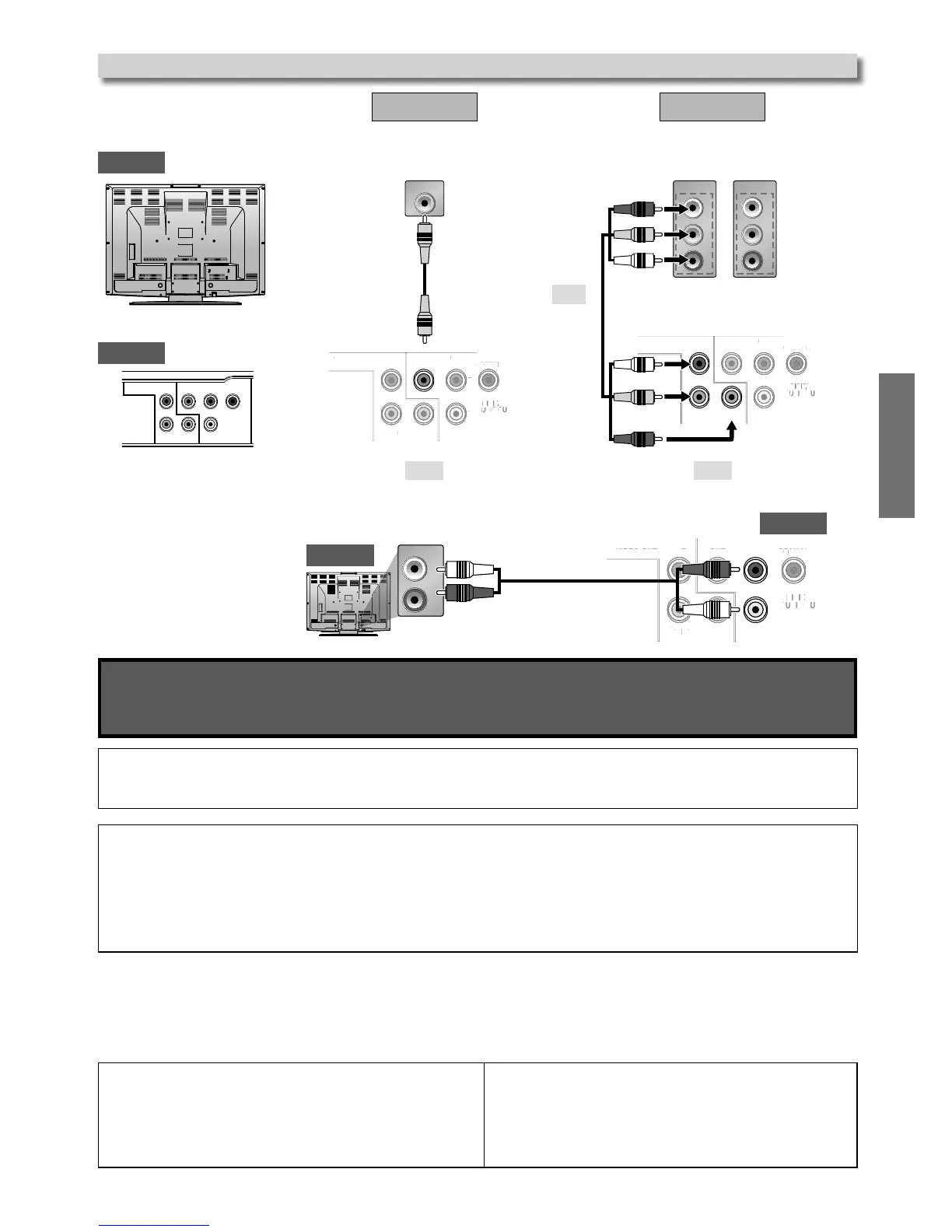
Supplied cables used in this connection are as follows:
• Audio cable (L/R) × 1
• Video cable × 1
Please purchase the rest of the necessary cables at your local store.
Note(s):
• Connect this unit directly to your TV.
If Audio / Video cables are connected to a VCR, pictures may be distorted due to the copy protection system.
If your TV is compatible with 525 (480) Progressive Scanning and you want to enjoy that high quality picture;
You must select the connection COMPONENT VIDEO OUT above and Progressive Scanning mode. To set the mode, set “Progressive”
to “On” in “SYSTEM” menu. Refer to pages 16 for more details.
• When “Progressive” is “On”, video signals from the unit’s VIDEO OUT jack will be Distorted.
If your TV is not compatible with Progressive Scanning;
Use this unit in Interlace mode and set “Progressive” to “Off” in “SYSTEM” menu or by pressing and holding [
B (PLAY)
] Key on the
Front Panel for more than 5 seconds.
After connecting to your TV:
You will need to find the viewing channel (external input channel) on your TV.
Please refer to your TV’s Owner’s manual for details.
Input modes for common TV brands:
Listed below are inputs for common brand name TV’s.
Connection to a TV
Method 1
Method 2
Standard picture Better picture
VIDEO OUT COMPONENT VIDEO OUT
DIGITAL
AUDIO OUT
COAXIAL
COMPONENT
VIDEO OUT
VIDEO
OUT
AUDIO
OUT
YC
B
/P
B
C
R
/P
R
L
R
VIDEO IN
DIGITAL
AUDIO OUT
COAXIAL
COMPONENT
VIDEO OUT
VIDEO
OUT
AUDIO
OUT
YC
B
/P
B
C
R
/P
R
L
R
COMPONEN
or
Video cable (supplied)
Component video cable (not supplied)
Audio cable (supplied)
This unit
This unit
TV
TV
Emerson: VIDEO, AUX
Hitachi: INPUT, AUX
JVC: VIDEO, VIDEO1, VIDEO2, VIDEO3
LG: INPUT, AUX
Magnavox: AUX CHANNEL, SOURCE
Panasonic: TV/VIDEO
Philips: VIDEO, SOURCE
RCA: INPUT, TV/VCR, 00, 90, 91, 92, 93
Samsung: TV/VIDEO
Sanyo: VIDEO
Sharp: 00
Sony: VIDEO1, VIDEO2, VIDEO3
Toshiba: TV/GAME



 To Next Page