–
9
–
EN
SETUP
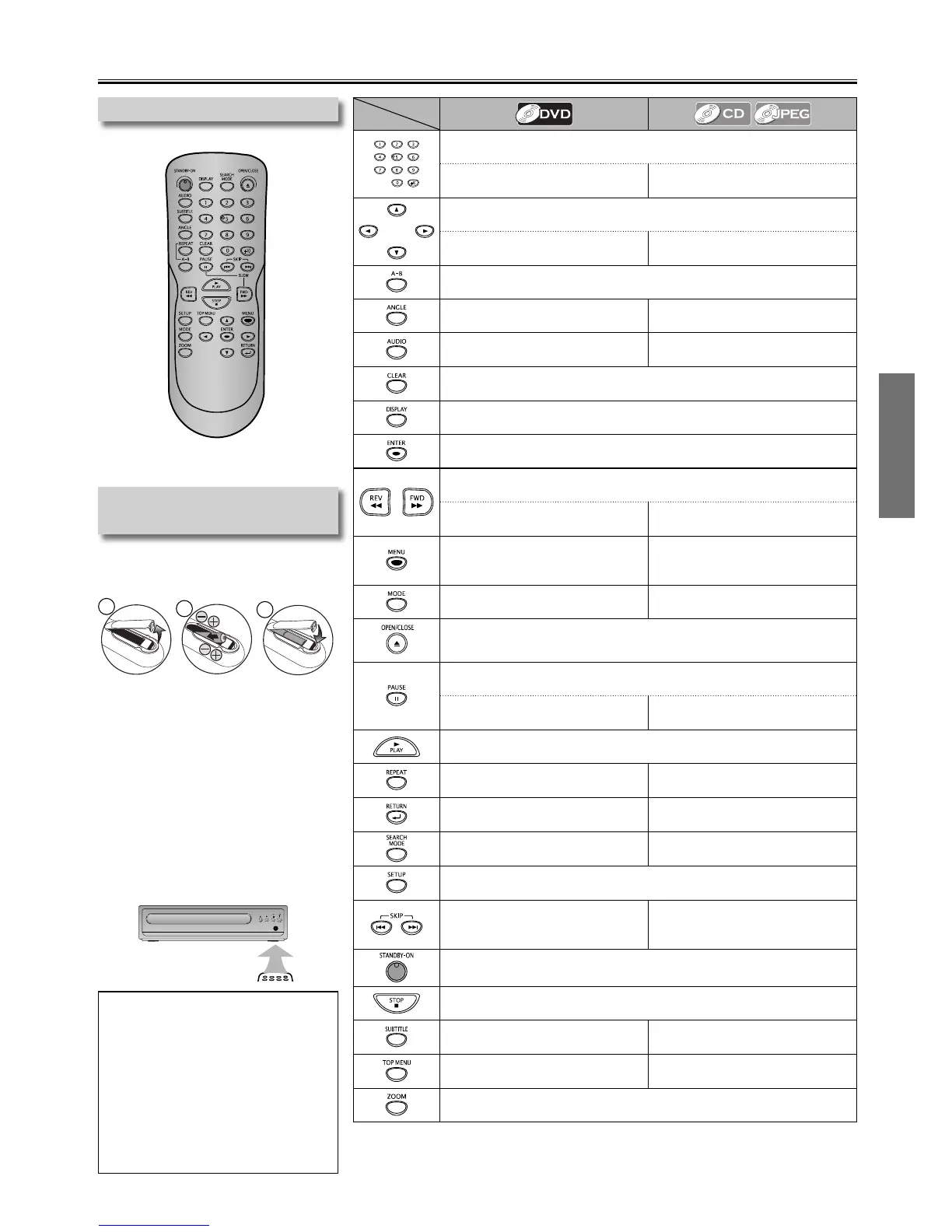
• To enter values in the input eld.
• To select Chapter or Title directly.
• To select Track directly. CD
• To select File directly. JPEG
• To move the Cursor.
------
• To Rotate the picture during
playback of JPEG Files. (JPEG)
• To Repeat between your chosen points A and B. (DVD) (CD)
• To select Camera Angles on a disc.
------
• To select Audio language on a
disc.
------
• To Clear the A-point for A-B Repeat. (DVD) (CD)
• To Clear the incorrect number once entered on search mode.
• To Display the current disc information.
• To Select Items or Settings.
• To Search Forward / Backward through a disc. ×2, ×4, ×8, ×20 DVD CD
• To Begin Slow Forward Playback
in the Pause mode.
------
• To Call up the menu on a disc.
• To Display the Thumbnail when
a disc with JPEG Files is inserted
and the File is highlighted. (JPEG)
------
• To Play Back Randomly. (CD)
• To Open or Close the Disc tray.
• To turn On the unit.
• To Pause disc Playback.
• To Advance Playback one Frame
at a time.
------
• To Start Playback or Resume Playback.
• To Play Back a Chapter, Title or
Disc Repeatedly.
• To Play Back Repeatedly.
• To Call up the Menu when
Playing Back a disc.
• To Return to the File List when
Thumbnail is displayed. (JPEG)
• To Search Chapter, Title or Time.
• To Search Tracks or Files.
• To Search Time. CD
• To Call up the Setup menu.
• To Skip Chapters or Titles.
• To Skip Tracks.
• To Switch between pages when
Thumbnail is displayed. (JPEG).
• To Turn the unit On or to Turn the unit into the Standby mode.
To Completely turn O the unit, you must Unplug the AC Power cord.
• To Stop Playback.
• To Select Subtitle Language on
a disc.
------
• To Call up the Title Menu on a
disc.
------
• To Magnify part of a Picture. (×1.5, ×2, ×2.5) (DVD) (JPEG)
Installing the Batteries for the
Remote Control
Install 2 AA (1.5V) batteries matching
the polarity indicated inside battery
compartment of the remote control.
2
3
1
* Batteries not supplied.
Keep in mind the following when using
the remote control:
• Make sure that there are no obstacles
between the remote control and the
remote sensor on the unit.
• The maximum operable ranges from the
unit are as follows.
– Line of sight:
approx. 23 feet (7m)
– Either side of the center:
approx. 16 feet (5m) within 30°
– Above: approx. 16 feet (5m) within 15°
– Below: approx. 10 feet (3m) within 30°



 To Next Page