–
12
–
EN
DVD FUNCTIONS
1 / 1 Eng 1 / 9D 5.1CH 1 / 2 Eng
A
B
C
Title 00 : 08 : 101 / 6 Chapter 3 / 39
On-Screen Display
F
D
G
E
1
2
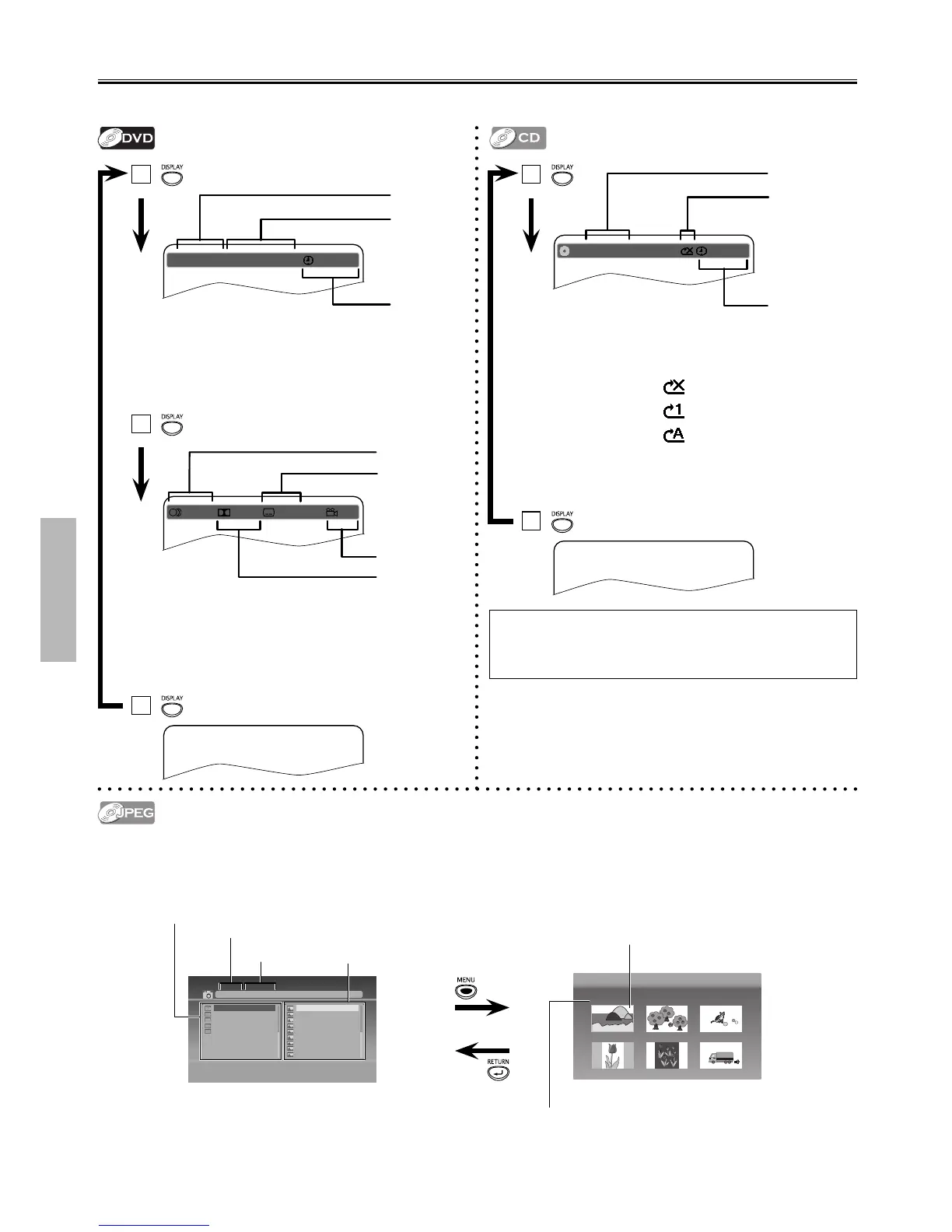
You can check the information about the current disc by pressing [DISPLAY].
Insert a JPEG formatted disc, then the Folder/File list will
automatically appear on the TV Screen.
Press [MENU] to Display the Thumbnail Screen while an
available File is highlighted.
Press [ SKIP H ] or [ SKIP G ] to Switch between Pages.
Press [RETURN] to Go Back to the File List.
3
CD TRK 2 / 10 00 : 00 : 31
A
B
C
A:
Current Track Number / Total Tracks
B:
Current Repeat Mode
Off ;
Track Repeat ;
Repeat All ;
C:
Elapsed Time of the Current Time
2
1
Note(s):
• The Current Disc Information will automatically appear on the
TV Screen when a CD disc is inserted.
A:
Current Title Number / Total Titles
B:
Current Chapter Number / Total Chapters
C:
Elapsed Time of the Current Time
D:
Currently Selected Language / Total Languages
E:
Current Audio
F:
Currently Selected Subtitle / Total Subtitles
G:
Currently Selected Angle / Total Angles
1. 007_7 [388K] 2. 008_8 [306K] 3. 009_9 [368K]
4. 010_10 [338K] 5. 011_11 [367K] 6. 012_12 [389K]
[
jpg9999
]
Jpeg01.jpg
Jpeg01.jpg
Jpeg02.jpg
Jpeg03.jpg
Jpeg04.jpg
Jpeg05.jpg
Jpeg06.jpg
Jpeg07.jpg
Jpeg09.jpg
Jpeg10.jpg
01.JPEG1
02.JPEG2
03.JPEG3
04.JPEG4
05.JPEG5
Folder Name
File Name
Folder List
( Thumbnail will be displayed when a File is
Highlighted inside a Folder)
File List
Thumbnail
File Name



 To Next Page