
 Need help?
Do you have a question about the Funkwerk GSM-R and is the answer not in the manual?
Details guidelines for using the GSM-R handset for operational purposes, emphasizing safety.
Details on using and charging the rechargeable batteries for the GSM-R handset.
Instructions for safe use and handling of charging equipment.
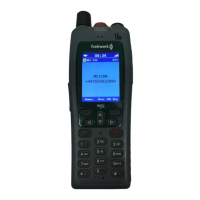
Details the function of each numbered control and button on the GSM-R handset, including navigation and selection keys.
Provides step-by-step instructions for powering the GSM-R handheld device on and off, including initial charging advice.
Explains the various icons and symbols displayed in the status field, indicating battery status, signal strength, and network information.
Illustrates and describes the pictograms used in the display field to represent different call types, statuses, and network events.
Explains how to manually lock and unlock the handheld's keyboard to prevent accidental key presses, including emergency call exceptions.
Guides users on how to initiate and end outgoing voice calls, covering both dialing directly and using the phonebook.
Explains how to place an active call on hold to manage multiple calls or set up new ones.
Details how to handle incoming calls while already on an active call, including options to take, abort, or replace.
Provides instructions for initiating group or broadcast calls using pre-programmed group numbers (VGC/VBC).
Describes how the handheld receives and handles incoming group calls, including priority management.
Details methods for calling specific operational terminals like Signallers, Route Controllers, and ECRs using short codes or direct numbers.
Explains the process of composing and sending text or flash messages to other OPH handsets, including character limits.
Describes how to view and manage incoming text messages, including notifications and accessing the message inbox.
Details the options available for received text or flash messages: delete, view details, reply (answer), or forward.
Provides an overview of the handheld's menu structure and navigation concept for accessing functions efficiently.
Lists and describes the functions available within the Messages menu, such as creating, inbox, outbox, drafts, and message options.
Outlines the functions within the Phonebook menu, including adding contacts, service numbers, group calls, and broadcast calls.
Covers fundamental device configurations like date, time, and display brightness, accessed via the General menu.
Specifies settings for message centre configuration, message validity duration, saving sent messages, and delivery reports.
Covers management of contacts, including adding new entries, editing existing ones, and deleting contacts.
Outlines the warranty period and conditions for the GSM-R handheld, covering manufacturing defects.
Details the procedure for raising warranty claims, contacting support, and handling battery or unit replacements.
Provides the physical address for sending all warranty returns and repairs for GSM-R handheld units.
Explains the policy for handling units that fail outside the warranty period or are physically damaged, involving replacement at cost.
Describes the GSM-R network's design for supporting communication and the 'best endeavours' approach to coverage.
This document describes the Funkwerk OPH handheld, a GSM-R (Global System for Mobile Communications – Railway) device designed for operational communications within the GB Rail Network. It supports both analogue and digital operation modes, providing essential communication tools for trackside workers. The device is intended for business use only by authorized personnel who have been briefed on its operation.
The Funkwerk OPH handheld serves as a critical communication device for trackside workers, enabling them to make and receive calls, send messages, and interact with various operational terminals. Its primary function is to facilitate safe and efficient communication within the GSM-R network.
The Funkwerk OPH handheld is designed for ease of use in a demanding trackside environment, featuring a clear display, tactile buttons, and intuitive navigation.
Proper maintenance and care are essential to ensure the longevity and reliable operation of the Funkwerk OPH handheld.
 General
| Network | GSM-R |
|---|---|
| Frequency | 900 MHz |
| Protection | IP54 |
| Display Type | Monochrome |
| Keypad | Yes |

 To Next Page
