Trackside Worker GSM-R User Guide
10
th
March 2015 Page 16
6.4 Setting up a Group Call or Broadcast Call
Requirement:
A Group call or Broadcast call can only be set up using group programmed on
the SIM.
Group- and Broadcast call from the phonebook:
1.
Open the menu
Phonebook
Broadcast call
VGC [x] / VBC [x]
.
2.
Push the send button .
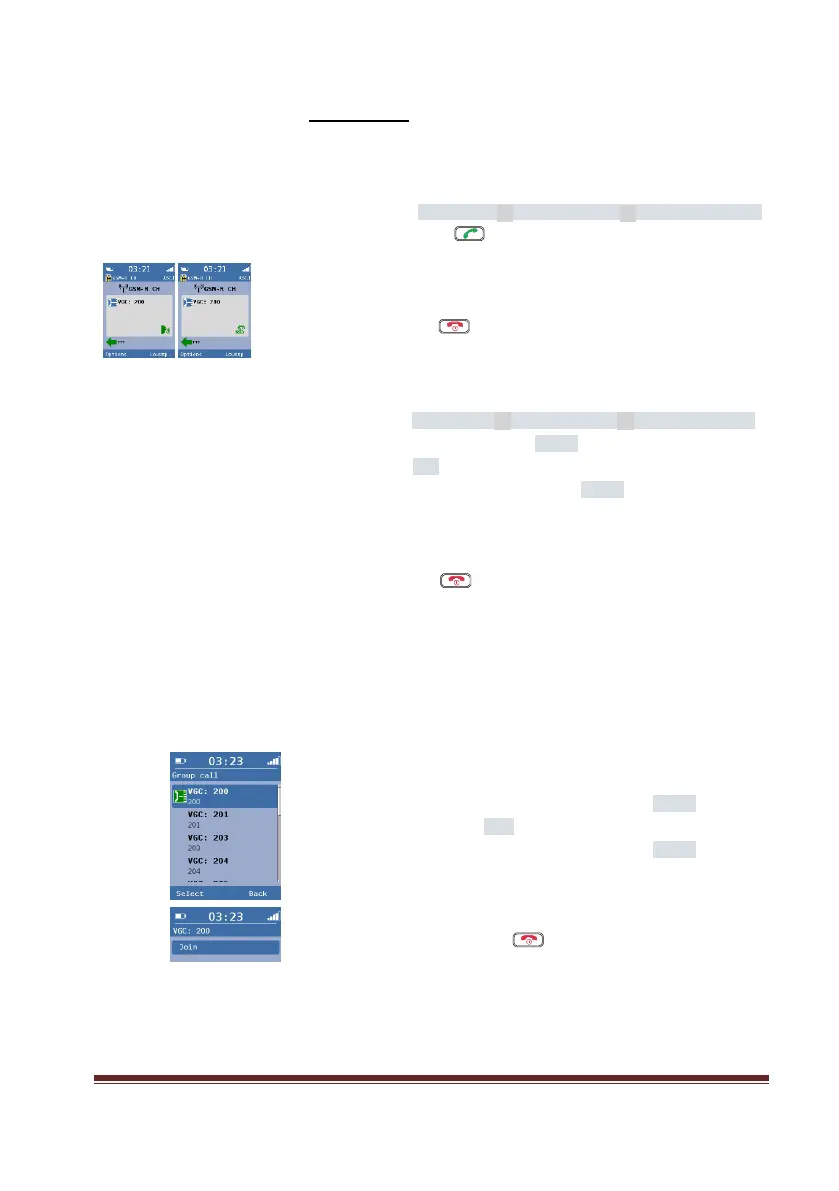
The display shows the VGC / VBC and the dialling symbol.
3.
Press down the PTT button to speak.
4.
Release the PTT button after speech.
5.
Push the exit button , to terminate the outgoing call.
The display shows the VGC / VBC and the derogation symbol.
Or
1.
Open the menu
Phonebook
Broadcast call
VGC [x] / VBC [x]
.
2.
Press the left-hand selection button Select.
3.
Select the entry Call.
4.
Confirm with the left-hand selection button Select.
The display shows the VGC / VBC and the dialling symbol.
5.
Press down the PTT button to speak.
6.
Release the PTT button after speech.
7.
Push the exit button , to terminate the outgoing call.
The display shows the VGC / VBC and the derogation symbol.
6.5 Incoming Group Calls
Incoming group calls are set up with a pre-determined priority level.
Existing speech or data connections with a
lower priority will be
terminated.
The incoming group call is announced by an attention tone.
6.
Confirm with the left-hand selection button Select.
7.
Select the entry Join.
8.
Confirm with the left-hand selection button Select.
The display shows the VGC and the dialling symbol.
5.
Press down the PTT button to speak.
6.
Release the PTT button after speech.
7.
Push the exit button , to terminate the outgoing call.
The display shows the VGC and the derogation symbol.

 To Next Page
 Loading...