11
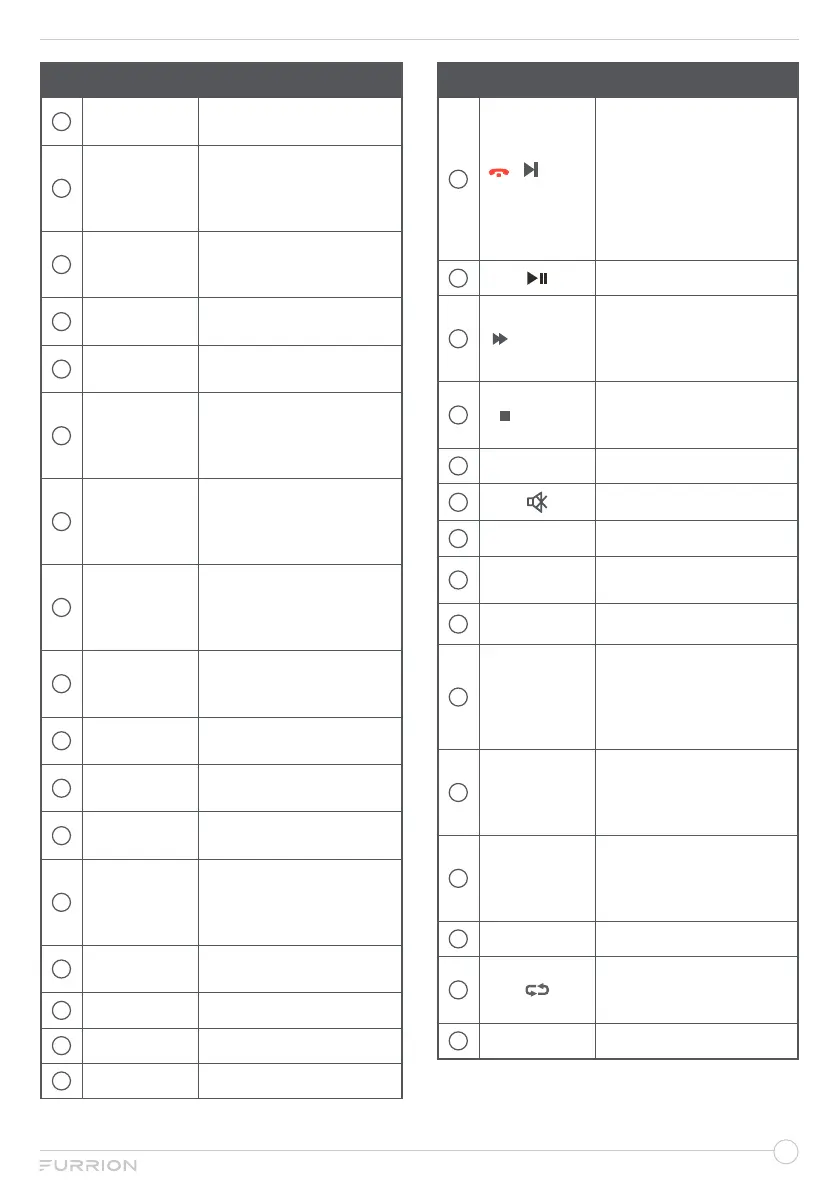
No. Button Function
19
NICAM /
AUDIO
Cycle through NICAM
sound modes.
20
RDM / P.LIST
Toggle random playback
mode on & off;
Display the recorded
segment.
21
SEARCH /
GOTO
Jump to a specific time on
a DVD/VCD/MP3/WMA
or CD.
22
S.MODE
Select the different sound
mode directly.
23
P.MODE
Select the different picture
mode directly.
24
SEL
Toggle between Volume,
Bass, Treble & Balance;
Hours & Minutes for
adjusting.
25
LOC*/SLOW
Adjust radio reception
strength;
Start slow motion
playback.
26
ST#/ANGLE
Select Stereo & Mono
sound; Switch viewing
angles on compatible
media.
27
EQ
Select the sound mode
Cinema, Rock, Classic &
Flat.
28
DISPLAY
Toggle on screen on the
selected source On & Off.
29
ASPECT
Cycle through available
display aspect ratios.
30
PBC/TITLE
Start the programmed
playback function.
31
A-B/TTX
Start the A-B repeat
function (playback loop of
a segment of track); Turn
the Teletext On/Off.
32
SUBT
Select subtitle language
(DVD).
33
FREEZE
Freeze current picture.
34
AV
Select AV Mode.
35
AUX/ARC
Select AUX/ ARC Mode.
No. Button Function
36
/ / APS
SIZE
Scan radio stations: Press
it to search through each
stored station. Press & hold
it to scan and store the 6
strongest stations;
End or reject a call (when
the system is connected to
a cell phone).
37
Pause the playback.
38
/ S.PAGE
During playback, select the
next track/ chapter;
Display a sub-page of
upper options.
39
/ INDEX
Stop playback;
Return to the index/initial
page.
40
CH+/-
Channel Up/Down.
41
Toggle audio On or Off.
42
EXIT
Exit the current menu.
43
FAV
Add the channel to favorite
list.
44
C.LIST
Display the channel list.
45
MENU
− Enter the main menu.
− Long press MENU
button on the remote
control to pop up the
HOME page.
46
REC / AUTO
Record the program
immediately.
Automatically adjust the
picture in PC mode.
47
Prog/Mouse
− Start the programmed
playback function.
− Enable/Disable mouse
cursor.
48
ZOOM
Enlarge screen images.
49
Toggle between the
current and previous
channel.
50
STEREO
Switch to Stereo mode.



 To Next Page