21
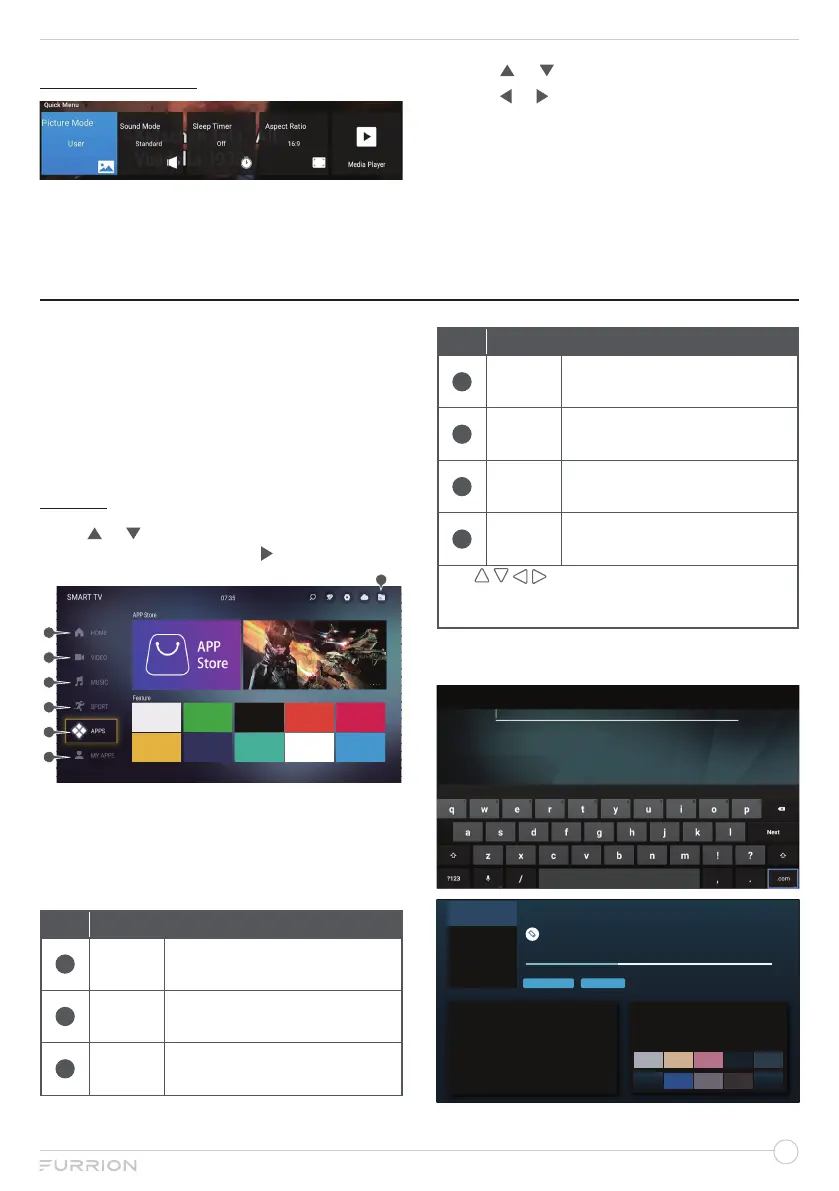
QUICK MENU
1. Press MENU button to display the main
menu.
2. Use or to select Quick Menu.
3. Use or to highlight your desired mode.
4. Press OK button to confirm your
selection.
5. Press MENU button to return to the
previous menu or press EXIT at any time
to exit the setting.
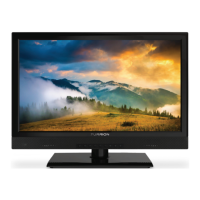
HOME
The picture is for a reference only, the actual
item is the standard.
The home screen will be displayed
automatically when the TV is turned on. If not,
long press MENU button on the remote control
to pop up.
APPS
Press
or
to select APPS in the Source
Menu, and then press OK or
to enter.
NOTE: You must connect to the network to
use the search feature. The search results
may vary depending on the channel, region,
network settings, and whether you have
agreed to the terms and conditions.
Item
Description
1
HOME
The popular programs for
quick access.
2
VIDEO
The recommended video
programs for quick access.
3
MUSIC
The recommended music
programs for quick access.
Item
Description
4
SPORT
The recommended sport
programs for quick access.
5
APPS
Search for your favorite
apps and install on your TV.
6
MY
APPS
Add the app to your favorite
list for quick access.
7
Files
Play the files to be saved in
a USB flash/hard drive.
Use buttons to navigate and
highlight the channel, then press OK button to
access the APP or watch the program.
Button to select TV Store to download Apps
you desired as the figure shows:
Downloads: 27 Size: 16.59 MB Version: 4.7.0 build 7926
6.00 MB/16.59 MB 36.18%
Pause
Cancel


 To Next Page