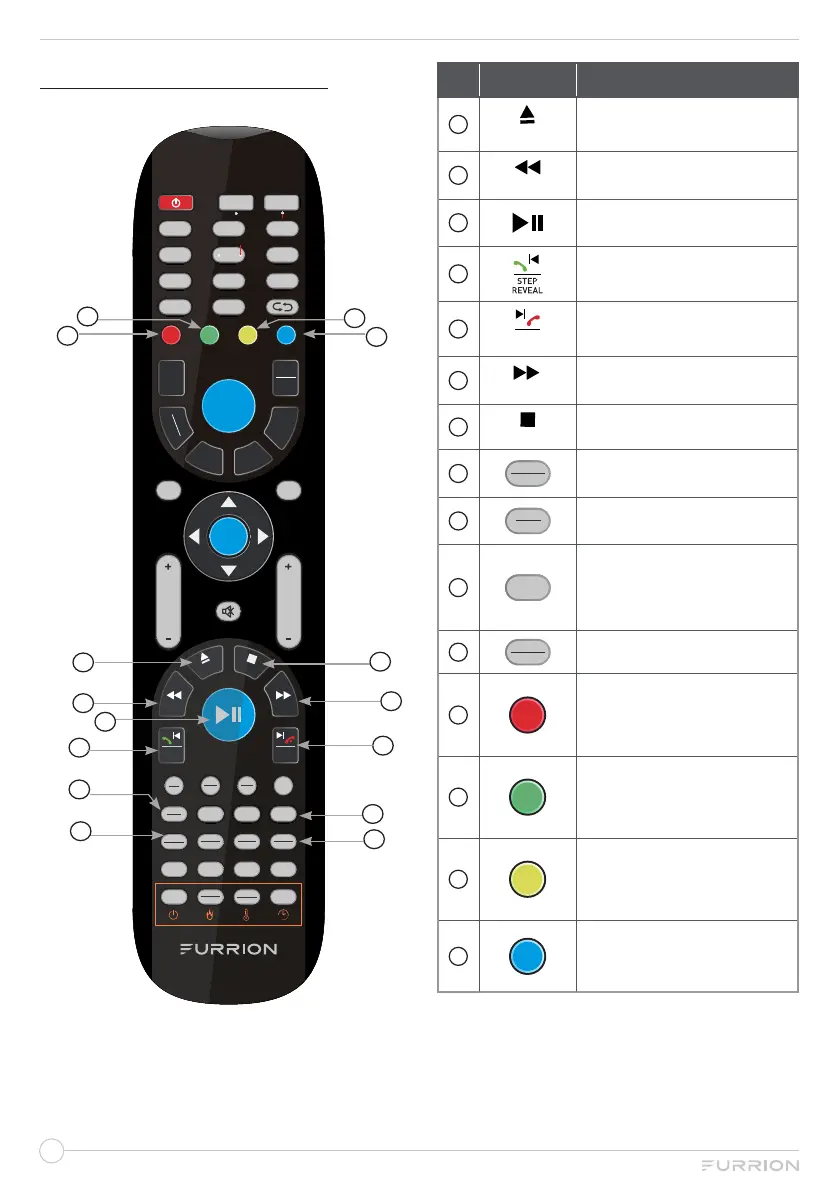
DVD PLAYER CONTROLS
LOC
*
SLOW
ST#
ANGLE
FIREPLACE
TV
1 2 3
4 5
6
7
8 9/AF
0/TA
-
/
--
PTY
STEREO
FAV
C.LIST
EPG
TV
RADIO
T
SHIFT
EXIT
WB
STEP
REVEAL
APS
SIZE
CLOCK
SLEEP SUBT
AV
P.MODE S.MODE ASPECT
SEL
DISPLAY
EQ
SOURCE
HOLD
S.PAGE
INDEX
AUTO
TUNE
DVD SETUP REPEAT ZOOM Prog/Mouse
OK
CHVOL
MENU
AM
FM
DVD
USB
AUX
ARC
NICAM
AUDIO
SEARCH
GOTO
RDM
P.LIST
A-B
TTX
FREEZE
PBC
TITLE
REC
AUTO
Home
1
2
3
4
9
5
8
12
11
6
7
10
14
15
13
No. Button Function
1
A
U
TO
T
U
N
E
Eject DVD/CD.
2
HOLD
Select the previous track/
chapter during playback.
3
Start, pause or restart the
playback.
4
STEP
REVEAL
Play the previous file directly.
5
APS
SIZE
Play the next file directly.
6
S.PAGE
Select the next track/chapter
during playback.
7
INDEX
Stop playback.
8
SEARCH
GOTO
Jump to a specific time on a
DVD/VCD/MP3/WMA or CD.
9
NICAM
AUDIO
Cycle through NICAM sound
modes.
10
SUBT
Display subtitles on
compatible media. Press
repeatedly to cycle through
subtitle options.
11
PBC
TITLE
Display DVD/VCD Title.
12
Enter the DVD SETUP.
13
Repeat.
14
Enlarge the screen images.
15
Start the programmed
playback function.


 To Next Page