13
BEFORE OPERATION
WHAT’S IN THE BOX
Thanks for purchasing this Furrion FHD 12V
SMART TV WITH DVD COMBO. This manual
will help you set up and begin using your TV.
Please read this manual thoroughly and keep
this manual in a safe place for future reference.
First, check the contents of your box with the
parts checklist below:
● Smart TV × 1
● Cigarette Adapter × 1
● Remote Control × 1
● Quick Start Guide × 1
● Warranty Manual × 1
● Warning Card x 1
● Important Safety Insturctions x 1
● 12V Power Adapter × 1
● Wall Mount Screws M4*8 x 4
● Screw Adapters x 4
Now you can get started!
INSTALL
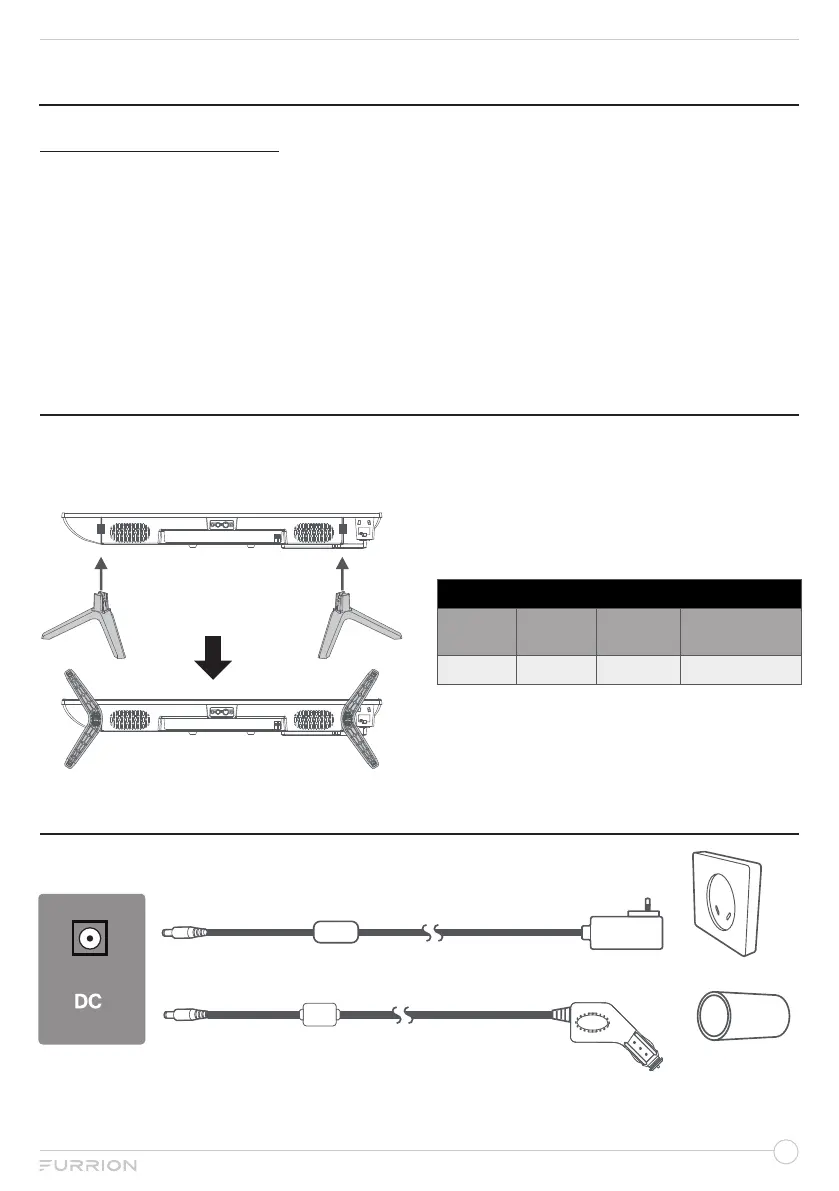
A. Use the supplied TV
stands
B. Wall Mount
Follow the installation guide supplied with the
Wall-Mount Bracket when installing the TV.
Choose an appropriate location and refer to
VESA pattern for mounting.
VESA MOUNTING PATTERN
Width
(mm)
Height
(mm)
Screw
Size
Screw Quantity
(pcs)
100 100 M4*8mm 4
CONNECT POWER


 To Next Page