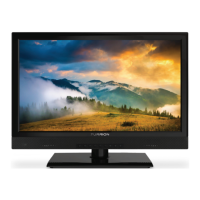
This document is a user manual for the Furrion 24" FHD 12V Smart TV with DVD Combo, model FDFD24D3D, Lippert Item No.: 2021132193.
Function Description:
The Furrion 24" FHD 12V Smart TV with DVD Combo is a versatile entertainment system designed for use in various settings, including caravans and vehicles, thanks to its 12V DC power compatibility. It integrates a Full HD (1920 x 1080) smart television with a built-in DVD player, offering a comprehensive entertainment solution. The TV features an integrated digital tuner for receiving digital broadcasts without an external set-top box. It also includes a Closed Caption Decoder with Full Text Mode for hearing-impaired viewers. The smart TV functionality is powered by Whales OS from Zeasn, allowing users to stream their favorite apps, movies, and shows, and download content player apps from the Zeasn app store. The built-in DVD player supports various disc formats including DVD, VCD, SVCD, CD, and their recordable versions (DVD-R/RW, CD-R/RW). Connectivity options are extensive, including HDMI, USB, coaxial out, video in, audio in, mini line out, RF in, and RJ45 in. The TV is designed with Furrion's Vibrationsmart™ technology to protect against road movement and Climatesmart™ technology to protect against temperature fluctuations, making it suitable for mobile environments.
Important Technical Specifications:
- Screen Size: 24 inches
- Resolution: Full HD (1920 x 1080)
- Power Source: 12V DC (10-30V DC range), 100-240V AC 50/60 Hz (via AC/DC power adapter, excluded)
- Power Consumption: Not explicitly stated, but designed for 12V operation.
- Dimensions (without Stand): 21 11/16" x 12 15/16" x 2 1/2" (551 x 329 x 63mm)
- Dimensions (with Stand): 21 11/16" x 15" x 6 3/4" (551 x 381 x 171mm)
- VESA Mounting Pattern: 100mm x 100mm (M4*8mm screws, 4 quantity)
- Input/Output Connections:
- DC In: 1
- Coaxial Out: 1
- Video In: 1 (Yellow)
- Audio In: 1 (Right Red, Left White)
- Mini Line Out: 1
- RF In: 1
- RJ45 In: 1
- HDMI In: 2
- USB: 2 (USB1, USB2 5V=500mA)
- Supported Disc Formats (DVD Player): DVD, DVD-R, DVD+R, DVD-RW, DVD+RW, VCD, SVCD, CD, CD-R, CD-RW.
- Supported Multimedia Formats (USB): MP3, WMA, JPEG, MPEG-1, MPEG-2, MPEG-4 DIVX3.xx, DIVX5.xx.
- Operating System: Whales OS from Zeasn.
- Included Accessories: Smart TV x1, Cigarette Adapter x1, Remote Control x1, Quick Start Guide x1, Warranty Manual x1, Warning Card x1, Important Safety Instructions x1, 12V Power Adapter x1, Wall Mount Screws M4*8 x4, Screw Adapters x4.
Usage Features:
The TV offers a user-friendly interface with on-screen display (OSD) menus for easy navigation and settings adjustment.
- Remote Control: A comprehensive remote control is provided for all functions, including power, input selection, channel navigation, volume control, menu access, DVD player controls, and smart TV features. Specific buttons for TV/Fireplace, Number Buttons, T.SHIFT (for DTV program pause/record), TV/RADIO, EPG, SOURCE, NAVIGATION BUTTONS, VOL+/-, / AUTO TUNE (Eject DVD/CD, channel search), / HOLD (previous track/chapter, Teletext), / STEP REVEAL (frame-by-frame playback, call dial/accept), DVD/USB, AM/FM, SLEEP/CLOCK, NICAM/AUDIO, RDM/P.LIST, SEARCH/GOTO, S.MODE, P.MODE, SEL (volume, bass, treble, balance), LOC*/SLOW, ST#/ANGLE, EQ, DISPLAY, ASPECT, PBC/TITLE, A-B/TTX, SUBT, FREEZE, AV, AUX/ARC, //APS SIZE (scan radio, end/reject call), / S.PAGE, / INDEX, CH+/-, (audio on/off), EXIT, REC/AUTO, Prog/Mouse, ZOOM, and STEREO.
- Control Panel: On-device buttons include INPUT, MENU, CH+, CH-, VOL+, VOL-, and POWER.
- Input Source Selection: Users can easily switch between various input sources (ATV, DVB-C, DVB-T, AV, DVD, HDMI1, HDMI2) via the remote or control panel.
- Picture Adjustments: BRIGHTNESS, CONTRAST, COLOR, and SHARPNESS can be precisely adjusted. Picture modes (User, Standard, Dynamic, Mild) and color temperature (Normal, Warm, Cool) are available. DNR (Off, Low, Middle, High) and Aspect Ratio adjustments are also included.
- Sound Adjustments: Sound modes (User, Standard, Music, Cinema), Bass, Treble, and Balance can be adjusted. Surround sound (On/Off), AVL (On/Off), and Digital Audio Output (Auto, RAW, PCM, Off) settings are available.
- Timer Functions: OSD Timer, Sleep Timer, and Auto Power Down can be configured.
- System Lock: Parental control features allow setting a password (default 0000) and locking specific sources.
- Network Settings: Supports wired and wireless network connections for smart TV features.
- Time Settings: Automatic Date & Time, Time Zone, Set Time, Set Date, Daylight Saving, and 24 Hours format.
- Home Screen: Displays popular programs, video, music, sport, apps, and files for quick access.
- Media Playback: Supports photo, music, and video playback from USB flash/hard drives.
- DVD Operation: Automatic playback upon disc insertion, DVD menu navigation, subtitle display (SUBT), audio track/language selection (MTS/AUDIO), and zoom function (ZOOM).
- CEC (Consumer Electronics Control): Allows control of compatible HDMI-connected devices. Settings include HDMI CEC Setup, Device Auto Power Off, TV Auto Power On, CEC device list, Amplifier Support ARC, and Speaker Preference.
Maintenance Features:
- Cleaning: Clean the apparatus only with a dry cloth.
- Ventilation: Do not block ventilation openings. Ensure 4 inches (10 cm) free space around the unit when placing it on a shelf.
- Power Cord Protection: Protect the power cord from being walked on or pinched.
- Battery Replacement: Replace remote control batteries annually or when operation becomes erratic. Do not mix old and new batteries or different types.
- Unplugging: Unplug the apparatus during lightning storms or when unused for long periods.
- Servicing: Refer all servicing to qualified service personnel. Do not remove the back cover as it exposes high voltages.
- Condensation: Allow the unit to acclimatize for about an hour in new surroundings before switching on to prevent condensation.
- LCD Panel Care: Do not press hard or jolt the LCD panel. Avoid leaving fixed patterns on the screen for long periods to prevent ghost images.
- Troubleshooting Guide: The manual provides a comprehensive troubleshooting section for common issues such as TV not operating, no sound, remote control not working, poor sound/picture, poor TV/cable/satellite reception, TV shutting off, black and white image, and audio noise.
- Reset TV: Option to reset the TV to factory default settings through the Setting menu.
- Software Updates: OTA Update option is available in the Common settings menu.


 To Next Page
 General