17
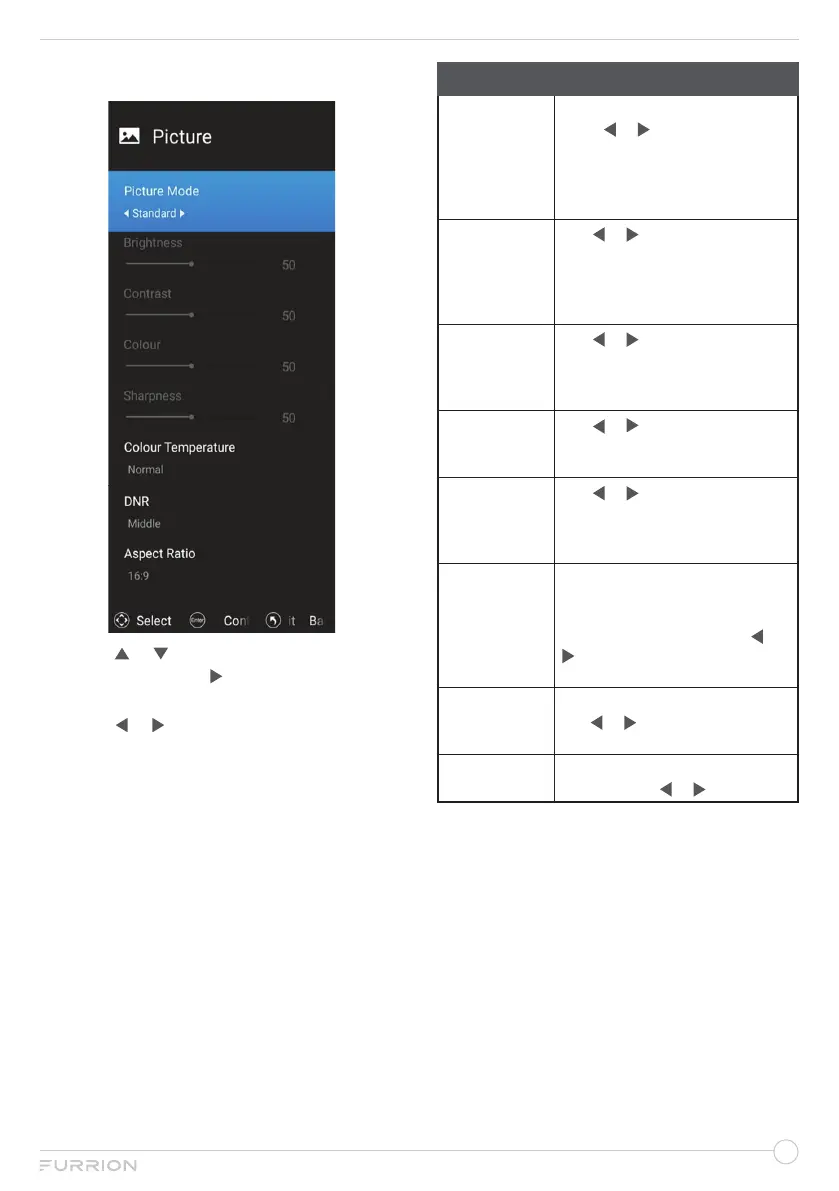
Picture Menu
1. Press or to highlight your desired
setting, then press or OK to enter the sub-
menu setting.
2. Press or to adjust the setting.
3. Press MENU button to return to the
previous menu.
4. Press EXIT at any time to exit the setting.
Picture
Picture Mode
Press OK to enter Picture mode,
press or to select User,
Standard, Dynamic or Mild.
*Press P-MODE button on the
remoter control to cycle the
picture mode directly.
Brightness
Use or to adjust the visual
perception output of the entire
picture.
(*Only adjustable under User
mode).
Contrast
Use or to adjust the highlight
intensity of the picture.
(*Only adjustable under User
mode)
Colour
Use or to adjust the colour.
(*Only adjustable under User
mode)
Sharpness
Use or to adjust the peaking
in the detail of the picture.
(*Only adjustable under User
mode)
Colour
Temperature
Change the overall colour cast of
the picture.
Press OK to enter Colour
Temperature adjusting, use or
to select Normal, Warm or.
Cool
DNR
Press OK to enter DNR adjusting,
use or to select Off, Low,
Middle or High.
Aspect Ratio
Press OK to enter Aspect Ratio
adjusting, use or to adjust.


 To Next Page