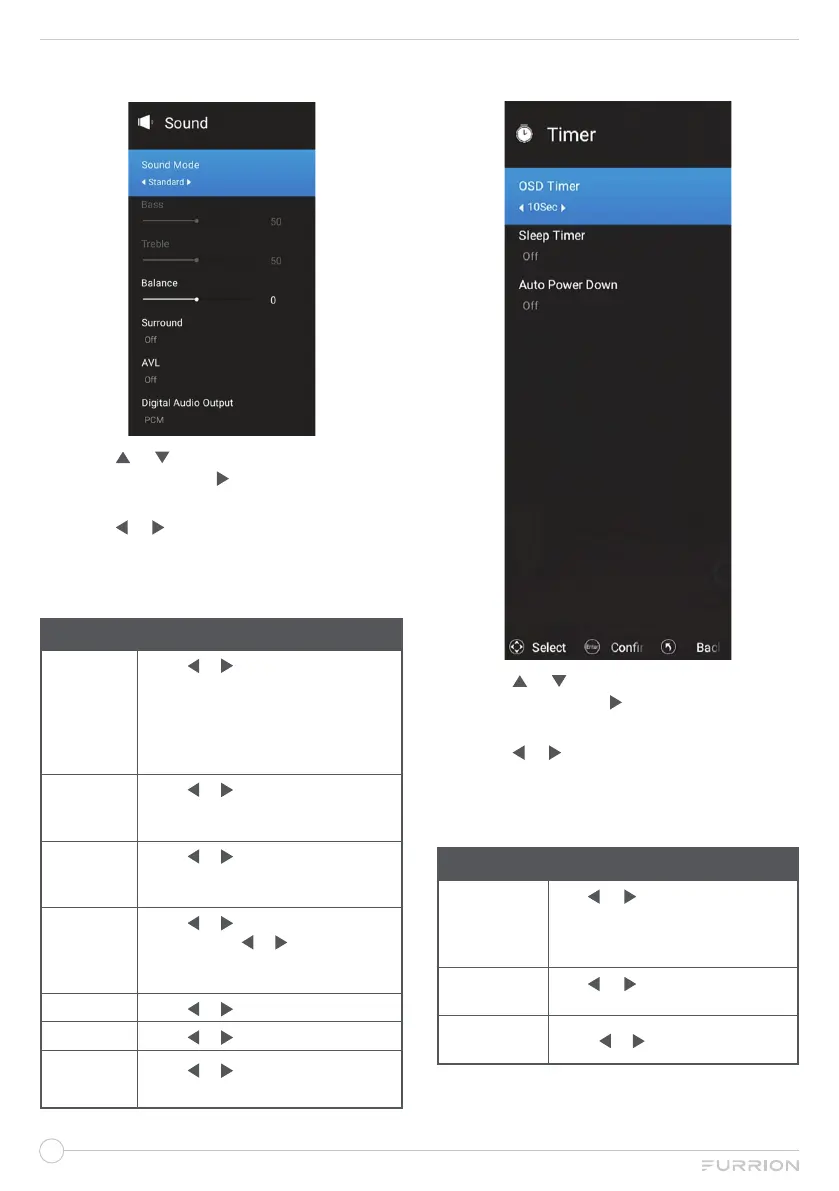
Sound Menu
1. Press or to highlight your desired
setting, then press or OK to enter the
sub-menu setting.
2. Press or to adjust the setting.
3. Press MENU button to return to the
previous menu.
4. Press EXIT at any time to exit the setting.
Sound
Sound
Mode
Press or to show the list to
select User, Standard, Music, or
Cinema.
*Press S-MODE button on the
remote control to change the sound
mode directly.
Bass
Press or to adjust the level of
the lower-pitched sounds.
(*Only adjustable under User mode)
Treble
Press or to increase or
decrease high-pitched sounds.
(*Only adjustable under User mode)
Balance
Press or to enter the setting
page and use or to adjust the
audio output between left and right
track.
Surround Press or to select
On
or Off.
AVL Press or to select
On
or Off.
Digital Audio
Output
Press or to select Auto, RAW,
PCM
or Off.
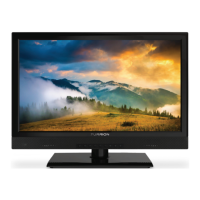
Timer Menu
1. Press or to highlight your desired
setting, then press or OK to enter the
sub-menu setting.
2. Press or to adjust the setting.
3. Press MENU button to return to the
previous menu.
4. Press EXIT at any time to exit the setting.
Timer
OSD Timer
Use or to adjust the amount
of time the On Screen Menu
stays on the screen before
disappearing.
Sleep Timer
Use or to select your
decision.
Auto Power
Down
Press or to select
On
or Off.


 To Next Page