19
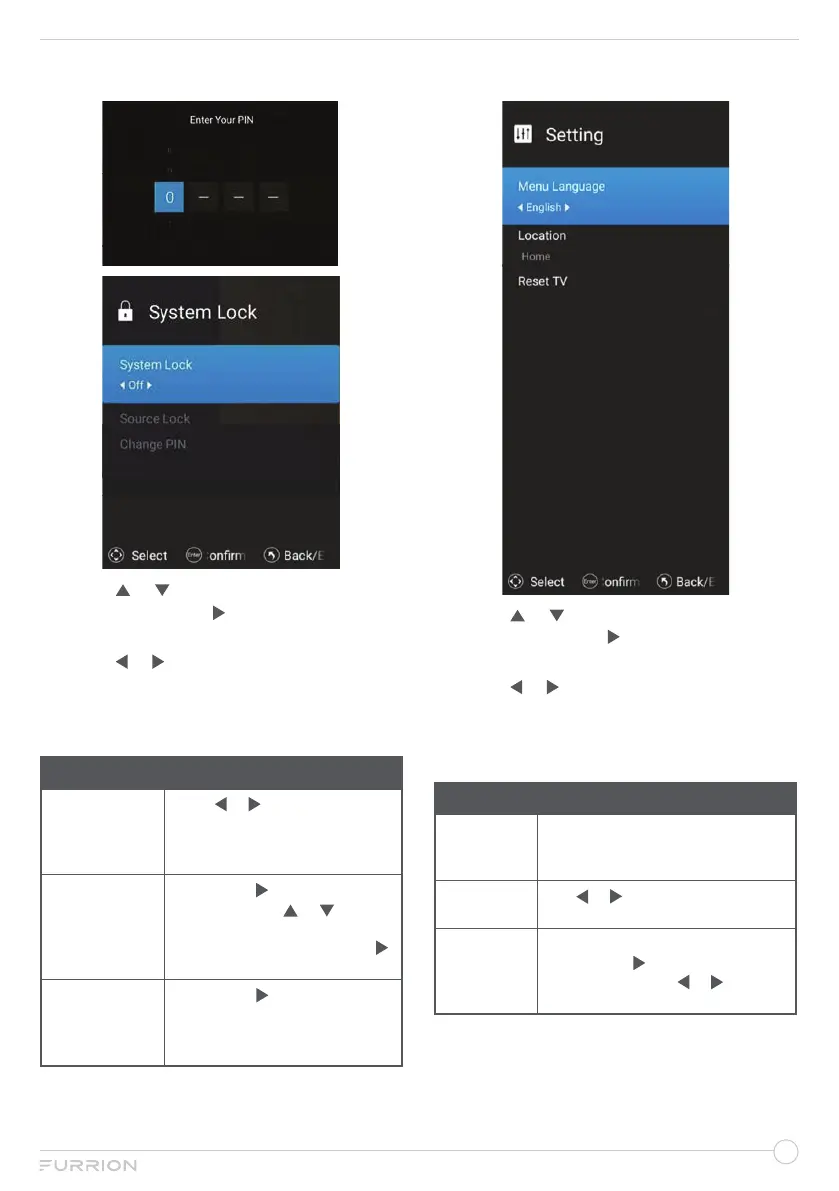
System lock Menu
1. Press or to highlight your desired
setting, then press or OK to enter the
sub-menu setting.
2. Press or to adjust the setting.
3. Press MENU button to return to the
previous menu.
4. Press EXIT at any time to exit the setting.
System Lock
System Lock
Press or to set On or Off.
You need to input password to
enter sub-menu, the password
default is 0000.
Source Lock
Press OK or
to enter Source
Lock, then press
or to
select ATV, DVB-C, DVB-T, DVD,
HDMI1 or HDMI2,
press OK or
to lock the source you selected.
Change PIN
Press OK or
to enter, input the
default 0000, then input the
new
password you desired, confirm
your password at third time.
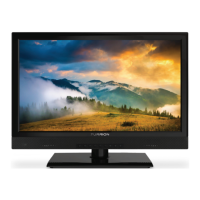
Setting Menu
1. Press or to highlight your desired
setting, then press or OK to enter the
sub-menu setting.
2. Press or to adjust the setting.
3. Press MENU button to return to the
previous menu.
4. Press EXIT at any time to exit the setting.
Setting
Menu
Language
Select the language and default
language according to shipping
area and clients requirements.
Location
Use or to select Store or
Home.
Reset TV
Change to factory default settings.
Press OK or to enter, input
password, and use or to select
Cancel or Reset to reset.


 To Next Page