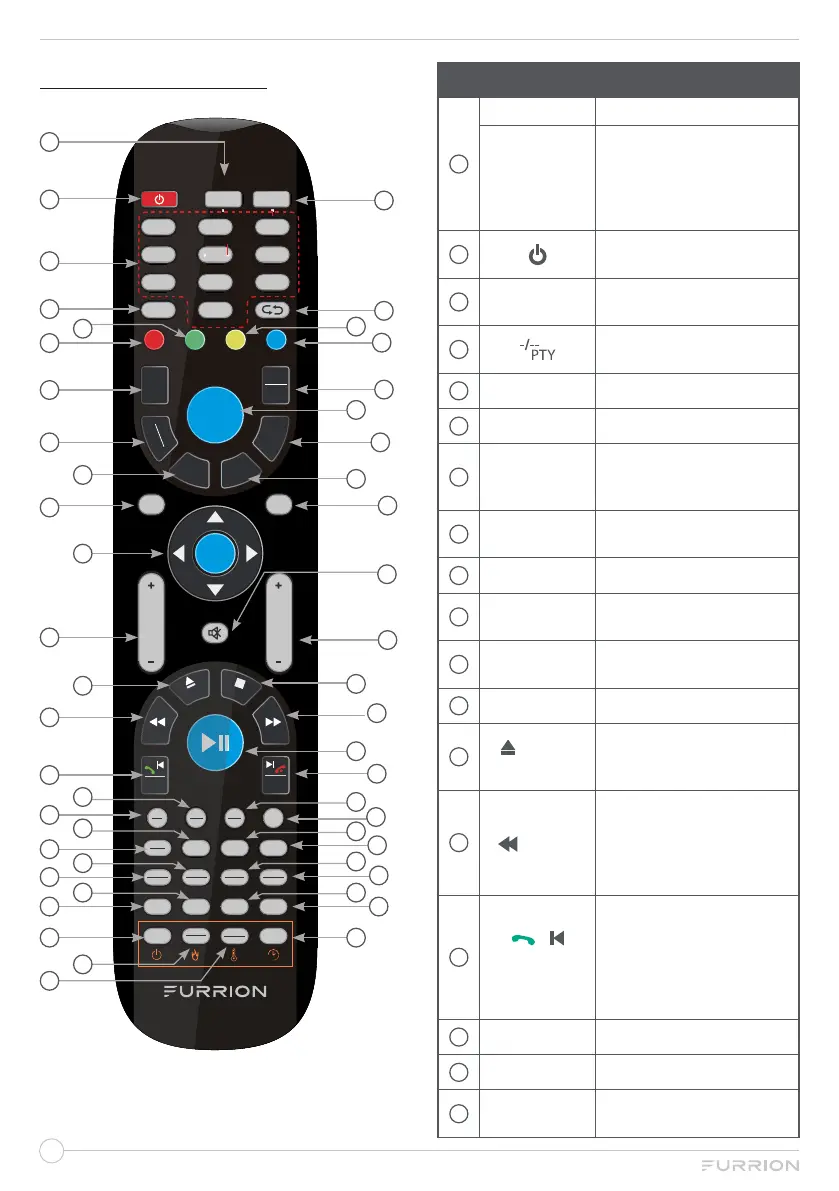
REMOTE CONTROL
LOC
*
SLOW
ST#
ANGLE
FIREPLACE
TV
1 2 3
4 5
6
7
8 9/AF
0/TA
-
/
--
PTY
STEREO
FAV
C.LIST
EPG
TV
RADIO
T
SHIFT
EXIT
WB
STEP
REVEAL
APS
SIZE
CLOCK
SLEEP SUBT
AV
P.MODE S.MODE ASPECT
SEL
DISPLAY
EQ
SOURCE
HOLD
S.PAGE
INDEX
AUTO
TUNE
DVD SETUP REPEAT ZOOM Prog/Mouse
OK
CHVOL
MENU
AM
FM
DVD
USB
AUX
ARC
NICAM
AUDIO
SEARCH
GOTO
RDM
P.LIST
A-B
TTX
FREEZE
PBC
TITLE
REC
AUTO
Home
1
2
3
4
5
6
7
8
9
11
10
12
13
14
15
17
18
16
25
26
19
20
21
22
23
24 27
28
29
30
31
32
33
35
34
38
36
37
39
40
41
42
43
44
46
45
47
49
50
48
No. Button Function
1
TV
Switch to TV mode.
TV/
FIREPLACE
Select Furrion Fireplace
remote control functions
* Please refer to your
Furrion Fireplace manual
for more information.
2
Turn the TV/Entertainment
System on/off.
3
NUMBER
BUTTONS
Enter numbers or select
channels.
4
Toggle between single &
double digit input.
5
REPEAT
Change the playing mode.
6
DVD SETUP
DVD menu setup.
7
T.SHIFT
Pause current DTV
program and start
recording.
8
TV/RADIO
Switch between DTV and
radio programs.
9
EPG
Display EPG information.
10
SOURCE
Cycle through input
sources.
11
NAVIGATION
BUTTONS
Confirm selections.
12
VOL+/-
Increase/decrease volume.
13
/ AUTO
TUNE
Eject DVD/ CD;
Directly enter the channel
search mode.
14
/ HOLD
During playback, select the
previous track/chapter;
Hold On/Off the current
page display in Teletext
mode.
15
/
/ STEP
REVEAL
Play forward frame by
frame during DVD/ VCD
playback.
Dial or accept a call (when
the system is connected to
a cell phone).
16
DVD/USB
Select DVD/USB.
17
AM/FM
Select AM/FM/WB Radio.
18
SLEEP/
CLOCK
Set the sleep timer.


 To Next Page