12
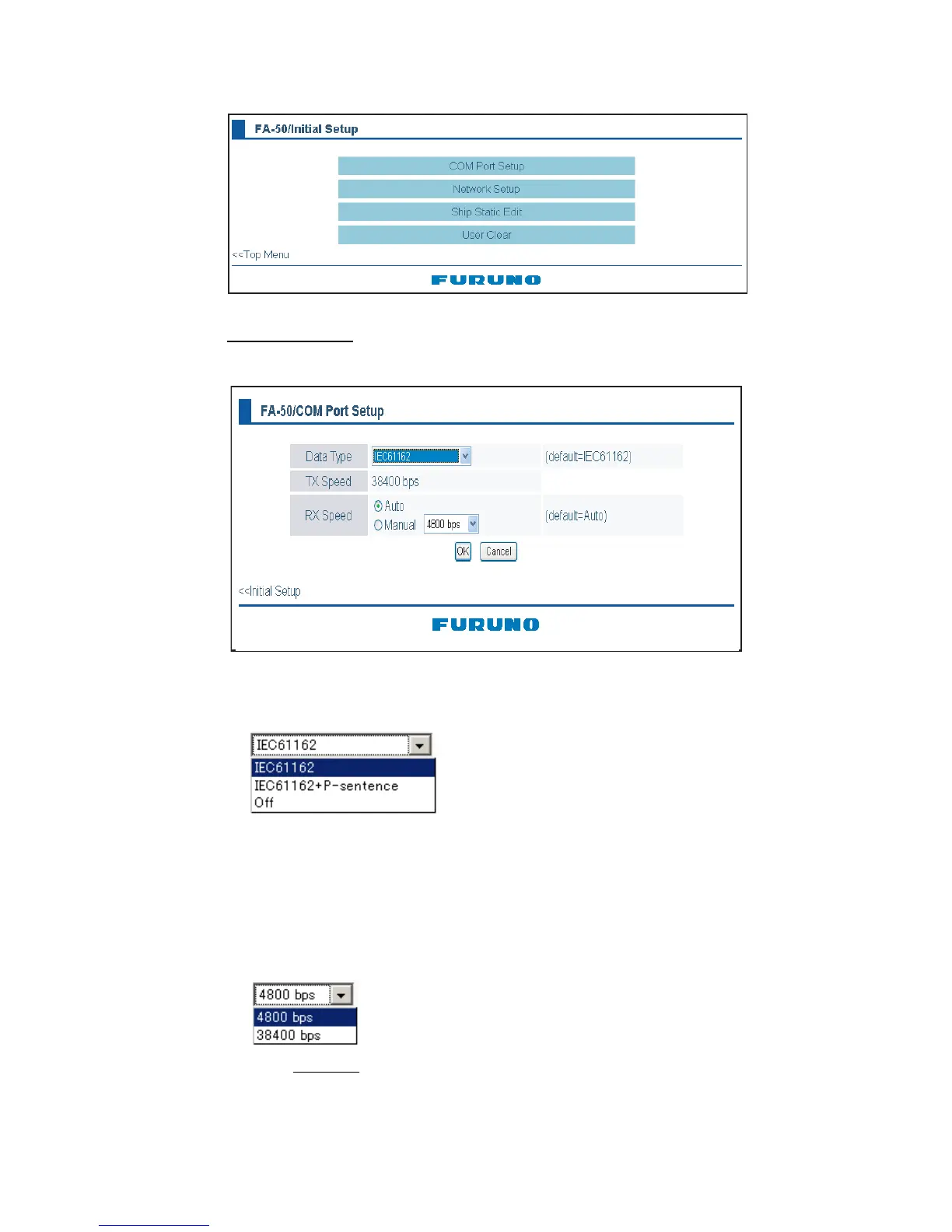
4. Click Initial Setup to show the Initial Setup screen.
COM port setup
5. Click COM PORT Setup to show the COM Port Setup screen.
6. The default setting for Data Type is IEC61162, which is suitable for most installa-
tions. If change is necessary, click the Data Type drop-down list and choose data
type as applicable, among the following choices.
IEC61162: Transmit and receive IEC61162 format data via COM port. (P sen-
tences are received but not transmitted.)
IEC61162+ P-sentence: Transmit and receive IEC61162+P sentences format
data via COM port.
Off: FA-50 transmits no data.
With the radio buttons at RX Speed, choose how RX speed is regulated, Auto or
Manual. For manual, choose speed from the drop-down list.
Note: Tx speed
is fixed at 38400 bps.
7. Click OK to confirm setting.
8. Click "<<Port Setup" to return to the Port Setup menu.
(default=IEC61162)



 To Next Page