174
TXSETTING
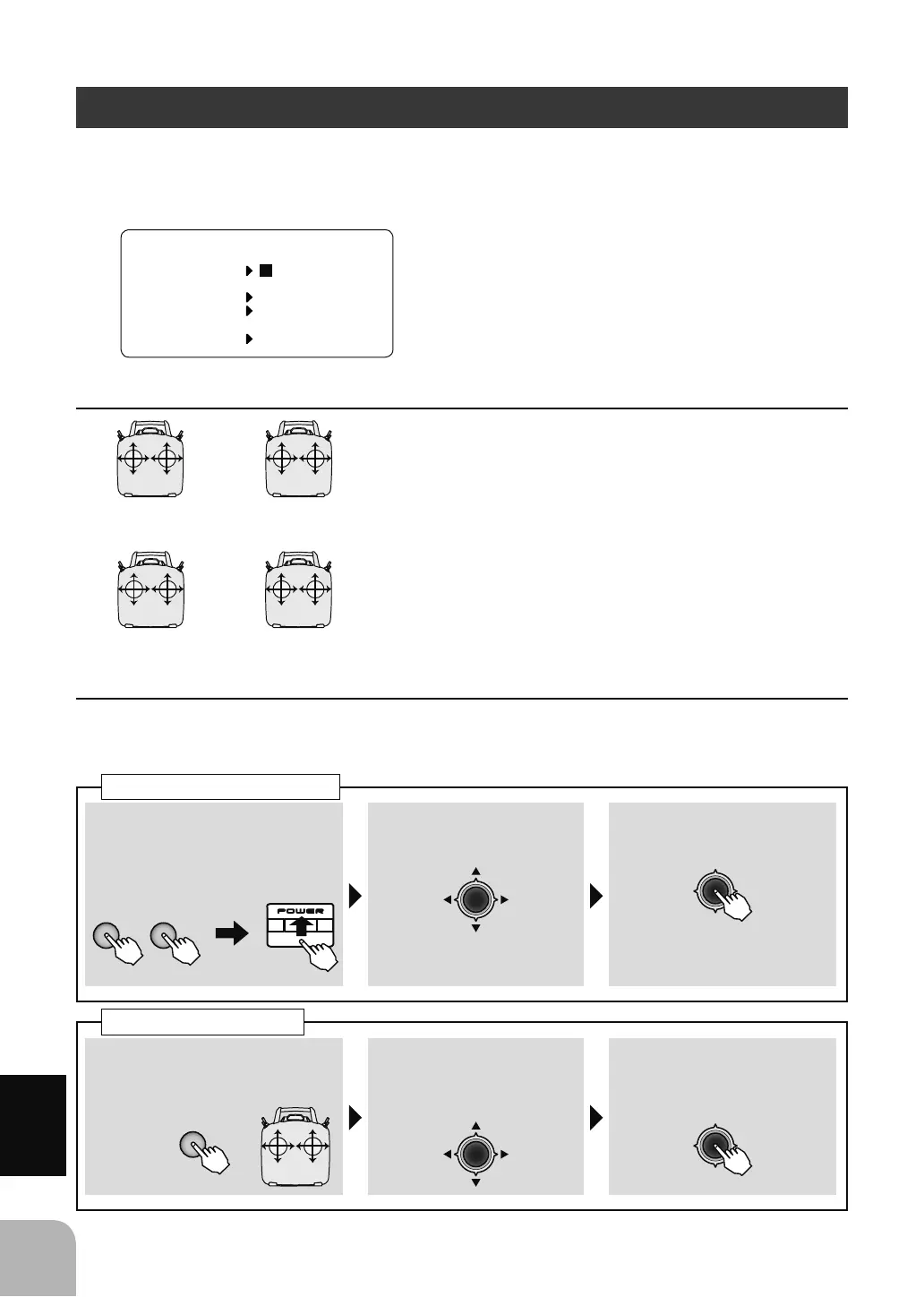
The settings here are special settings that are unnecessary during normal use. The stick mode can be
changed and stick adjustment (calibration), throttle lever reverse, and language can be set.
■ STK-MODE
■ STK-ADJ
Turnonthepowerswitchwiththe+key
and‒keypressedinthepoweroffstate.The
screenshownattheleftappears.Toreturn
tothehomescreen,turnoffthepower
andthenturnthepowerbackonwithout
pressingthekeys.
ThisistheMODE1 〜 MODE4setting.The
initialstateisMODE2.Tochangethemode
thestickratchetmustbechanged.Request
thatthisbedonebyFutabaService.(Charged
modification)
Thisfunctionisnormallynotused.Ifstickdeviationshouldoccur,makethisadjustment.
Donotuseitinthenormalstate.
THRELE
RUD
AIL
MODE1
ELETHR
RUD
AIL
MODE2
THRELE
AIL
RUD
MODE3
ELETHR
AIL
RUD
MODE4
①Turnoffthepowerandthen
turnthepowerbackonwhile
pressingthe+keyand‒key
simultaneously.
②SelectSTK-ADJ → NEXT
inthemenuwiththeJog
key.
③Enterthesettingscreenby
pressingtheJogkey.
Callingthesettingscreen
+ −
①Selectthestickyouwantto
adjustwith1 〜 4withthe+
key.
+
②PresstheJogkeydown
andselectNEUT■ .
③Setthesticktotheneutral
positionandpresstheJog
key.
Stickadjustment
23
4
1
7;6(77,1*
(QJOLVKᴾ
67.02'(
67.$'- 1(;7
7+55(9 125
/$1*8$*(



 To Next Page