131
Helicopter
Function
Method
①Callthemenuscreenfromthe
homescreenby pressingthe +
keyfor1second.
+
② Select
fromthemenuwiththe
Jogkey.
③Openthesettingscreenby
pressingtheJogkey.
(1second)
Callingthesettingscreen
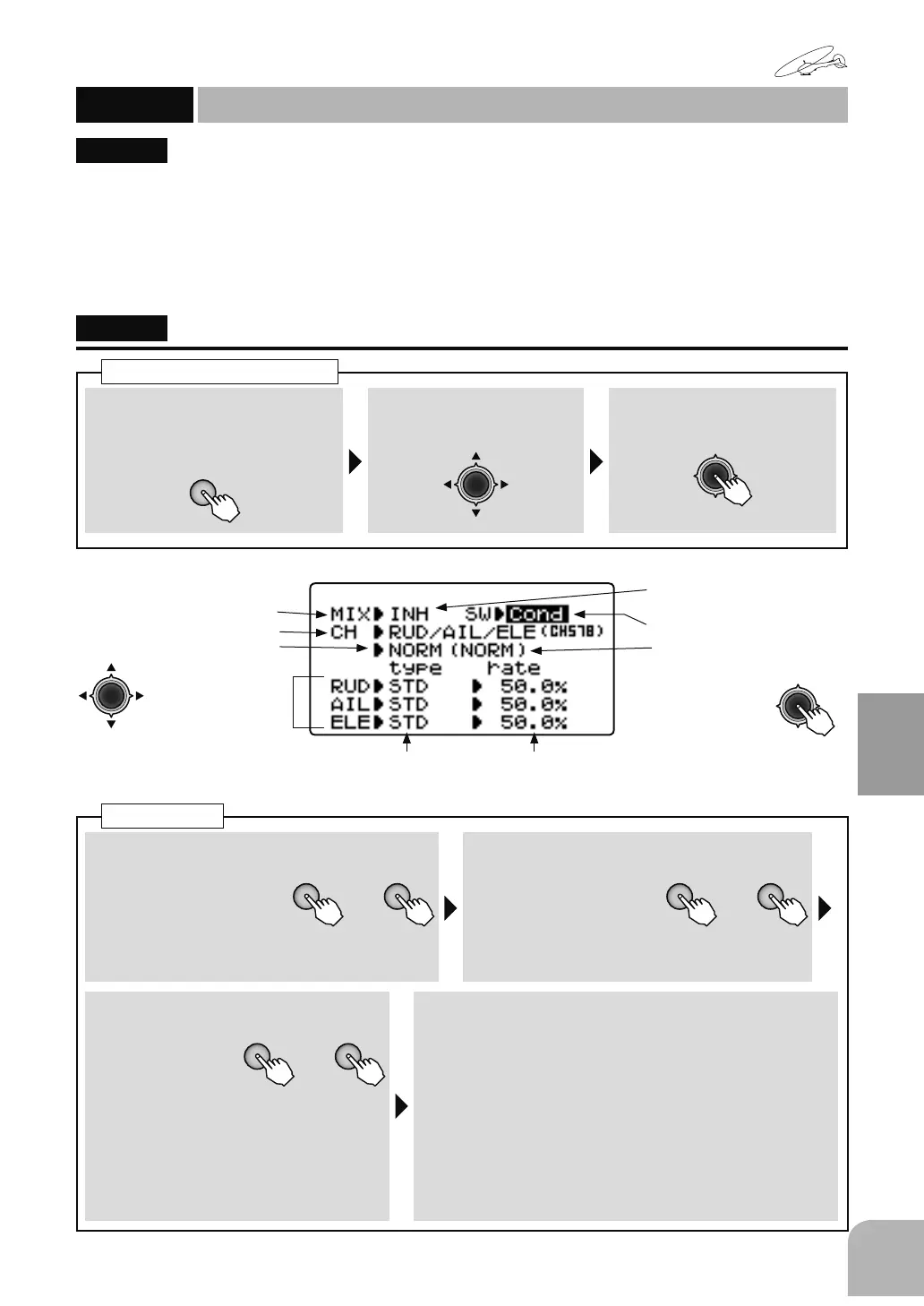
This mixing adjusts the gyro sensitivity from the
transmitter. The AVCS gyro (GY mode) or normal
gyro (STD mode) can be selected. Up to 3 axes can
be set.
ŏ7KHVHQVLWLYLW\FDQEHOLQNHGWRWKHFRQGLWLRQ&RQG
RUDQDUELWUDU\VZLWFKDQGVHW
ŏ:KHQWKH*<PRGHZDVVHOHFWHG$9&RU125
LVGLVSOD\HGDWWKHVHQVLWLYLW\VHWWLQJYDOXH
ŏ7KHVHQVLWLYLW\VHWWLQJFKDQQHOFDQEHVHOHFWHG
IURPWKH58'&+58'$,/&+&+58'
(/(&+&+RU58'$,/(/(&+&+&+
FRPELQDWLRQV
"GYROSENS"
(ForhelicoptersGyromixing)
GYROSENS
Gyromixing
(HELICOPTER)
■ Activatingthefunction
+ −
or
①Selectthe"MIX"item
andthenselectthe
"ON"bypressingthe+
keyor‒key.
● Whenyoudonotuseafunction,settothe
"INH"side.
■ Gainswitchselection
+ −
or
②Selectthe"SW"item
andthenselectthe
switchbypressing the
+keyor‒key.
Range:Cond,SwA 〜 SwH
■ Gainchannelselection
+ −
or
③ Selectthe
"CH"itemand
thenselect
thesensitivity
settingchannelbypressingthe+key
or‒key.
Range:RUD,RUD/AIL,
RUD/ELE,RUD/AIL/ELE
Default:RUD
■ Gyrotypeandsensitivitysetting
④PresstheJogkeyandselectthesensitivitysetting
screenyouwanttosetandthenset"type"(gyro
type)and"rate"(gyrosensitivity)ofeachchannelby
pressingthe+keyor‒key.
("type")Range:STD,GY Default:STD
("rate")Range:0 〜 100%(STD),NOR100 〜 0 〜
AVC100%(GY) Default:50%(STD),0%(GY)
● Whenyouwanttoreturnthesetvaluetotheinitial
value,pressthe+keyand‒keysimultaneously.
Gyrosetup
Activatingthefunction
Gainchannelselection
Switchdirection
Gyrotype,
Gainrate
● Whennotusingthisfunction,
selectINH.
Gainswitchdirection
(Presentswitchposition)
● Switchestothe
sensitivitysetting
screenofeach
switchdirection
whentheJogkeyispressed.
● Selectthesettingitem
withtheJogkey.
(Gyrotype) (GyroGainset)
● WhenaFutabaGYgyroisused,gyrotype"GY"isselected.Thisswitchesthegyrosensitivity
settingitemtothemodeandsensitivitydirectreadingdisplay.
*<526(16


 To Next Page