97
< Linkagemenu >
Temperature
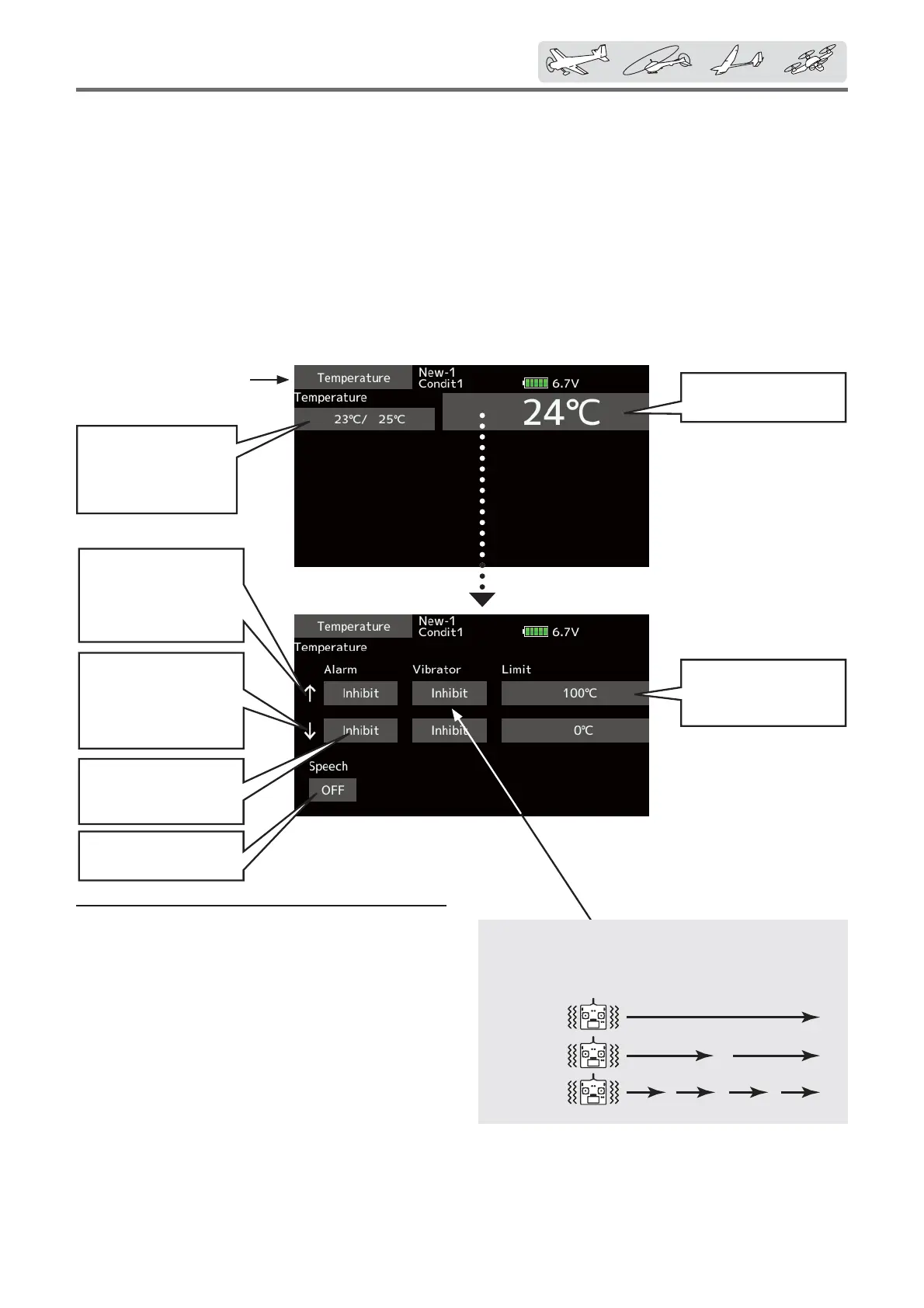
Setsthetemperature
onwhichthealarm
operates.
↑Anupwardarrow
willshowthatan
alarmwillsoundwhen
thetemperaturerises
abovethesetvalue.
↓Adownwardarrow
willshowthatan
alarmwillsoundwhen
thetemperaturedrops
belowthesetvalue.
Alarmischosenfrom
Buzzer,Voice,and
Inhibit.
AllowsSpeechtobe
turnedONorOFF.
ŏ Tap the [Temperature] button in the Telemetry
screen to call the setup screen shown below.
Max.andmin.values
sincethepower
wasturnedONwill
display.
Telemetry:Temperature
Displaying data from the temperature
Temperature is a screen which displays/sets
up the temperature information from an optional
temperature sensor.
The temperature of the model (engine, motor,
battery, etc.) which is Àying can be displayed.
If it becomes higher or lower than the setting, an
alarm and/or vibration will alert you.
Alert set : Temperature warning
1. Tap Alarm and choose from Bu]]er, Voice,
and Inhibit.
2. Choose "Inhibit" for Vibrator if no
t
using the
vibrator alarm. If using vibrator, choose one
of the three types.
3. Tap to the Limit [
℃
] item .
4. Adjust the rate using the "ʈʈ" "ʈ" "ʆ" "ʆʆ"
buttons.
Initial value: Ń100
℃
Ņ0
℃
Adjustment range: -20
℃
~200
℃
(ŃLimit
≧
ŅLimit)
*When the screen is tapped for one second, the rate is reset
to the initial value.
5. To terminate the input and return to the
original state, push the H/E button.
*Atemperaturesensormustbeinstalledintheaircraft.
*It cannot be used in FASST mode and S-FHSS mode.
*Only receiver voltage and EXT voltage can be used in
FASSTest12CH mode.
*The FASSTest18CH /T-FHSS mode can use all the telemetry
functions.
Type1
Type2
Type3
"Vibrator"type
Ifthefollowingtypesareselected,thetransmitter
willvibrateduringthewarning.
ŏReturn to
Linkage menu



 To Next Page