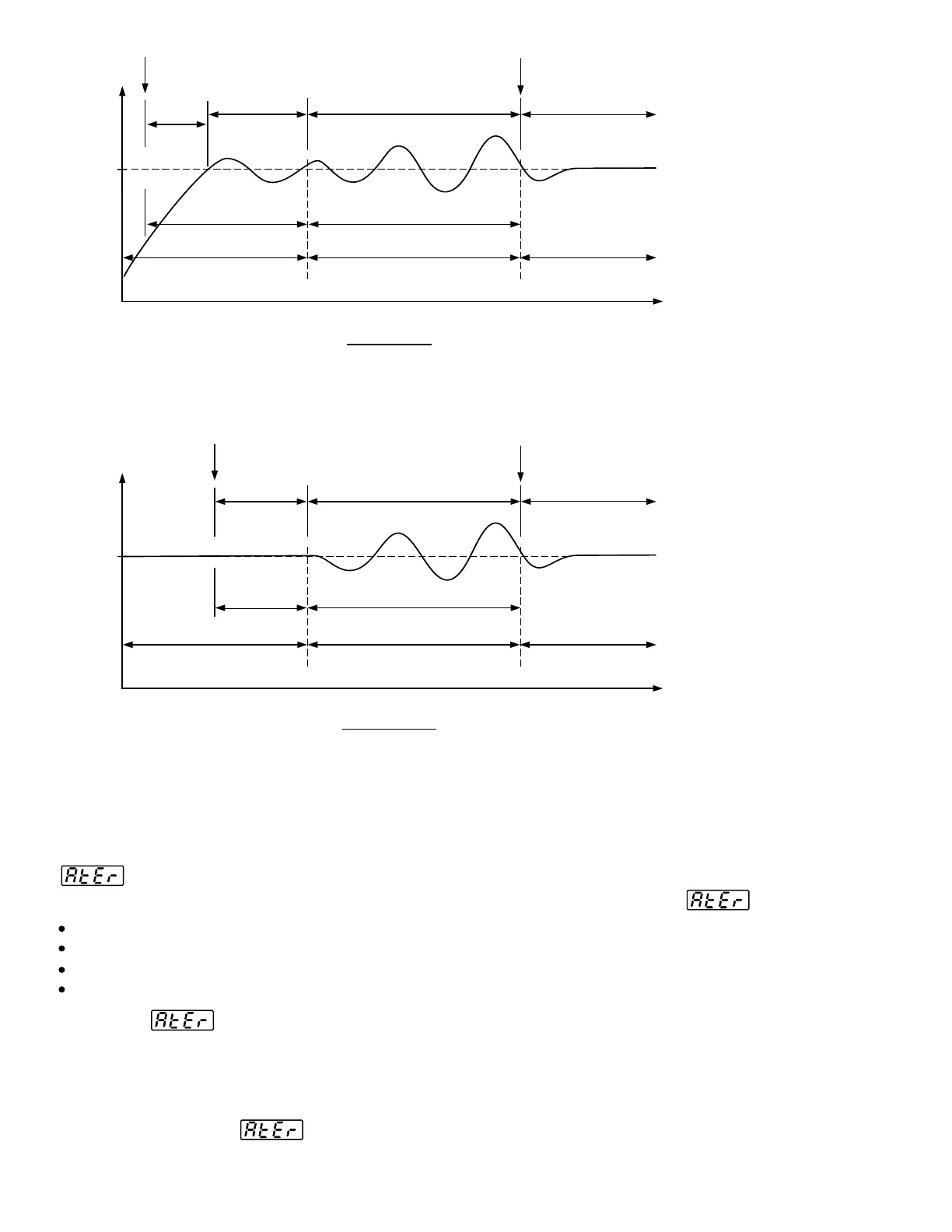
Auto-tuning
Begins
Auto-tuning
Begins
Auto-tuning
Begins
Auto-tuning
Begins
Auto-tuning
Complete
Auto-tuning
Complete
Auto-tuning
Complete
Auto-tuning
Complete
PID ControlPID Control
Pre-tune StagePre-tune Stage
Pre-tune StagePre-tune Stage
Pre-tune
Stage
Pre-tune
Stage
Post-tune StagePost-tune Stage
Post-tune StagePost-tune Stage
PID ControlPID Control
ON-OFF ControlON-OFF Control
ON-OFF ControlON-OFF Control
PID ControlPID Control
PID ControlPID Control
Time
Time
Warm-up
Cycle
Warm-up
Cycle
Waiting
Cycle
Waiting
Cycle
Waiting
Cycle
Waiting
Cycle
Learning CycleLearning Cycle
Learning CycleLearning Cycle
New PID CycleNew PID Cycle
New PID CycleNew PID Cycle
=2 Integral
Time
=2 Integral
Time
=2 Integral
Ti
m
e
=2 Integral
Time
Set PointSet Point
Set PointSet Point
Figure 3.4
Auto-tuning Procedure
Figure 3.4
Auto-tuning Procedure
PV
PV
Cold StartCold Start
Warm StartWarm Start
If the auto-tuning begins near the set point ( warm start ), the unit passes the
warm-up cycle and enters the waiting cycle. Afterward the procedures are same
as that described for cold start.
If the auto-tuning begins near the set point ( warm start ), the unit passes the
warm-up cycle and enters the waiting cycle. Afterward the procedures are same
as that described for cold start.
Auto-Tuning ErrorAuto-Tuning Error
If auto-tuning fails an ATER message will appear on the upper display in cases of :If auto-tuning fails an ATER message will appear on the upper display in cases of :
Solutions toSolutions to
1. Try auto-tuning once again.
2. Don't change set point value during auto-tuning procedure.
3. Don't change event input state during auto-tuning procedure.
4. Use manual tuning instead of auto-tuning. ( See section 3-20 ).
5. Touch any key to reset message.
1. Try auto-tuning once again.
2. Don't change set point value during auto-tuning procedure.
3. Don't change event input state during auto-tuning procedure.
4. Use manual tuning instead of auto-tuning. ( See section 3-20 ).
5. Touch any key to reset message.
If PB exceeds 9000 ( 9000 PU, 900.0 F or 500.0 C ).
or if TI exceeds 1000 seconds.
or if set point is changed during auto-tuning procedure.
or if event input state is changed so that set point value is changed.
LLIf PB exceeds 9000 ( 9000 PU, 900.0 F or 500.0 C ).
or if TI exceeds 1000 seconds.
or if set point is changed during auto-tuning procedure.
or if event input state is changed so that set point value is changed.
LL
Auto-Tuning ErrorAuto-Tuning Error
31
UM83001A-August-2024



 To Next Page