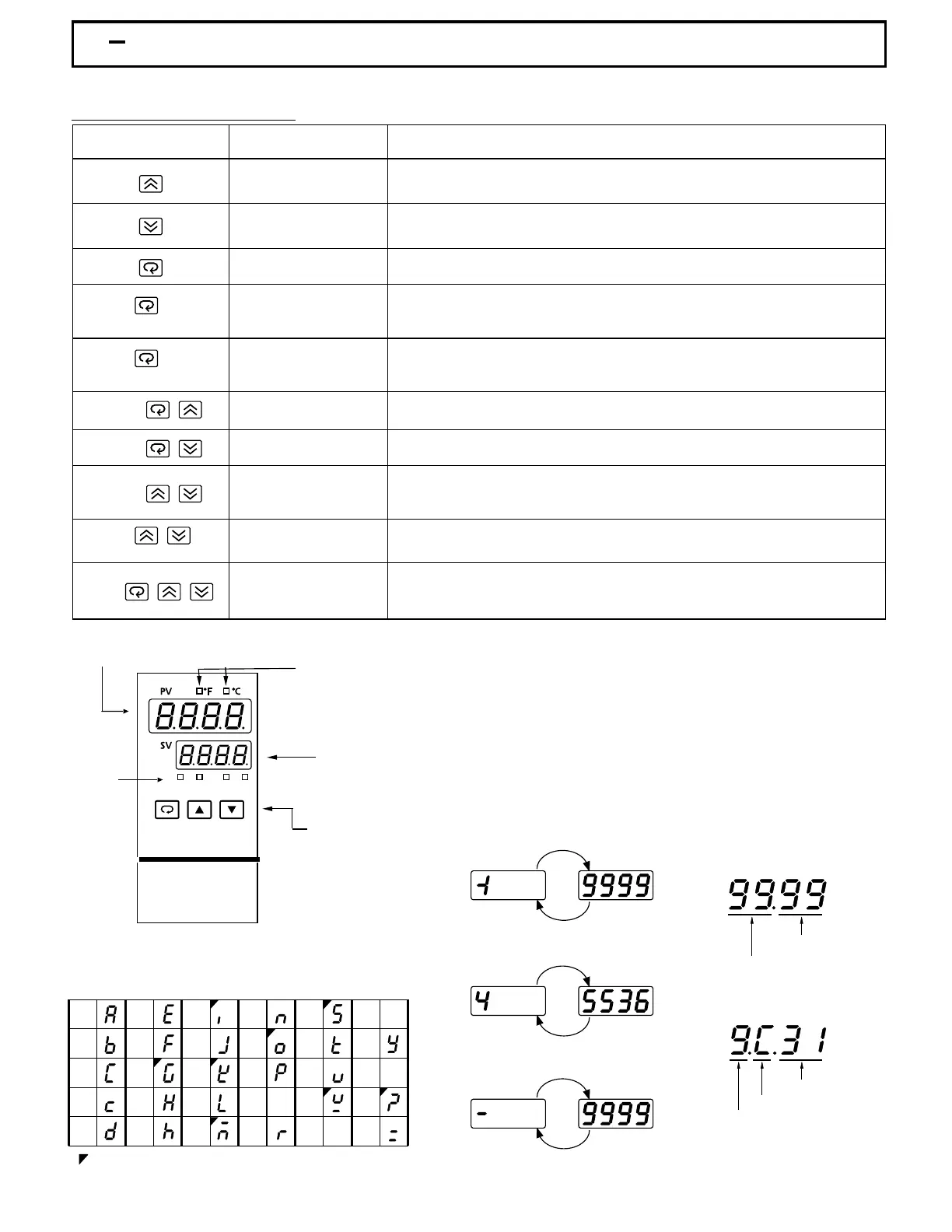
Table 1.2 Keypad OperationTable 1.2 Keypad Operation
For a number with decimal point the
display will be shifted one digit right:
For a number with decimal point the
display will be shifted one digit right:
-19999 will be displayed by:-19999 will be displayed by:
45536 will be displayed by:45536 will be displayed by:
-9999 will be displayed by:-9999 will be displayed by:
The unit is programmed by using three keys on the front panel. The available key functions are listed in following table.The unit is programmed by using three keys on the front panel. The available key functions are listed in following table.
Press and release quickly to increase the value of parameter.
Press and hold to accelerate increment speed.
Press and release quickly to decrease the value of parameter.
Press and hold to accelerate decrement speed.
Select the parameter in a direct sequence.
Allow access to more parameters on user menu, also used to Enter manual
mode, auto-tune mode, default setting mode and to save calibration data
during calibration procedure.
Select the parameter in a reverse sequence during menu scrolling.
Select the operation Mode in sequence.
Reset the front panel display to a normal display mode, also used to leave
the specific Mode execution to end up the auto-tune and manual control
execution, and to quit the sleep mode.
The controller enters the sleep mode if the sleep function ( SLEP ) is enabled
( select YES ).
By entering correct security code to allow execution of engineering programs.
This function is used only at the factory to manage the diagnostic reports.
The user should never attempt to operate this function.
Press
for at least 3 seconds
Press
for at least 6 seconds
Press
Press
Press
Press
Press
for at least 3 seconds
Up Key
Down Key
Scroll Key
Enter Key
Start Record Key
Reverse Scroll Key
Mode Key
Reset Key
Sleep Key
Factory Key
TOUCHKEYS FUNCTION DESCRIPTION
Reset historical values of PVHI and PVLO and start to record the peak process
value.
How to display a 5-digit number ?How to display a 5-digit number ?
1 4 Keys and Displays1 4 Keys and Displays
: Confused Character: Confused Character
Table 1.3 Display Form of CharactersTable 1.3 Display Form of Characters
-199.99 will be displayed by -199.9
4553.6 will be displayed by 4553
-199.99 will be displayed by -199.9
4553.6 will be displayed by 4553
For a number without decimal point
the
display
will be divided into two
alternating phases:
For a number without decimal point
the display will be divided into two
alternating phases:
A
E
I
N
S
X
B
F
J
O
T
Y
C
G
K
P
U
Z
c
H
L
Q
V
?
Dh
M
R
W
=
Power On Sequence
1.) Display segments OFF for 0.5 secs.
2.) Display segments ON for 2.0 secs
3.) Display Program Code for 2.5 secs
4.) Display Date Code for 1.25 secs.
5.) Display S/N for 1.25 secs
Power On Sequence
1.) Display segments OFF for 0.5 secs.
2.) Display segments ON for 2.0 secs
3.) Display Program Code for 2.5 secs
4.) Display Date Code for 1.25 secs.
5.) Display S/N for 1.25 secs
Program CodeProgram Code
Program No.Program No.
Program VersionProgram Version
Year (1999)Year (1999)
Month (December)Month (December)
Date (31'st)Date (31'st)
Date CodeDate Code
UMA83001A-August-2024
6
Figure 1.4 Front Panel DescriptionFigure 1.4 Front Panel Description
Lower Display,
to display set point
value,parameter
value or control
output value etc.
Lower Display,
to display set point
value,parameter
value or control
output value etc.
3 Buttons for ease
of control setup
and set point
adjustment.
3 Buttons for ease
of control setup
and set point
adjustment.
Upper Display, to display process value,
menu symbol and error code etc.
Upper Display, to display process value,
menu symbol and error code etc.
Out 1 LEDOut 1 LED
Out 2 LEDOut 2 LED
Alm 1 LEDAlm 1 LED
Alm 2 LEDAlm 2 LED
FDC-8300
Out1 Out2 Alm1 Alm2
Process Unit IndicatorProcess Unit Indicator



 To Next Page