38
- Default settings
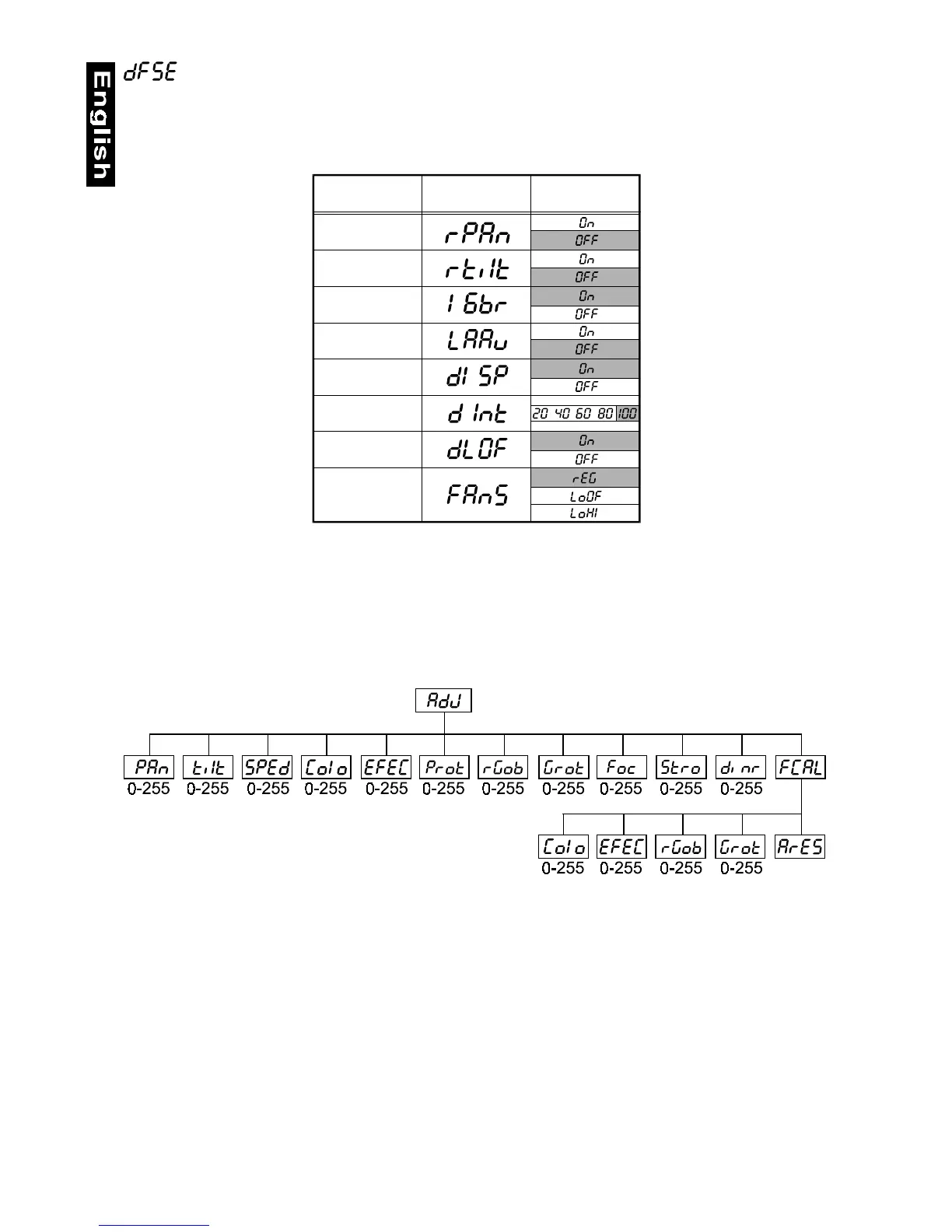
Press [Enter] to reset all fixture personalities (not the adjusting functions) to the default values. On the display will
appear „rSt” meaning that the fixture makes the reset. See the table of personality setting and their default
positions.
AdJ - Adjusting the default positions of colour, gobo and effect wheels
By this function you can calibrate and adjust the colour, gobo and effect wheels to their standard/right positions.
Use the [Up] and [Down] keys to browse through the adjusting menu - the display shows step by step these
messages: "PAn, Tilt, SPEd, Colo, EFEC, Prot, rGOB, Grot, Foc, Stro, dimr, FCAL" by which you can adjust
the fixture to the required / desired position (0-255) before the function calibration. Then when the positioning is
finished use the last "FCAL" function (Fixture calibration).
1. Calibration via the control board
Press [Enter] and the [Up] and [Down] keys in order to display the following messages: "Colo, EFEC, rGob,
Grot" for very smooth function calibration. Select one of them, press [Enter] and use the [Up] and [Down] keys
in order to adjust their right value from 0 to 255. Then press [Enter] to confirm or [Mode] to cancel and return to the
menu. This can be repeated for each calibration parameter if it is required. When the calibration is finished, it is
necessary to use the "ArES" function in order to write the calibration values to the memory (EEPROM) and to
make a reset in order to check the newly adjusted positions of the colour, gobo and effect wheels. When the reset
of the fixture is finished, the display will show the "FCAL" message. Press [Enter] to repeat the calibration or
[Mode] to return to the "AdJ" menu.
2. Calibration via the external controller
Press [Enter] and the [Up] and [Down] keys in order to display the following messages: "Colo, EFEC, rGob,
Grot" - calibration parameters. Select one of them and press [Enter].
Now you can calibrate the colour, gobo and effect wheel by your controller. The DMX calibration protocol is
described in the table mentioned below.
Personality Display
Pan reverse
Tilt reverse
Movement
resolution
Lamp on
automatically
Automatic black-
-out of display
Display intensity
Lamp off via DMX
Low fan speed
operating
Default values
(SHADED)


 To Next Page