7
1
4 5
32
INTENZA WATER FILTER
To improve the quality of the water you use and extend the life of your machine at the same time, it is recommended that you install the
water lter. After installation, go to the water lter initialization programme (see the "MACHINE MENU", page 25). In this way, the machine
informs the user when the water lter must be replaced.
Remove the water lter from its packaging, immerse it vertically (with the opening positioned upwards) in cold water and
gently press its sides to let the air bubbles out.
Remove the small white lter from the
tank and store it in a dry place sheltered
from dust.
Fill the tank with fresh drinking water
and re-insert it into the machine.
Place a container beneath the hot water/
steam wand.
Insert the lter in the empty tank. The
reference mark and the groove must
match. Push rmly until it is completely
inserted.
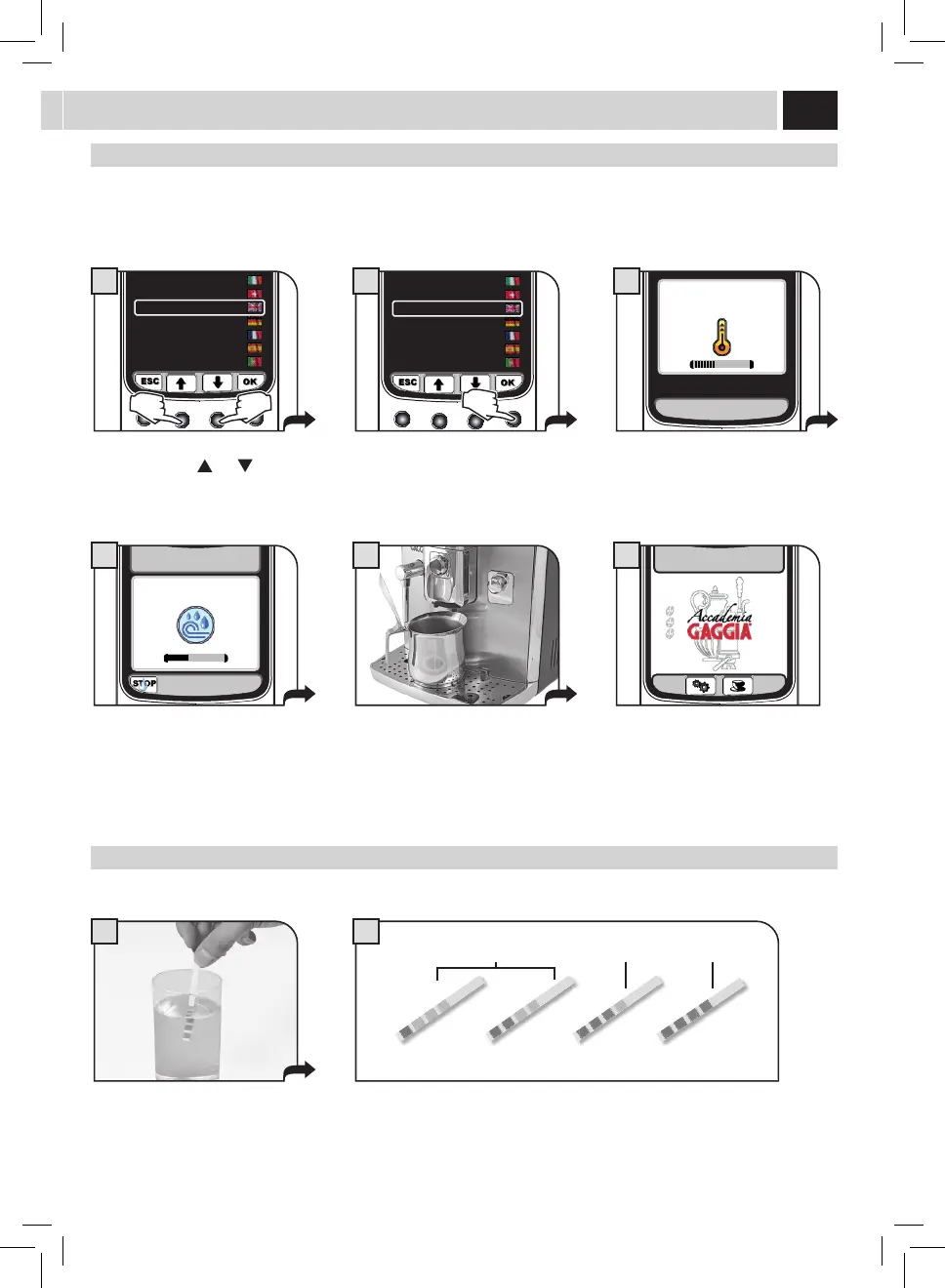
Set up the Intenza Aroma System:
A = Soft water
B = Medium water (standard)
C = Hard water
Press the "OK" button. Press the "OK" button to conrm the
introduction of the new water lter.
Press the "OK" button to conrm. Wait
until the cycle is completed and remove
the container.
Access the "MACHINE MENU" (see page 25).
Select "WATER SETTINGS" and "ACTIVATE
FILTER", then press "OK".
3
OFF
WATER HARDNESS
ENABLE FILTER
ACTIVATE FILTER
2.4. WATER SETTINGS
6
2.4.3. WATER SETTINGS
ACTIVATE FILTER?
7
ACTIVATE FILTER
INSERT WATER FILTER
AND FILL THE WATER TANK
8
ACTIVATE FILTER
PLACE A CONTAINER
UNDER THE
HOT WATER SPOUT
9
NOTE: At the end of the procedure the display automatically returns to the product dispensing page.
If the Intenza water lter is not available, insert the small white lter previously removed (see point 1) into the tank.



 To Next Page
 Loading...