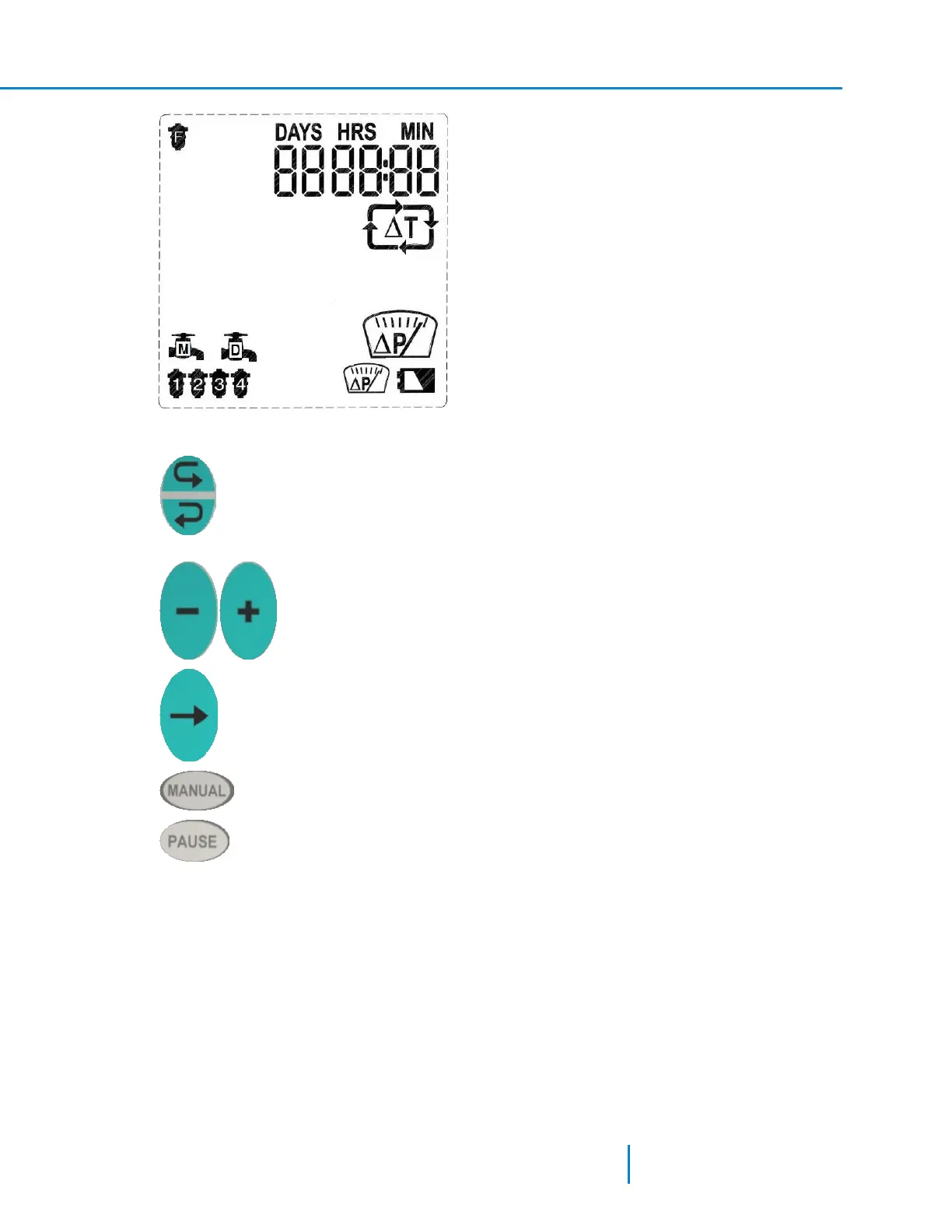
Keys
Forward key – used to scroll forward through the controller screens in a clockwise
direction.
Backward key – used to scroll backward through the controller screens in a
contra clockwise direction.
Minus and Plus keys – used to edit numerical fields and for setting/unsetting
graphical elements.
Arrow key – used to move between elements in the current screen and to move
through digits or graphical elements within a field.
Manual key – used to start or stop a manual back-flushing cycle.
Pause key – used to enter the controller to pause mode and to return it to
regular operation mode.
Panel Left Side
Programs - I to VI default flushing progrmas covering a wide range of filters. Each program differs from
the other in the timing of the operation stages.
Main-Delay Valve - displays valves icons with the letter M and/or D indicating that the controller is
configured with a Main Valve and/or a Delay Valve
No. of Filters – displays up to 21 filter shapes marked with the number 1-12. In accordance with the
actual number of configured filters, the LCD shows the filters configured. It is not necessary to configure
the filters in a sequence, therefore in a system with two filters that are configured at solenoids 1 and 4
the LCD shows two filter shapes; one marked with the number 1 and the other marked with the
number 4.
27 AMCFlushing Controller User Guide
Overview of the Interface



 To Next Page