Chapter 3 -- Installation--Running the Framework
3 - 7
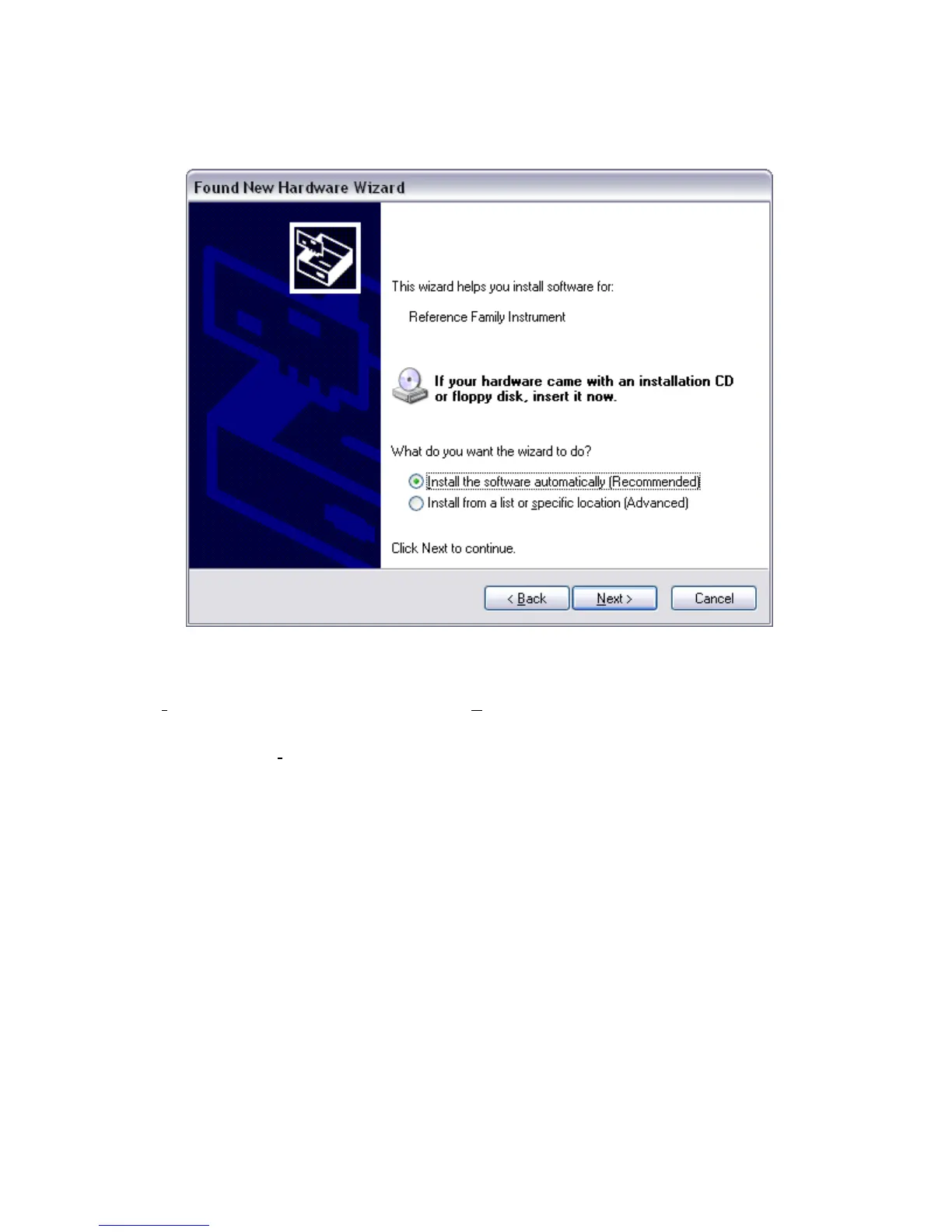
Figure 3-4
Install the Software Automatically
All Gamry device drivers are pre-installed on your computer disk drive during the software installation process.
Select Install the software automatically, then select Next.
These messages will also be seen when an Interface 1000 instrument is moved to a new USB port. In this
case, you can still select Install the software automatically, even if you do not have the Gamry Instruments
CD. The driver that was previously installed on your computer’s disk drive will be used.
The Windows Device Manger will locate and install the required files, which are already on your system.
Running the Framework
Regardless of your electrochemical application, Gamry recommends running the Gamry Framework after you
install new Framework software or add a potentiostat to your system. The Framework Instrument Manager
allows you to:
• Rename potentiostats,
• Calibrate potentiostats,
• Manage potentiostat firmware,
• Authorize Specific Applications for use with Specific Potentiostats
You run the Gamry Framework by clicking on the icon it installed on the Windows desktop. You can connect
and power any Gamry potentiostats either before or after you start the Framework.


 To Next Page