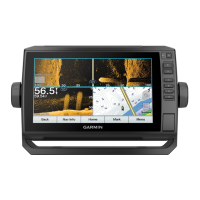
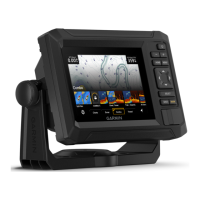
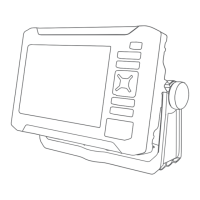
The Garmin ECHOMAP UHD2 5X/7X is a chartplotter designed for marine navigation, fishfinding, and user data management. It provides a connected boating experience through its integration with the ActiveCaptain app and Garmin Express.
Function Description:
The device serves as a central hub for marine activities, offering detailed charts, 3D chart views, and advanced sonar capabilities. It allows users to plan and navigate routes, mark waypoints, and record tracks. The chartplotter can connect wirelessly to other ECHOMAP UHD2 devices for data and sonar sharing, and to mobile devices via the ActiveCaptain app for software updates, chart downloads, and community features. It also supports the Garmin Quickdraw Contours feature for creating custom maps of water bodies.
Important Technical Specifications:
All Models:
- Material: Polycarbonate plastic
- Water Rating: IEC 60529 IPX7 (withstands incidental exposure to water up to 1 m for up to 30 min)
- Temperature Range: From -15° to 55°C (from 5° to 131°F)
- Input Voltage: From 9 to 18 Vdc
- Fuse: 3 A, 125 V fast-acting
- Memory Card: 1 microSD card slot; 32 GB max. card size (FAT32, speed class 4 or higher; 8 GB or larger with speed class 10 recommended)
- Display Resolution: WVGA, 800 x 480 pixels
- Sonar Frequencies (dependent on transducer):
- Traditional: 50/200, 77/200, 83/200 kHz
- Single Channel CHIRP: from 40 to 250 kHz
- Garmin ClearVü CHIRP: 260/455/800 kHz
- Sonar Transmit Power (RMS) (dependent on transducer rating and depth):
- CHIRP: 500 W
- Garmin ClearVü CHIRP: 500 W
- Sonar Depth (dependent on transducer, water salinity, bottom type, and other water conditions): 701 m (2,300 ft.) at 77 kHz
- Wireless Frequency: 2.4 GHz @ 19.7 dBm maximum
5x Models:
- Dimensions (chartplotter only, W x H x D): 188 x 122 x 61.5 mm (7 3/8 x 4 13/16 x 2 7/16 in.)
- Dimensions (on bail mount with sun cover, W x H x D): 212 x 143.3 x 100 mm (8 3/8 x 5 5/8 x 3 15/16 in.)
- Clearance to nearest obstruction behind chartplotter: 57 mm (2 1/4 in.)
- Display Size (W x H): 109 x 65.8 mm (4 5/16 x 2 9/16 in.); 127.3 mm (5 in.) diagonal
- Weight: 0.5 kg (1.1 lb.)
- Max. Power Draw: 8.4 W
- Typical Current Draw at 12 Vdc (RMS): 600 mA
- Max. Current Draw at 12 Vdc: 700 mA
- Compass-safe Distance: 7.62 cm (3 in.)
7x Models:
- Dimensions (chartplotter only, W x H x D): 232 x 143.1 x 67 mm (9 1/8 x 5 5/8 x 2 5/8 in.)
- Dimensions (on bail mount with sun cover, W x H x D): 243.4 x 153.9 x 105.5 mm (9 9/16 x 6 1/16 x 4 1/8 in.)
- Clearance to nearest obstruction behind chartplotter: 62.5 mm (2 7/16 in.)
- Display Size (W x H): 86.9 x 155.1 mm (3 7/16 x 6 1/8 in.); 177.8 mm (7 in.) diagonal
- Weight: 0.68 kg (1.5 lb.)
- Max. Power Draw: 15 W
- Typical Current Draw at 12 Vdc (RMS): 1.1 A
- Max. Current Draw at 12 Vdc: 1.25 A
- Compass-safe Distance: 12.7 cm (5 in.)
Usage Features:
- Home Screen Customization: Users can rearrange category items and feature buttons on the home screen for personalized access to functions.
- Page Customization: The startup screen can be customized with a personal image. Combination pages, which display multiple functions, can be edited to change layout, data overlays, and screen functions.
- Data Overlays: Data overlays on any screen can be customized to show specific information like GPS speed, heading, water temperature, depth, time of day, and GPS position.
- Backlight and Color Adjustment: Backlight levels, color mode (e.g., day/night), and color themes can be adjusted for optimal viewing in various conditions.
- Automatic Power Management: The chartplotter can be set to turn on automatically when power is applied or to turn off automatically after a selected period of inactivity.
- GPS Satellite Signal Acquisition: The device automatically acquires satellite signals to set time and date. Signal strength can be monitored.
- GPS Source Selection: If multiple GPS sources are available, users can select their preferred source.
- ActiveCaptain App Integration: Connects to mobile devices for software updates, chart downloads, user data transfer (waypoints, routes), access to the Garmin Quickdraw Contours Community, and trip planning.
- Wireless Sharing: Two ECHOMAP UHD2 devices can connect wirelessly to share user data and sonar. A host device can also connect to other wireless devices.
- Chart Views: Offers various chart types including Navigation Chart, Fishing Chart, Perspective 3D, 3D Chart, Fish Eye 3D, and Relief Shading (premium charts only).
- Chart Interaction: Zoom in/out, pan, select items, measure distances, and create waypoints directly on the chart.
- Navaid Information: View details about navigation aids, including beacons, lights, and obstructions.
- Navigation: Supports Go To (direct course), Route To (multi-turn routes), and Auto Guidance (calculates best path avoiding obstacles, premium charts only). Routes can be created, saved, edited, and navigated parallel to.
- Tracks: Records the boat's path (active track), which can be saved, edited, and followed. Track log memory management allows for recording until full or continuous recording.
- Boundaries: Create boundary areas (lines, circles) to avoid or remain in designated water areas, with alarms for entering/exiting. Tracks and routes can be converted to boundaries.
- Sonar Fishfinder: Displays sonar information in various views: Traditional, Split-Frequency, Split-Zoom, Garmin ClearVü, and Flasher View.
- Sonar Controls: Stop sonar transmission, select transducer type and sonar source, rename sources, create waypoints on sonar screen, pause display, adjust level of detail, color intensity, range, scroll speed, noise rejection, and appearance settings (color scheme, A-Scope, depth line, edge, fish symbols, Pic. Advance, overlay data).
- Sonar Alarms: Set alarms for shallow water, deep water, water temperature, contour, and fish.
- Gauges and Graphs: View various engine and environmental information (speed, heading, depth, position) through customizable gauges and graphs.
- Warning Manager: Displays system warnings and allows sorting, filtering, and saving messages.
- Device Configuration: Adjust system settings (units, language, navigation preferences, keyboard layout, screenshot capture), view system software information, event logs, and e-label regulatory information.
- Keel Offset: Compensates depth readings based on transducer installation relative to the keel or water line.
- Water Temperature Offset: Compensates temperature readings from sensors.
Maintenance Features:
- Software Updates: Software can be updated using the ActiveCaptain app (via Wi-Fi) or Garmin Express desktop app (via memory card).
- Chart Updates: Charts can be updated using the ActiveCaptain app (via Wi-Fi) or Garmin Express desktop app (via memory card). Chart subscriptions can be purchased and renewed through ActiveCaptain.
- User Data Management: Copy all user data (waypoints, tracks, routes, boundaries) to a memory card, or copy data from a specified area. User data can be merged from or replaced by data on a memory card.
- Backup and Restore: Backup user data to a computer and restore backup data to the chartplotter. System information can also be saved to a memory card.
- Factory Reset: Restore device settings to factory defaults, delete user data, or delete data and reset settings.
- Cleaning: The screen should be cleaned gently with an eyeglass lens cleaner safe for anti-reflective coatings and a soft, lint-free cloth.
- Troubleshooting: Includes guidance for issues like GPS signal acquisition and device power problems.

 Need help?



 To Next Page
 General