Customizing the Chartplotter
Home Screen
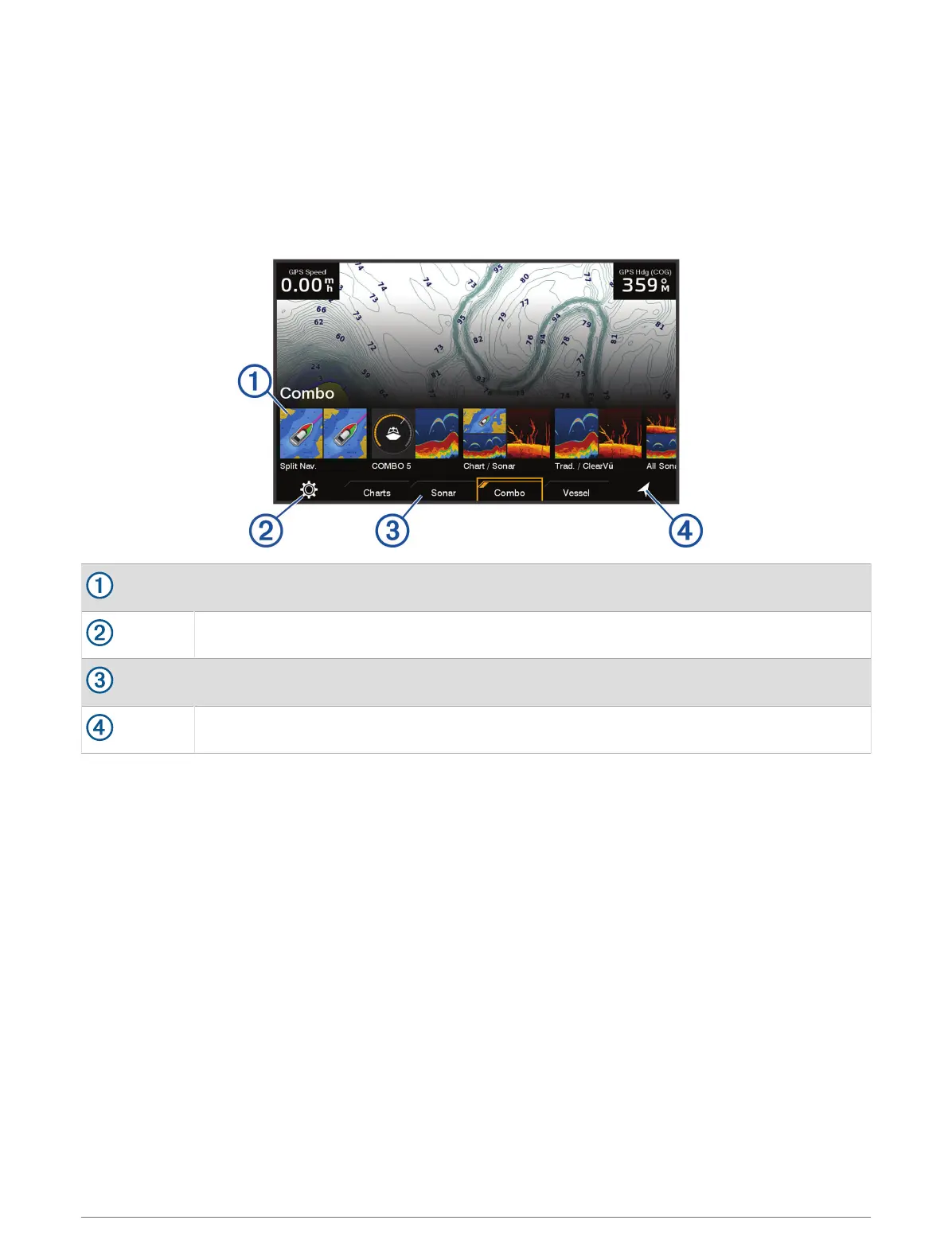
The home screen is an overlay that provides access to all of the features in the chartplotter. The features are
dependent on the accessories you have connected to the chartplotter. You may not have all of the options and
features discussed in this manual.
When viewing any screen, you can return to the home screen by selecting HOME.
Features buttons
Settings menu button
Category tabs
Navigation information button
The categories tabs provide quick access to the main features of your chartplotter. For example, the Sonar tab
displays the views and screens related to the sonar feature.
TIP: To view the available categories tabs, you may need to use the arrow keys to scroll left or right.
Rearranging the Category Items
You can customize the screen by rearranging the items in the categories.
1 Select a category to customize, such as Charts
2 Highlight a feature button, such as Nav. Chart.
3 Press and hold the SELECT button.
4 Select Rearrange.
Arrows appear on the feature buttons.
5 Reselect the button to move.
6 Use the arrow keys to highlight the new location and deselect.
7 Select the new location for the button.
8 Repeat until you finish customizing the screen.
9 Select BACK or Home when finished.
Customizing the Chartplotter 5




 To Next Page