Appendix
Optional Accessories
Optional accessories, such as mounts, maps, fitness accessories, and replacement parts, are available at http:/
/buy.garmin.com or from your Garmin dealer.
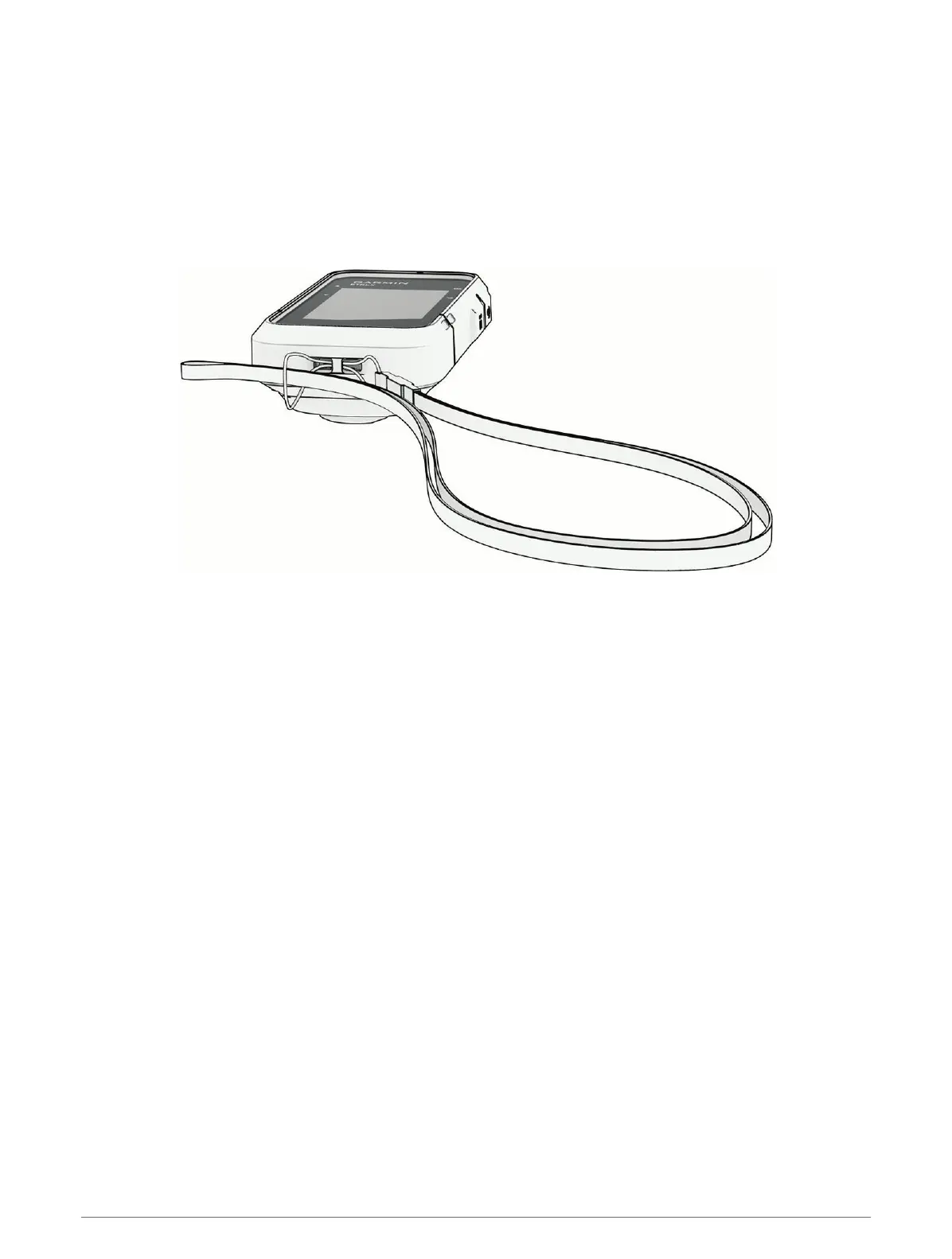
Attaching a Lanyard
1 Insert the loop of the lanyard through the slot in the device.
2 Thread the other end of the lanyard through the loop, and pull it tight.
3 If necessary, attach the lanyard to your clothing or backpack to tether it during an activity.
Troubleshooting
Maximizing Battery Life
You can do several things to extend the life of the batteries.
• Reduce the backlight brightness (System Settings, page17).
• Reduce the backlight timeout (System Settings, page17).
• Use expedition mode (Turning On Expedition Mode, page3).
• Turn off Bluetooth technology (Phone Settings, page17).
• Turn off additional satellite systems (System Settings, page17).
Long-Term Storage
When you do not plan to use the device for several months, remove the batteries. Stored data is not lost when
batteries are removed.
Restarting the Device
If the device stops responding, you may need to restart it. This does not erase any of your data or settings.
1 Remove the batteries.
2 Reinstall the batteries.
22 Appendix



 To Next Page