Garmin G950 Pilot’s Guide for the Pilatus PC-6
190-00870-02 Rev. A152
FLIGHT MANAGEMENT
SYSTEM
OVERVIEW
FLIGHT
INSTRUMENTS
EIS
AUDIO PANEL
& CNS
FLIGHT
MANAGEMENT
HAZARD
AVOIDANCE
AFCS
ADDITIONAL
FEATURES
APPENDICESINDEX
8) Select the desired range.
9) Press the ENT Key to accept the selected range.
10) Press the FMS Knob to return to the Navigation Map Page.
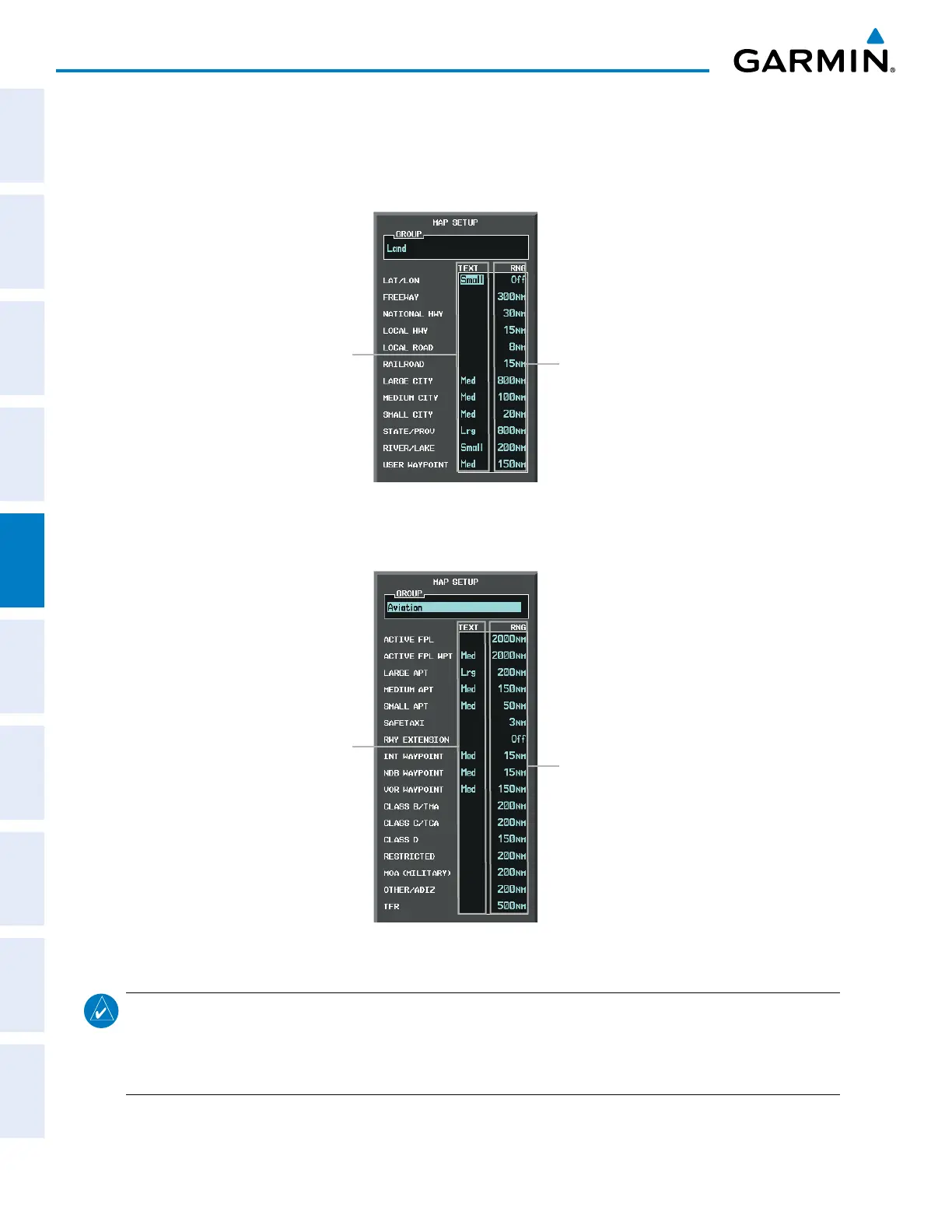
Figure 5-19 Navigation Map Setup Menu - LAND GROUP Setup
Maximum Display Range
Text Label Size
(None, Small, Med, or Lrg)
Figure 5-20 Navigation Map Setup Menu - AVIATION GROUP Setup
Maximum Display Range
Text Label Size
(None, Small, Med, or Lrg)
NOTE: Since the PFD Inset Map is much smaller than the MFD navigation maps, items are removed on the
PFD Inset Map two range levels smaller than the range selected in the Map Setup pages (e.g., a setting
of 100 nm removes the item at ranges above 100 nm on MFD navigation maps, while the PFD Inset Map
removes the same item at 50 nm).



 To Next Page