190-00870-02 Rev. A
Garmin G950 Pilot’s Guide for the Pilatus PC-6
339
HAZARD AVOIDANCE
SYSTEM
OVERVIEW
FLIGHT
INSTRUMENTS
EIS
AUDIO PANEL
& CNS
FLIGHT
MANAGEMENT
HAZARD
AVOIDANCE
AFCS
ADDITIONAL
FEATURES
APPENDICES INDEX
TAWS-B ALERTS
Alerts are issued when flight conditions meet parameters that are set within TAWS-B software algorithms.
TAWS-B alerts typically employ a CAUTION or a WARNING alert severity level, or both. When an alert
is issued, visual annunciations are displayed with voice alerts. Table 6-15 shows TAWS-B alert types with
corresponding annunciations and voice alerts.
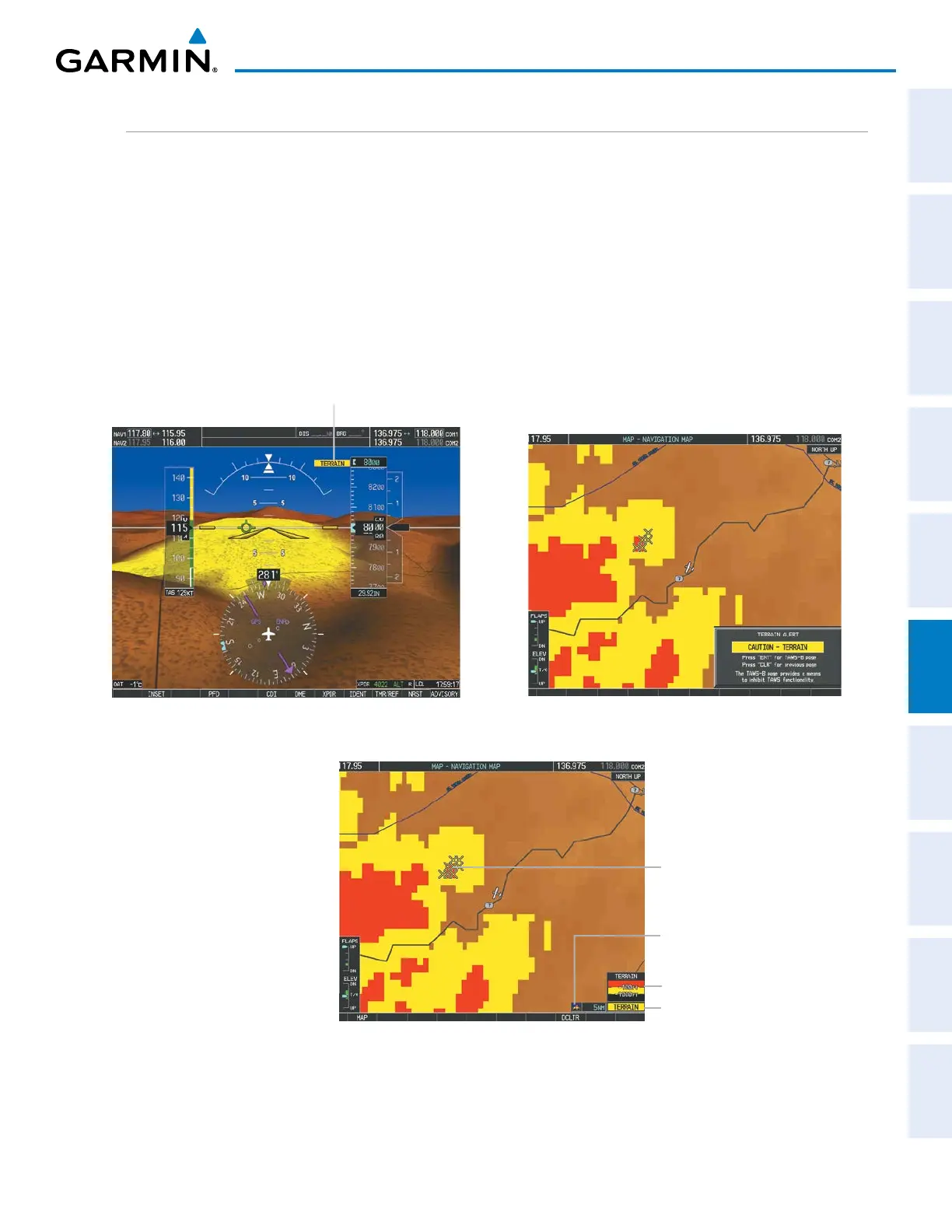
When an alert is issued, annunciations appear on the PFD and MFD. The TAWS-B Alert Annunciation is
shown to the upper left of the Altimeter on the PFD and below the Terrain Legend on the MFD. If the TAWS-B
Page is not displayed at the time, a pop-up alert appears on the MFD. To acknowledge the pop-up alert:
• Press the CLR Key (returns to the currently viewed page), or
• Press the ENT Key (accesses the TAWS-B Page)
Alert Annunciation
Figure 6-55 TAWS-B PFD Alert Annunciation
Figure 6-57 Navigation Map Page
(After TAWS-B Pop-up Alert Acknowledgment)
Alert Annunciation
Terrain Legend
Terrain Display Enabled
Icon
Figure 6-56 Navigation Map Page
TAWS-B Pop-up Alert
Potential Impact Points



 To Next Page