Garmin G950 Pilot’s Guide for the Pilatus PC-6
190-00870-02 Rev. A90
SYSTEM
OVERVIEW
FLIGHT
INSTRUMENTS
EIS
AUDIO PANEL
& CNS
FLIGHT
MANAGEMENT
HAZARD
AVOIDANCE
AFCS
ADDITIONAL
FEATURES
APPENDICESINDEX
SYSTEM
OVERVIEW
FLIGHT
INSTRUMENTS
EIS
AUDIO PANEL
& CNS
FLIGHT
MANAGEMENT
HAZARD
AVOIDANCE
AFCS
ADDITIONAL
FEATURES
APPENDICESINDEX
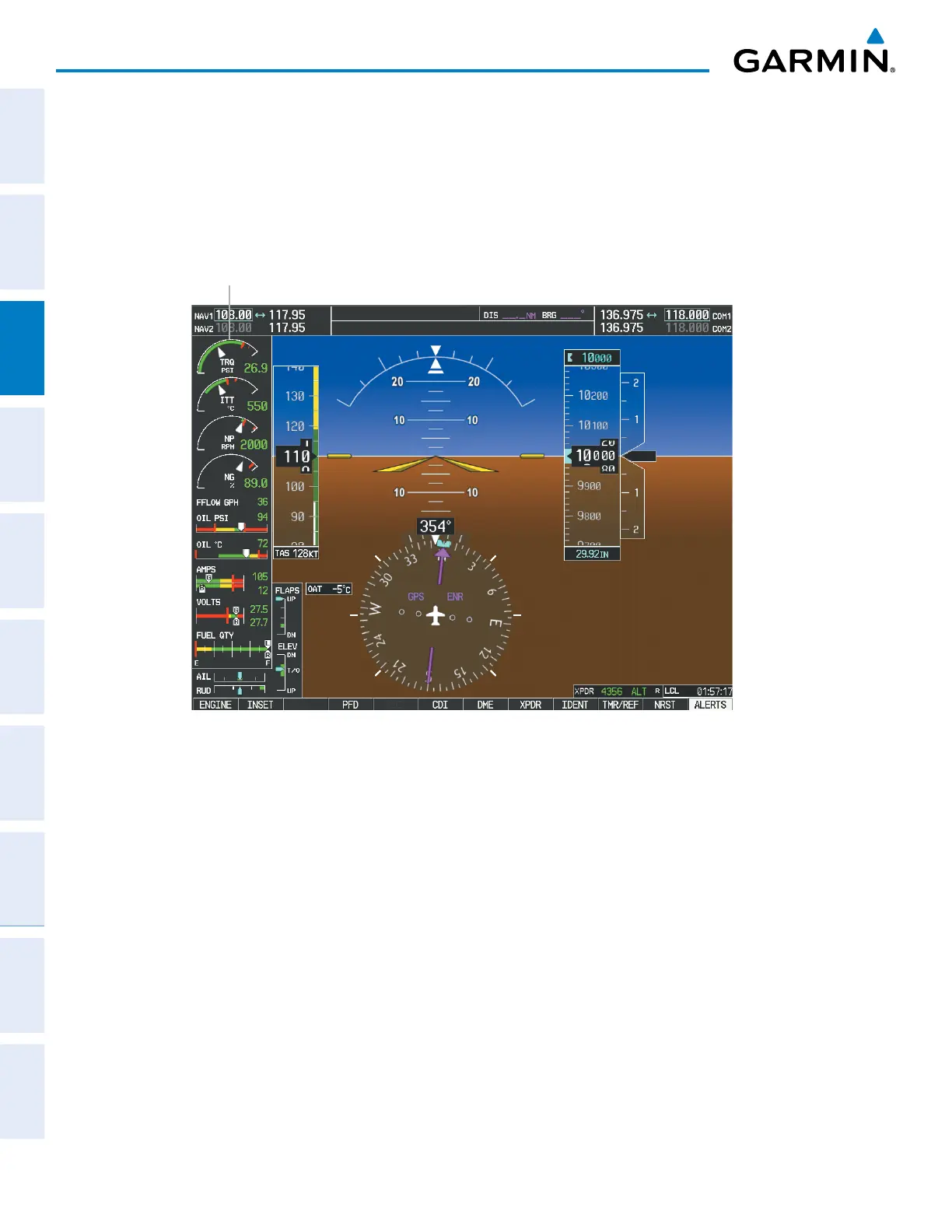
3.4 EIS DISPLAY IN REVERSIONARY MODE
In reversionary mode, the remaining display is re-configured to present PFD symbology together with the EIS
Display (refer to the System Overview for information about display Reversionary Mode). When the G950
®
displays enter reversionary mode, the EIS is separated into Engine, System, and Fuel displays. The displays are
identical to the displays in normal mode.
Figure 3-6 Reversionary Mode
EIS Display
=



 To Next Page