Garmin G950 Pilot’s Guide for the Pilatus PC-6
190-00870-02 Rev A378
ADDITIONAL FEATURES
SYSTEM
OVERVIEW
FLIGHT
INSTRUMENTS
EIS
AUDIO PANEL
& CNS
FLIGHT
MANAGEMENT
HAZARD
AVOIDANCE
AFCS
ADDITIONAL
FEATURES
APPENDICESINDEX
FIELD OF VIEW
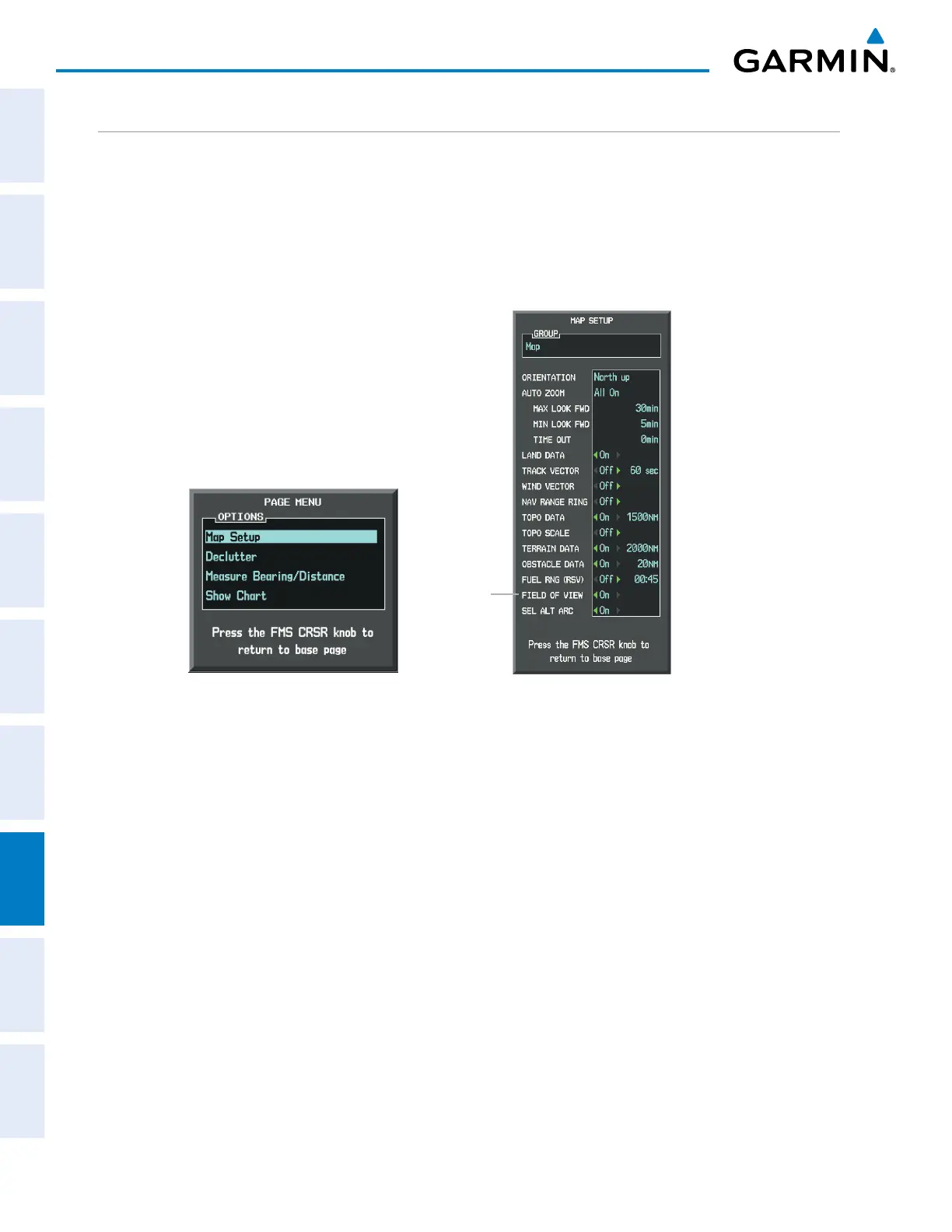
The PFD field of view can be represented on the MFD Navigation Map Page. Two dashed lines forming a
V-shape in front of the aircraft symbol on the map, represent the forward viewing area shown on the PFD.
Displaying field of view:
1) While viewing the Navigation Map Page, press the MENU Key to display the PAGE MENU.
2) Turn the large
FMS
Knob to highlight Map Setup and press the
ENT
Key.
Figure 8-12 Option Menus
Navigation Map Page OPTIONS Menu
Map Setup Menu, Map Group, Field of View Option
Field of
View
3) Turn the FMS Knob to select the Map Group and press the ENT Key.
4) Turn the large FMS Knob to scroll through the Aviation Group options to FIELD OF VIEW.
5) Turn the small FMS Knob to select On or Off.
6) Press the
FMS
Knob to return to the Navigation Map Page.



 To Next Page